Karl515
Level 5
January 31, 2019
Solved

Problem with deploying mvn archetype to localhost.

  • January 31, 2019
  • 11 replies
  • 5306 views

Hello there!

I have this problem that when I install using eclipse, it only installs to my .m2 repository instead of localhost:4502. What could be the cause of this?

-already make sure the base POM file is pointing to localhost:4502

Now I'm having thoughts it's because if the setting.xml that WKND tut let me put in .m2. but if I delete the setting.xml. I'm getting an error.

How can I let eclipse to install in localhost:4502? Thanks!
This post is no longer active and is closed to new replies. Need help? Start a new post to ask your question.
Best answer by Gaurav-Behl

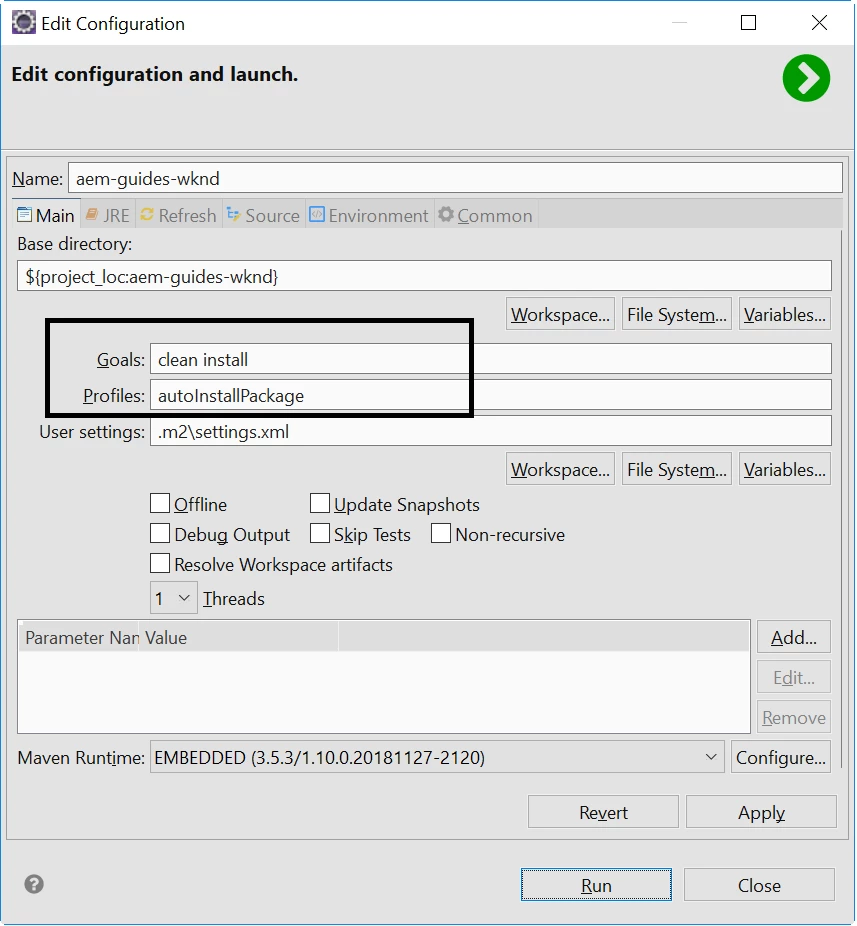
For Java EE (aka Eclipse) to produce the same results do this -

1) Right click on the project folder that you want to build

2) Click on Run as > Maven Build...

3) Mention the goals & profile that you want to execute:  clean install -PautoInstallPackage

4) Hit Run and check the results

11 replies

Feike_Visser1
Adobe Employee
Adobe Employee
January 31, 2019

what cmd do you use?

Karl515
Karl515Author
Level 5
January 31, 2019

default.

I'm not having this problem before. it just suddenly happen.

It goes to my .m2 repository.

I've got my base POM setup right.

using CMD or Eclipse JAVA EE. produces same results.

joerghoh
Adobe Employee
Adobe Employee
January 31, 2019

how does your maven command look like? Do you use a specific profile? (The deployment to a local AEM instance requires you to enable a specific profile, don't know its name from the top of my head).

Jörg

smacdonald2008
Level 10
January 31, 2019

Try opening up your project in Command line and typing:

mvn -PautoInstallPackage install

That should deploy your project to AEM.

Let us know if you are successful with that command.

Karl515
Karl515Author
Level 5
January 31, 2019

I didn't touch any Profile. I just set my MAVEN_HOME and path. I can deploy directly before, then this suddenly happens.

Karl515
Karl515Author
Level 5
January 31, 2019

Still went to my repo

Base POM

Gaurav-Behl
Level 10
January 31, 2019

Can you search for the below section in your pom.xml?  The 'id' mentioned is your profile name which you can pass to mvn command like Scott mentioned above using -P flag

If its missing then add it and test.

mvn clean install -PautoInstallPackage

<profiles>

<!-- something here -->

   <profile>

            <id>autoInstallPackage</id>

            <activation>

                <activeByDefault>false</activeByDefault>

            </activation>

            <build>

                <pluginManagement>

                    <plugins>

                        <plugin>

                            <groupId>org.apache.jackrabbit</groupId>

                            <artifactId>filevault-package-maven-plugin</artifactId>

                            <executions>

                                <execution>

                                    <id>create-package</id>

                                    <goals>

                                        <goal>package</goal>

                                    </goals>

                                </execution>

                            </executions>

                        </plugin>

                        <plugin>

                            <groupId>com.day.jcr.vault</groupId>

                            <artifactId>content-package-maven-plugin</artifactId>

                            <executions>

                                <execution>

                                    <id>install-package</id>

                                    <goals>

                                        <goal>install</goal>

                                    </goals>

                                    <configuration>

                                        <targetURL>http://${aem.host}:${aem.port}/crx/packmgr/service.jsp</targetURL>

                                    </configuration>

                                </execution>

                            </executions>

                        </plugin>

                    </plugins>

                </pluginManagement>

            </build>

        </profile>

<!-- something here -->

</profiles>

Karl515
Karl515Author
Level 5
January 31, 2019

Update.

CMD and JAVA EE displays the same result, but CMD deploys to localhost even tho displays to .m2. but Java EE displays installed to .m2 and also doesn't reflect to localhost.

Wierd

Karl515
Karl515Author
Level 5
January 31, 2019

Heres mine. I think we have the same

<profile>

            <id>autoInstallPackage</id>

            <activation>

                <activeByDefault>false</activeByDefault>

            </activation>

            <build>

                <pluginManagement>

                    <plugins>

                        <plugin>

                            <groupId>org.apache.jackrabbit</groupId>

                            <artifactId>filevault-package-maven-plugin</artifactId>

                            <executions>

                                <execution>

                                    <id>create-package</id>

                                    <goals>

                                        <goal>package</goal>

                                    </goals>

                                </execution>

                            </executions>

                        </plugin>

                        <plugin>

                            <groupId>com.day.jcr.vault</groupId>

                            <artifactId>content-package-maven-plugin</artifactId>

                            <executions>

                                <execution>

                                    <id>install-package</id>

                                    <goals>

                                        <goal>install</goal>

                                    </goals>

                                    <configuration>

                                        <targetURL>http://${aem.host}:${aem.port}/crx/packmgr/service.jsp</targetURL>

                                    </configuration>

                                </execution>

                            </executions>

                        </plugin>

                    </plugins>

                </pluginManagement>

            </build>

        </profile>

Gaurav-Behl
Gaurav-BehlAccepted solution
Level 10
January 31, 2019

For Java EE (aka Eclipse) to produce the same results do this -

1) Right click on the project folder that you want to build

2) Click on Run as > Maven Build...

3) Mention the goals & profile that you want to execute:  clean install -PautoInstallPackage

4) Hit Run and check the results