Polling importer not taking the latest updated time interval | Community
Skip to main content
Level 3
August 29, 2017
Solved

Polling importer not taking the latest updated time interval

  • August 29, 2017
  • 11 replies
  • 6267 views

Hi all,

I created a poll config with 300 seconds as the interval. It is working fine and polling for every five minutes. But if I updated the interval as, say 180 seconds, it's still taking up the old time and polling it for every five minutes. Shouldn't this be dynamic? I even restarted the server but it's still taking the old time interval. I don't want to restart or redeploy. Is there any reason why it isn't dynamic?

My poll config.

{

"jcr:primaryType": "sling:Folder",

"jcr:mixinTypes": [

"cq:PollConfig"

],

"jcr:createdBy": "admin",

"source": "myimporter:myDataSource",

"target": "somepath",

"jcr:created": "Fri Aug 11 2017 15:41:26 GMT+0530",

"interval": 180

}

This post is no longer active and is closed to new replies. Need help? Start a new post to ask your question.
Best answer by smacdonald2008

My findings -- it works on 6.1/6.2.

30.08.2017 10:26:53.538 *INFO* [pool-6-thread-3] com.community.aem.SimpleDSComponent Date : Wed Aug 30 10:26:53 EDT 2017

30.08.2017 10:26:53.538 *INFO* [pool-6-thread-3] com.community.aem.SimpleDSComponent scheme : myimporter

30.08.2017 10:26:53.538 *INFO* [pool-6-thread-3] com.community.aem.SimpleDSComponent datasource : myDataSource

You can change the value too in these versions:

You are correct - on AEM 6.3 - it throws exceptions. The bundle does into an Active state - but you cannot edit it.

This is a Product bug in AEM 6.3 - Please open a ticket and reference this AEM Community Thread.

11 replies

viveksachdeva
Community Advisor
Community Advisor
August 29, 2017

I dont think your configuration is getting applied initially also. IIRC the default time is 300 sec, which is whats being used in your case all the time. Can you check if you have followed steps mentioned in Adobe Experience Manager Help | Creating Custom Data Importer Services for Adobe Experience Manager ?

If you did and still having issues, would be great if you can share a sample package with issue being reproducible.

vitis90Author
Level 3
August 29, 2017

The polling config created as per the example doesn't work at all in AEM 6.3 with Archetype 11. We have tested that extensively. Using sling folder as per this example worked.

Creating a Custom Content Importer for AEM/CQ5 | Olson Digital

viveksachdeva
Community Advisor
Community Advisor
August 29, 2017

Thats strange. i dont see a reason why it would depend on maven archetype. Anyway can share the code(github maybe) if you are still facing the issue that you mentioned?

vitis90Author
Level 3
August 29, 2017

Hi Vivek,

I used this code only

https://github.com/heervisscher/htl-examples/blob/master/core/src/main/java/com/adobe/examples/htl/core/polling/CustomPolling.java

The problem is I'm not able to add or edit anything here

localhost:4502/etc/importers/polling.html

Ideally we should be able to edit and add right?

I even overlayed as per the instructions here Creating a Custom Content Importer for AEM/CQ5 | Olson Digital

Have you tried adding or editing?

It's totally blocking us and seems like a bug in AEM 6.3

viveksachdeva
Community Advisor
Community Advisor
August 29, 2017

Ok... I tried it now.. I can see the importer running and when I change the interval from crx-de, it is reflected and polling happens:

Here is the Java file which is almost same as the one you linked above. :

--- Java class---

package eventhandler;

import org.apache.felix.scr.annotations.Component;

import org.apache.felix.scr.annotations.Property;

import org.apache.felix.scr.annotations.Service;

import org.apache.sling.api.resource.Resource;

import com.day.cq.polling.importer.ImportException;

import com.day.cq.polling.importer.Importer;

@Component(metatype = false, enabled = true, label = "Custom importer")

@Service
@Property(name = Importer.SCHEME_PROPERTY, value = "myimporter")

public class CustomPolling implements Importer, Runnable {

   @Override
   public void run() {

  System.out.println("In run-method");

  }

   @Override
   public void importData(String scheme, String dataSource, Resource target, String login, String password) throws ImportException {

  System.out.println("In importData1-method");

  }

   @Override
   public void importData(String scheme, String dataSource, Resource target) throws ImportException {

  System.out.println("In importData2-method");

  }

}

-------------

And polling config:

Does that help?

vitis90Author
Level 3
August 29, 2017

Thanks for the reply. I have come to know that minimum time interval is 300 sec. AEM doesn't allow below that. But the main issue is

in 6.3 we are not able to edit or add new configurations here

localhost:4502/etc/importers/polling.html

But it is possible in 6.2. This seems like a clear bug. Can you check it if you have 6.3 as well? smacdonald2008​, can you please help?

smacdonald2008
Level 10
August 29, 2017

I will look into this. Stuff like should not be changed unless clearly stated in the Release Notes. Did you see mention of this?

vitis90Author
Level 3
August 30, 2017

Hi Scott,

Thanks for your reply. I have seen the release notes of 6.3 and there is no mention of polling feature. Can you please look into it?

Basically, I should be able to edit the timing interval here but its not possible in 6.3 but working very fine in 6.2.

It is throwing this error when I click on 'Edit'

smacdonald2008
Level 10
August 30, 2017

I will see if I get the same results on 6.3.

smacdonald2008
smacdonald2008Accepted solution
Level 10
August 30, 2017

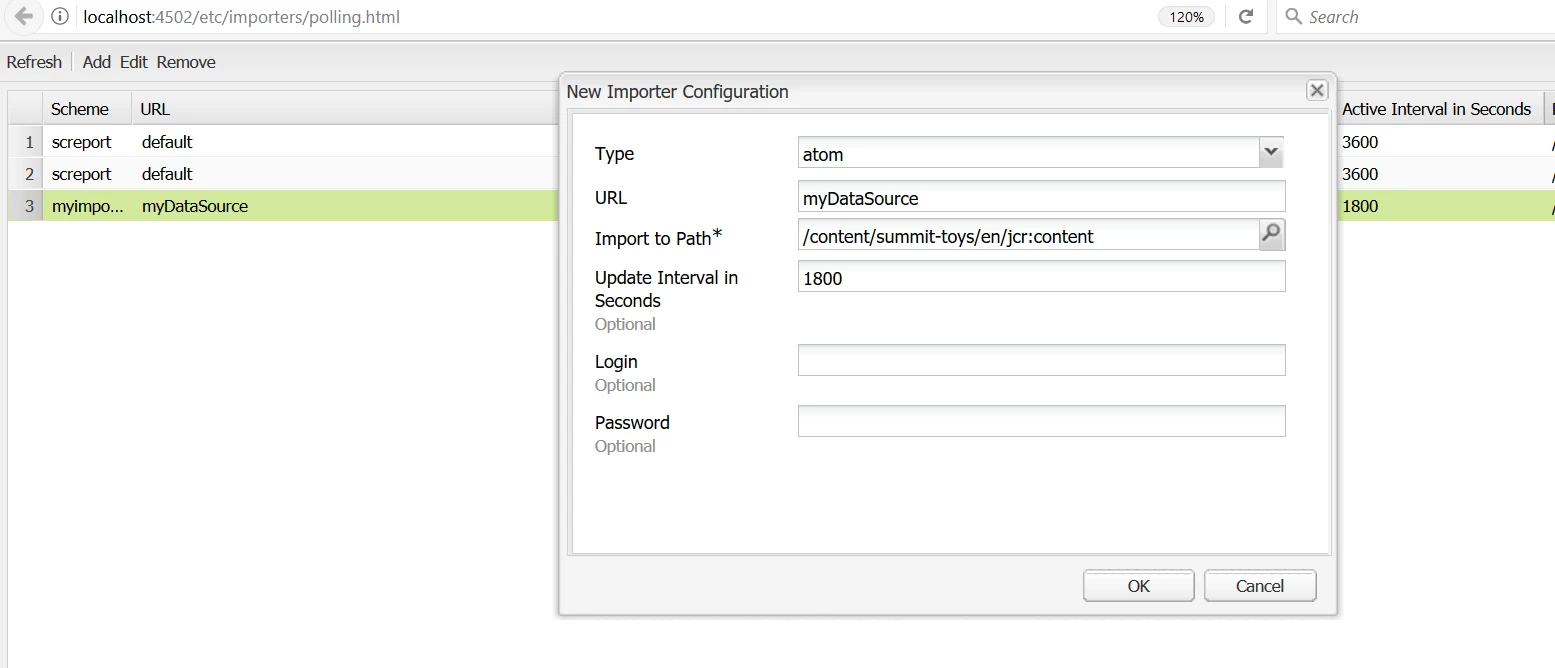
My findings -- it works on 6.1/6.2.

30.08.2017 10:26:53.538 *INFO* [pool-6-thread-3] com.community.aem.SimpleDSComponent Date : Wed Aug 30 10:26:53 EDT 2017

30.08.2017 10:26:53.538 *INFO* [pool-6-thread-3] com.community.aem.SimpleDSComponent scheme : myimporter

30.08.2017 10:26:53.538 *INFO* [pool-6-thread-3] com.community.aem.SimpleDSComponent datasource : myDataSource

You can change the value too in these versions:

You are correct - on AEM 6.3 - it throws exceptions. The bundle does into an Active state - but you cannot edit it.

This is a Product bug in AEM 6.3 - Please open a ticket and reference this AEM Community Thread.