Policy icon not showing; unable to allow/disallow components | Community
Skip to main content
Level 2
August 22, 2023
Solved

Policy icon not showing; unable to allow/disallow components

  • August 22, 2023
  • 1 reply
  • 1351 views

To better understand this, please check the minute 01:24 from the video in this article: https://experienceleague.adobe.com/docs/experience-manager-learn/sites/page-authoring/template-editor-feature-video-use.html?lang=en   

See how there is an Policy icon right besides the "+" icon. The problem is that it doesn't appear for any of my containers. I tried with the basic wknd project and this one too: https://github.com/adobe/aem-guides-wknd 

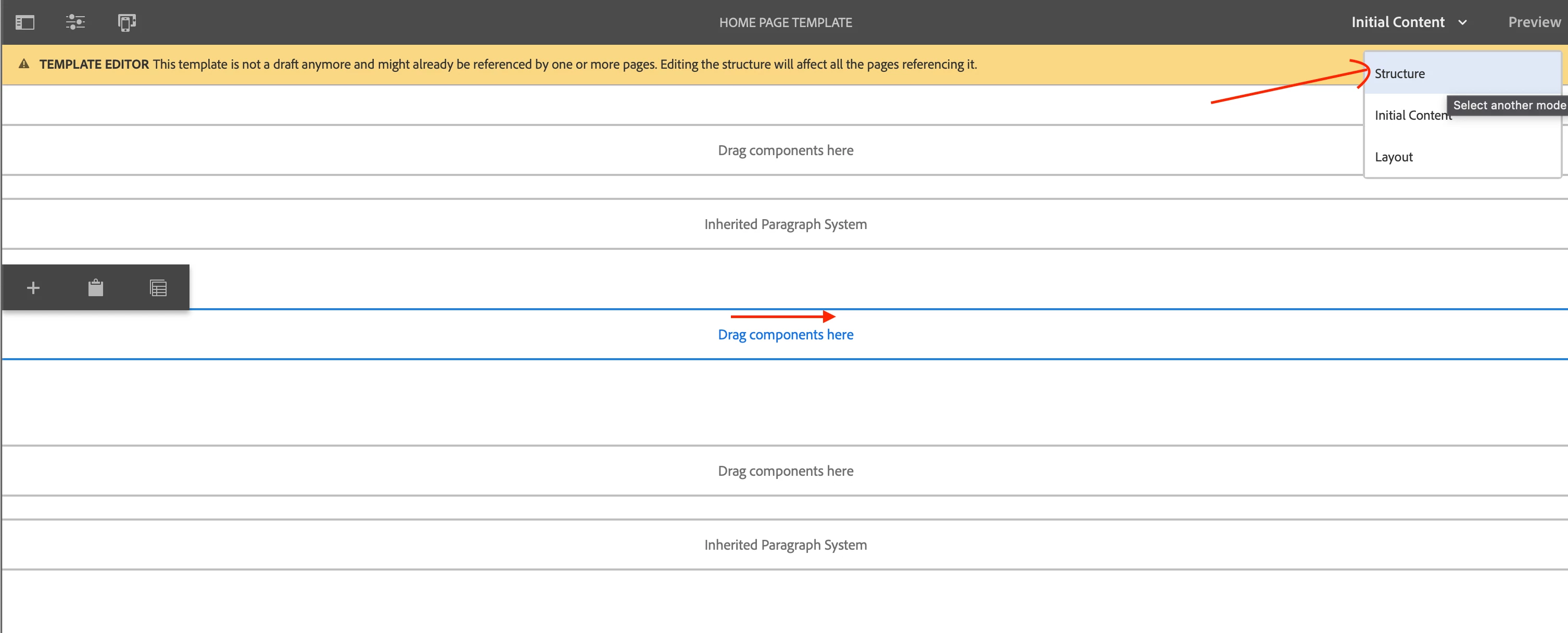
It doesn't appear for any of my projects. If I try to edit any template of the basic project, it should also show a default container showing a list of components, where I can also allow/disallow, like in this image. 

But it doesn't appear for me.  Example of how it shows here: [IMAGE]

What I tried to fix it:  

1) Completely deleted all projects, reinstalled AEM SDK and deleted the "crx-quickstart" folder before restarting the server;  
 
2) Installed multiple new projects, let me show you the code I used:  


mvn -B org.apache.maven.plugins:maven-archetype-plugin:3.2.1:generate \
-D archetypeGroupId=com.adobe.aem \
-D archetypeArtifactId=aem-project-archetype \
-D archetypeVersion=39 \ 
-D appTitle="WKND Sites Project" \
-D appId="wknd" \
-D groupId="com.adobe.aem.guides" \
-D artifactId="aem-guides-wknd" \
-D package="com.adobe.aem.guides.wknd" \
-D version="0.0.1-SNAPSHOT" \
-D aemVersion="6.5.7"  

(
I also tried with archetypes 37 and 43, and with aem versions 6.5.0 and "cloud")  

I also tried using the pre-made wknd site (https://github.com/adobe/aem-guides-wknd)  
I downloaded the classic.zip file, uploaded in CRX package manager, installed and built through crx package manager.  


But even then it's not showing the policy icon or the container from the screenshot.  
 
Current java version: 

java 20.0.2 2023-07-18
Java(TM) SE Runtime Environment (build 20.0.2+9-78)
Java HotSpot(TM) 64-Bit Server VM (build 20.0.2+9-78, mixed mode, sharing) 

AEM sdk I used:  

aem-sdk-2023.8.13099.20230810T160553Z-230702 

What else can I try? Thank you in advance



This post is no longer active and is closed to new replies. Need help? Start a new post to ask your question.
Best answer by Mahedi_Sabuj

Hi @edo_wjp,

You need to switch from "Initial Content" to "Structure" mode.

1 reply

Mahedi_Sabuj
Community Advisor
Community Advisor
August 22, 2023

Hi @edo_wjp,

Either the Java 8 or 11 JDK is required. Kindly refer to the provided link to find the Java JDK versions that are supported. 

https://experienceleague.adobe.com/docs/experience-manager-65/deploying/introduction/technical-requirements.html?lang=en#java-virtual-machines

 
Mahedi Sabuj
edo_wjpAuthor
Level 2
August 22, 2023

Hi there, thank you for the response. 

I had version 11 before, I changed just for testing purposes, and now I downgraded to version 11 again.  

openjdk 11.0.20 2023-07-18
OpenJDK Runtime Environment (build 11.0.20+8-post-Ubuntu-1ubuntu120.04)
OpenJDK 64-Bit Server VM (build 11.0.20+8-post-Ubuntu-1ubuntu120.04, mixed mode, sharing) 
 
javac 11.0.20 

Apache Maven 3.6.3

Maven home: /usr/share/maven
Java version: 11.0.20, vendor: Ubuntu, runtime: /usr/lib/jvm/java-11-openjdk-amd64
Default locale: en_US, platform encoding: UTF-8
OS name: "linux", version: "5.15.0-79-generic", arch: "amd64", family: "unix"


After downgrading, I restarted the server and started another project from scratch using this code:  

mvn -B org.apache.maven.plugins:maven-archetype-plugin:3.2.1:generate \
-D archetypeGroupId=com.adobe.aem \
-D archetypeArtifactId=aem-project-archetype \
-D archetypeVersion=43 \
-D appTitle="WKND Sites Project" \
-D appId="wknd" \
-D groupId="com.adobe.aem.guides" \
-D artifactId="aem-guides-wknd" \
-D package="com.adobe.aem.guides.wknd" \
-D version="0.0.1-SNAPSHOT" \
-D aemVersion="6.5.7" 

But, sadly, the problem persists. 


Mahedi_Sabuj
Community Advisor
Mahedi_SabujCommunity AdvisorAccepted solution
Community Advisor
August 22, 2023

Hi @edo_wjp,

You need to switch from "Initial Content" to "Structure" mode.

Mahedi Sabuj