Page properties option is not visible with read permission | Community
Skip to main content
shabarish
Level 2
May 20, 2022
Solved

Page properties option is not visible with read permission

  • May 20, 2022
  • 3 replies
  • 1580 views

Hi all,

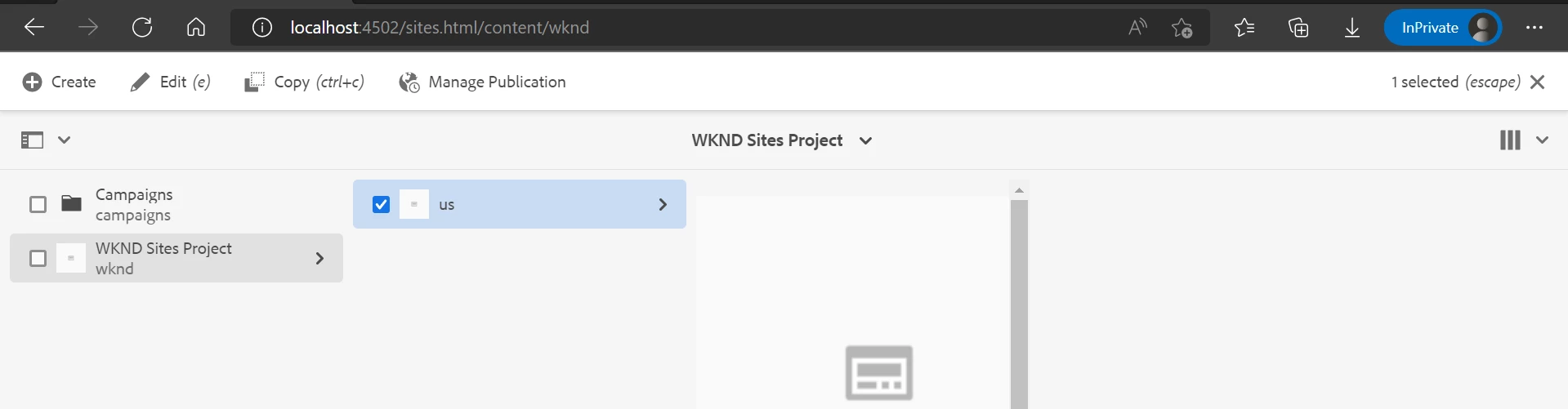
I have a requirement that user with read permission to see the page properties of the page. Currently if I provide just a read permission, page properties option is not visible , we need to provide at least read, modify permissions to see page properties in editor page but we want that user to have only view access of the page but not modify access.

Anyone could please help me with issue

This post is no longer active and is closed to new replies. Need help? Start a new post to ask your question.
Best answer by lukasz-m

Hi @shabarish,

I was able to reproduce described issue on AEM 6.5.10, 6.5.8, 6.5.11 - I did not checked others. I have found the root cause - however it looks more like a change in product than bug. Please have a look on details below.

In general Page Properties button on sites level is controlled on backend side via cq-siteadmin-admin-actions-properties-activator class. In other words depending on permissions cq-siteadmin-admin-actions-properties-activator class is set or not.
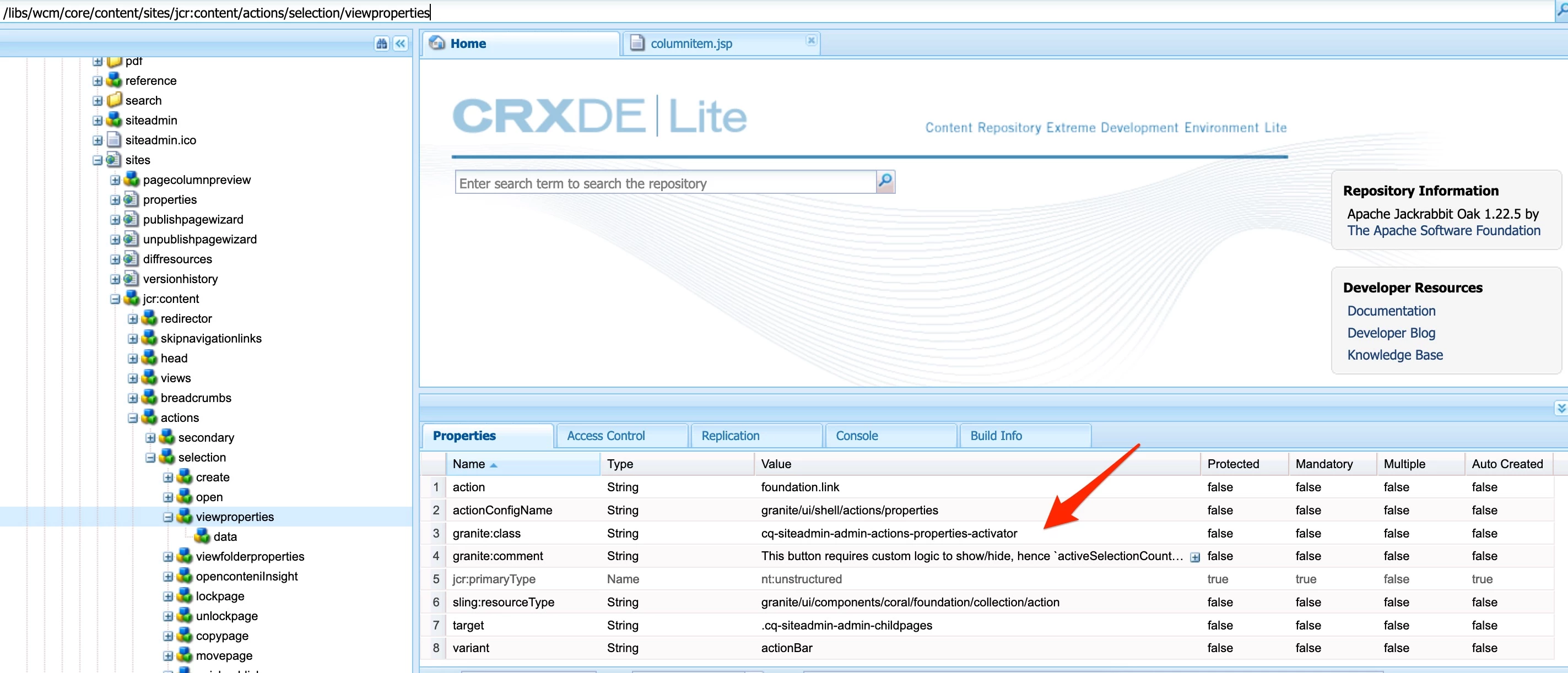
Each view has its own renderer (e.g jsp file). Column view is using column item - implementation can be found under /libs/cq/gui/components/coral/admin/page/columnitem/columnitem.jsp - and this is actually place where implementation has changed - method getActionRels to be more precise.

This is how it looks on AEM 6.5 (without any service pack)
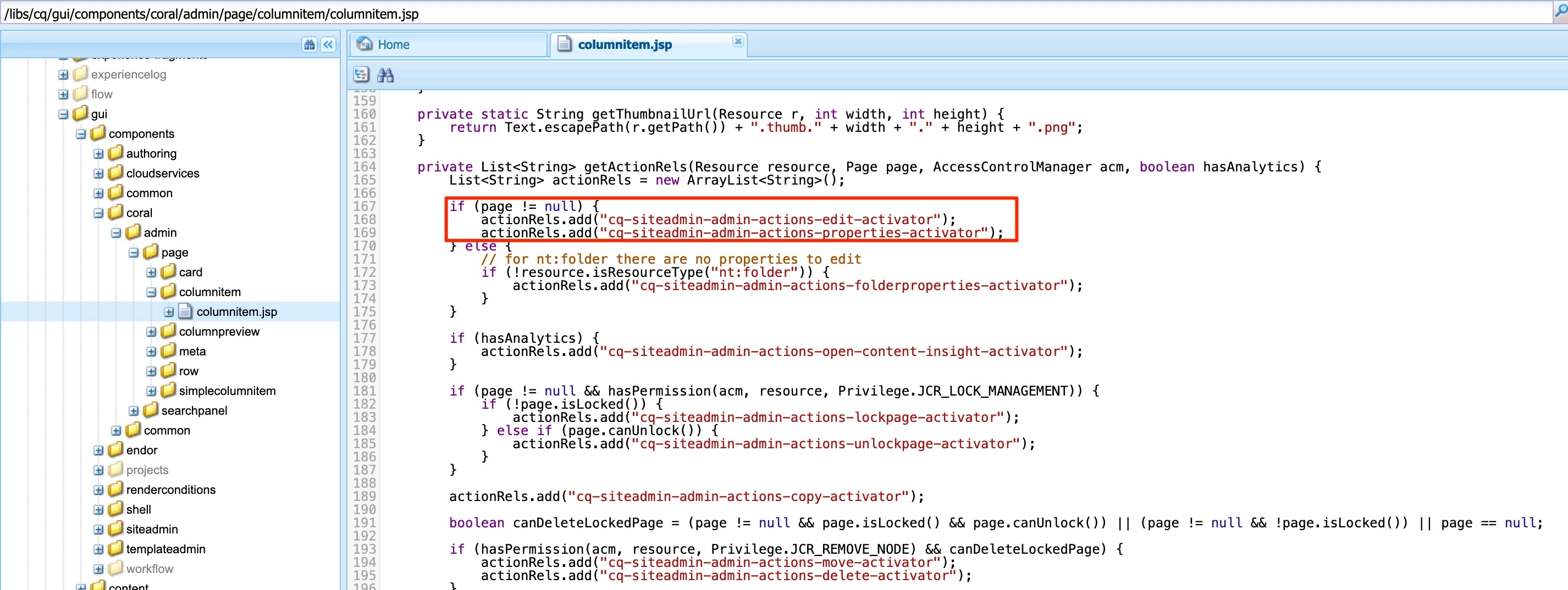
As you can see the only condition is to check if page is not null. So this is why Page Properties can be seen by users with Read only permissions on AEM 6.5.0 and some other versions.

This is how it looks on AEM 6.5.10 (SP10)
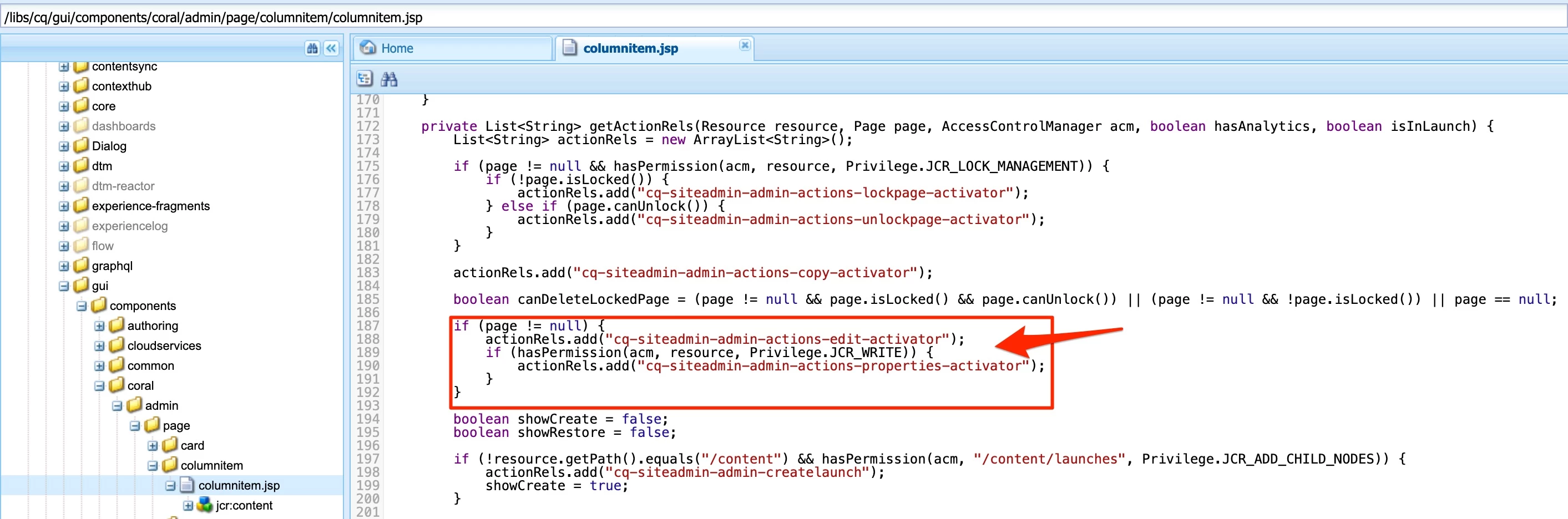
Additional condition has been added, which cause the result you can see. The additional condition checks if user has write privileges.

Solutions

Having above knowledge, I can see following solutions:

  1. Extend user permission set, granting them with Write permission. I can imagine that this could not be an option for you, but could be the easiest one that can be applied to get back access to Page Properties.
  2. Overlay /libs/cq/gui/components/coral/admin/page/columnitem/columnitem.jsp. I did very simple test, overlaying  path to columnitem.jsp under apps and removing condition where Write privilege is checked. After doing this Page Properties was available again for user with Read only permission.
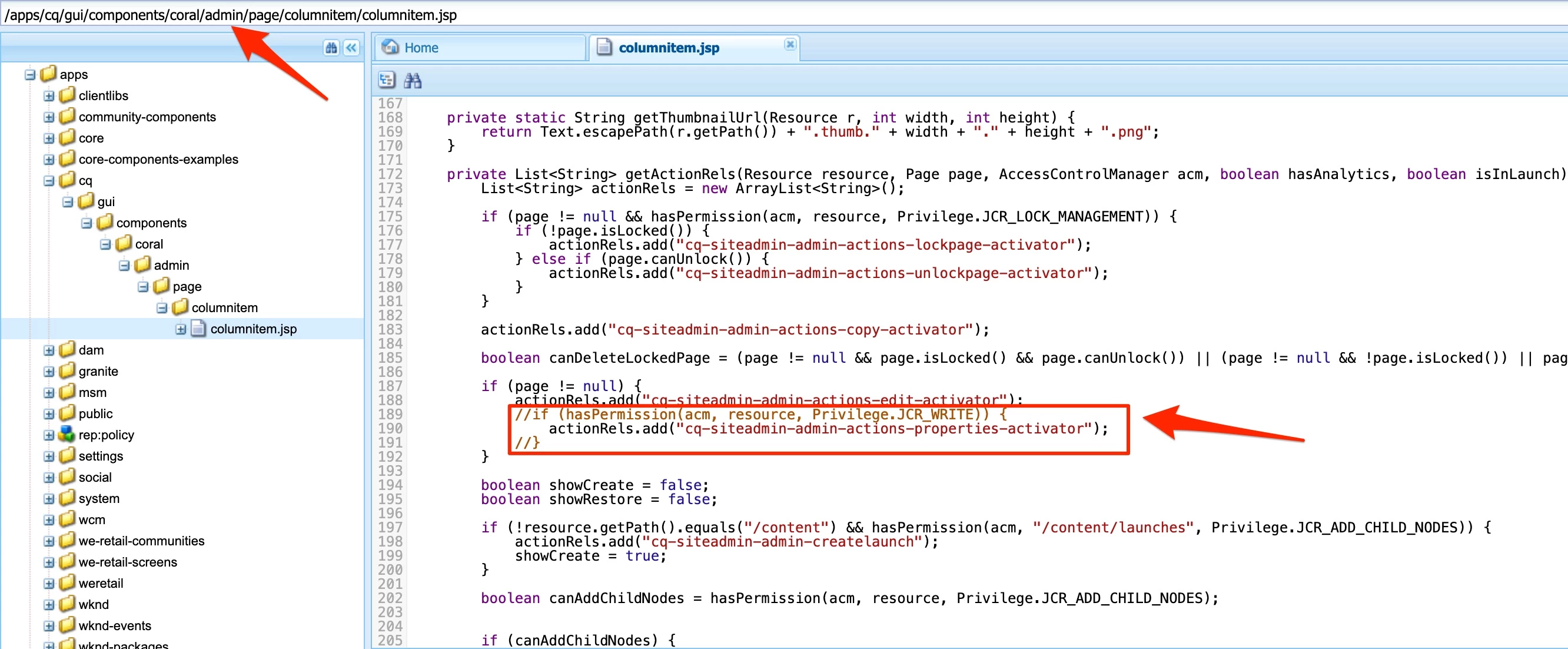
    Please be aware that in case you will decide to go this way, you will also need to do similar change for cards and list/table view. It will also be good to review overlay against value from /libs during each future SP upgrade. I believe these are paths to other sites view:
    1. /libs/cq/gui/components/coral/admin/page/card/card.jsp
    2. /libs/cq/gui/components/coral/admin/page/row/row.jsp

You can simply run search on crx/de to find other potential locations that use cq-siteadmin-admin-actions-properties-activator.

Summarizing, I am not sure why above change has been done and exactly in which SP it has been introduced. Nevertheless similar change has been applied on card and table/list view. Also it is not possible to access Page Properties having Read only permission form page editor level. So it looks that this is desired change. If you would like to know detailed justification I would suggest to raise Adobe support ticket.

3 replies

arunpatidar
Community Advisor
Community Advisor
May 20, 2022

Hi,

which version of AEM are you using?

Arun Patidar
shabarish
shabarishAuthor
Level 2
May 20, 2022

AEM 6.5.10

I tried in my local AEMaCS instance also

shabarish
shabarishAuthor
Level 2
May 20, 2022

AEM 6.5.10

I tried in my local AEMaCS instance also.

arunpatidar
Community Advisor
Community Advisor
May 20, 2022

From product side nothing has changed

https://experienceleague.adobe.com/docs/experience-manager-65/release-notes/service-pack/6.5.10.html?lang=en


I have also tried in 6.5.7 , I can see the page properties if I have read access to the content path and other apps, libs etc. folder

Arun Patidar
shabarish
shabarishAuthor
Level 2
May 20, 2022

Yes before installing 6.5.10  service pack with read permission it was working fine. Facing the issue after updating to 6.5.10 service pack. Can you please try with 6.5.10 or later or even in AEMaCS

lukasz-m
Community Advisor
lukasz-mCommunity AdvisorAccepted solution
Community Advisor
May 21, 2022

Hi @shabarish,

I was able to reproduce described issue on AEM 6.5.10, 6.5.8, 6.5.11 - I did not checked others. I have found the root cause - however it looks more like a change in product than bug. Please have a look on details below.

In general Page Properties button on sites level is controlled on backend side via cq-siteadmin-admin-actions-properties-activator class. In other words depending on permissions cq-siteadmin-admin-actions-properties-activator class is set or not.

Each view has its own renderer (e.g jsp file). Column view is using column item - implementation can be found under /libs/cq/gui/components/coral/admin/page/columnitem/columnitem.jsp - and this is actually place where implementation has changed - method getActionRels to be more precise.

This is how it looks on AEM 6.5 (without any service pack)

As you can see the only condition is to check if page is not null. So this is why Page Properties can be seen by users with Read only permissions on AEM 6.5.0 and some other versions.

This is how it looks on AEM 6.5.10 (SP10)

Additional condition has been added, which cause the result you can see. The additional condition checks if user has write privileges.

Solutions

Having above knowledge, I can see following solutions:

  1. Extend user permission set, granting them with Write permission. I can imagine that this could not be an option for you, but could be the easiest one that can be applied to get back access to Page Properties.
  2. Overlay /libs/cq/gui/components/coral/admin/page/columnitem/columnitem.jsp. I did very simple test, overlaying  path to columnitem.jsp under apps and removing condition where Write privilege is checked. After doing this Page Properties was available again for user with Read only permission.

    Please be aware that in case you will decide to go this way, you will also need to do similar change for cards and list/table view. It will also be good to review overlay against value from /libs during each future SP upgrade. I believe these are paths to other sites view:
    1. /libs/cq/gui/components/coral/admin/page/card/card.jsp
    2. /libs/cq/gui/components/coral/admin/page/row/row.jsp

You can simply run search on crx/de to find other potential locations that use cq-siteadmin-admin-actions-properties-activator.

Summarizing, I am not sure why above change has been done and exactly in which SP it has been introduced. Nevertheless similar change has been applied on card and table/list view. Also it is not possible to access Page Properties having Read only permission form page editor level. So it looks that this is desired change. If you would like to know detailed justification I would suggest to raise Adobe support ticket.