
Page edit mode not working | Community
Skip to main content
Himanshu_Singhal
Community Advisor
Community Advisor
December 3, 2017
Question

Page edit mode not working

  • December 3, 2017
  • 4 replies
  • 3527 views

Hi,

I'm not able to select page edit mode and when I click on "Edit" mode, it displays nothing. No drop-down is appearing to select and change page mode to Design or Targeting.

This issue seems to arise only in the higher environment like Staging, not on local. When I deploy code on local, I'm perfectly able to edit page or change mode.

I also tried changing the "Apache Sling Main Servlet" configuration i.e. changing the value "Number of Calls per Request" to higher values like 3000 or 5000 but still it's working.

In the browser console, I'm getting the following error:
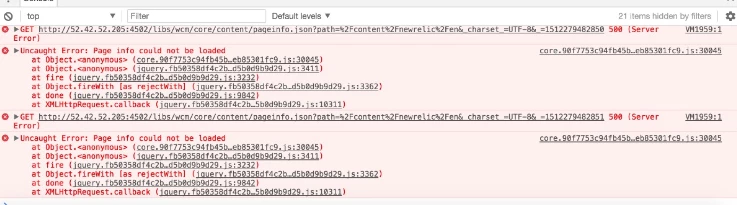
Any suggestions on how to resolve this issue?

Best Regards,

Himanshu

This post is no longer active and is closed to new replies. Need help? Start a new post to ask your question.

4 replies

smacdonald2008
Level 10
December 3, 2017

Is your higher environments AEM instances that have been upgraded? Seen similar issues on upgraded instances.

Himanshu_Singhal
Community Advisor
Community Advisor
December 4, 2017

I'm not sure about the upgrade if it has happened. I'll check it. If it has happened with the installation of any service pack or so, what's the fix for it?

edubey
Level 10
December 4, 2017

1. Do you have the required permissions on stage? If not, try with admin

2. For 500 error, you should be seeing something in error.log

Thanks

phaneendrak6728
August 13, 2019

smacdonald2008​ Even I'm seeing same Issue in AEM 6.4 , Is there any fix for this