Page description & component description field to share the authored content | Community
Skip to main content
Level 2
October 18, 2023
Solved

Page description & component description field to share the authored content

  • October 18, 2023
  • 2 replies
  • 1093 views

Hi,


I have the requirement where the page jcr description should be populated in a component's description field when dialog is open. please note: the component is authored on the same page. Now,  if I edit the description field in component dialog and save it. the new content or description should start reflecting in the page description field as well in page properties.


Is there any optimized way through which two fields with same name in different location(different locations meaning page component and individual component) can share the same data.


Please advise.

This post is no longer active and is closed to new replies. Need help? Start a new post to ask your question.
Best answer by aanchal-sikka

@ravijais04 


Option-1: Like @arunpatidar Instead of sharing a place to persist data. You can use following:


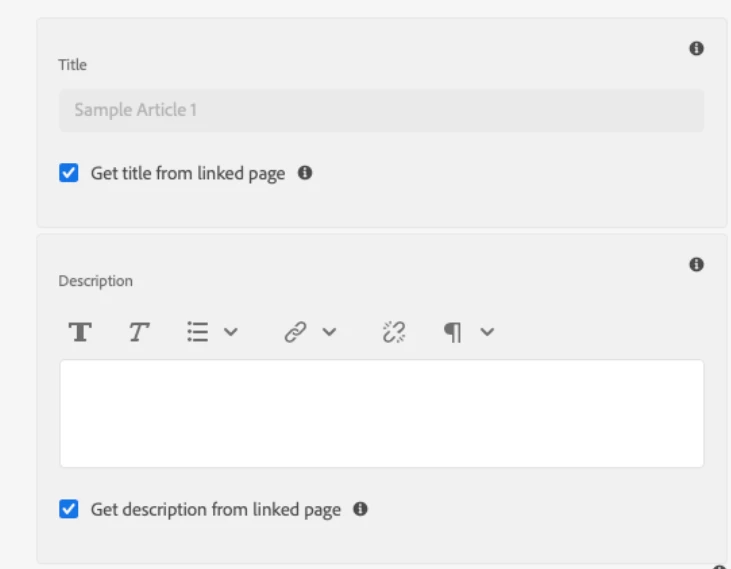
This is a snapshot from Teaser component. You can use the description from Page, and when needed override on component itself.


Option-2: Embed the component on template, so that the structure stays the same.

Now the description from Page properties should have a proper name like "./tile/openInNewWindow", here tile is the component and "openInNewWindow" is a property,

The property name is components' dialog should be "openInNewWindow"

I haven't tried it my-self. Just a thought


2 replies

arunpatidar
Community Advisor
Community Advisor
October 18, 2023
Level 2
October 19, 2023

Thanks Arun ! Let me check and try this.

aanchal-sikka
Community Advisor
aanchal-sikkaCommunity AdvisorAccepted solution
Community Advisor
October 18, 2023

@ravijais04 


Option-1: Like @arunpatidar Instead of sharing a place to persist data. You can use following:


This is a snapshot from Teaser component. You can use the description from Page, and when needed override on component itself.


Option-2: Embed the component on template, so that the structure stays the same.

Now the description from Page properties should have a proper name like "./tile/openInNewWindow", here tile is the component and "openInNewWindow" is a property,

The property name is components' dialog should be "openInNewWindow"

I haven't tried it my-self. Just a thought


Aanchal Sikka
Level 2
October 19, 2023

Thanks Aanchal ! 

aanchal-sikka
Community Advisor
Community Advisor
October 19, 2023

@ravijais04 


Just tried Option-2:


1. Created a new field in Page properties

2. Added a title field to the template at similar location. Unlocked component


3. Now when I edit via page properties, the property is reflected on page and vice versa


Aanchal Sikka