out of the box clientlibs | Community
Skip to main content
sreedobe
Level 4
August 10, 2020
Solved

out of the box clientlibs

  • August 10, 2020
  • 2 replies
  • 1973 views

Is there a way to know when creating a page, editing page properties ... what are all clientlibs categories used.

I have overlaid thumbnail in page dialog and would like to add all necessary clientlib categories in extraClientLibs property to get upload , select image work in thumbnail.


Thanks,

Sri

This post is no longer active and is closed to new replies. Need help? Start a new post to ask your question.
Best answer by BrianKasingli

There's no out of the box solution, so you would need to create a custom solution.

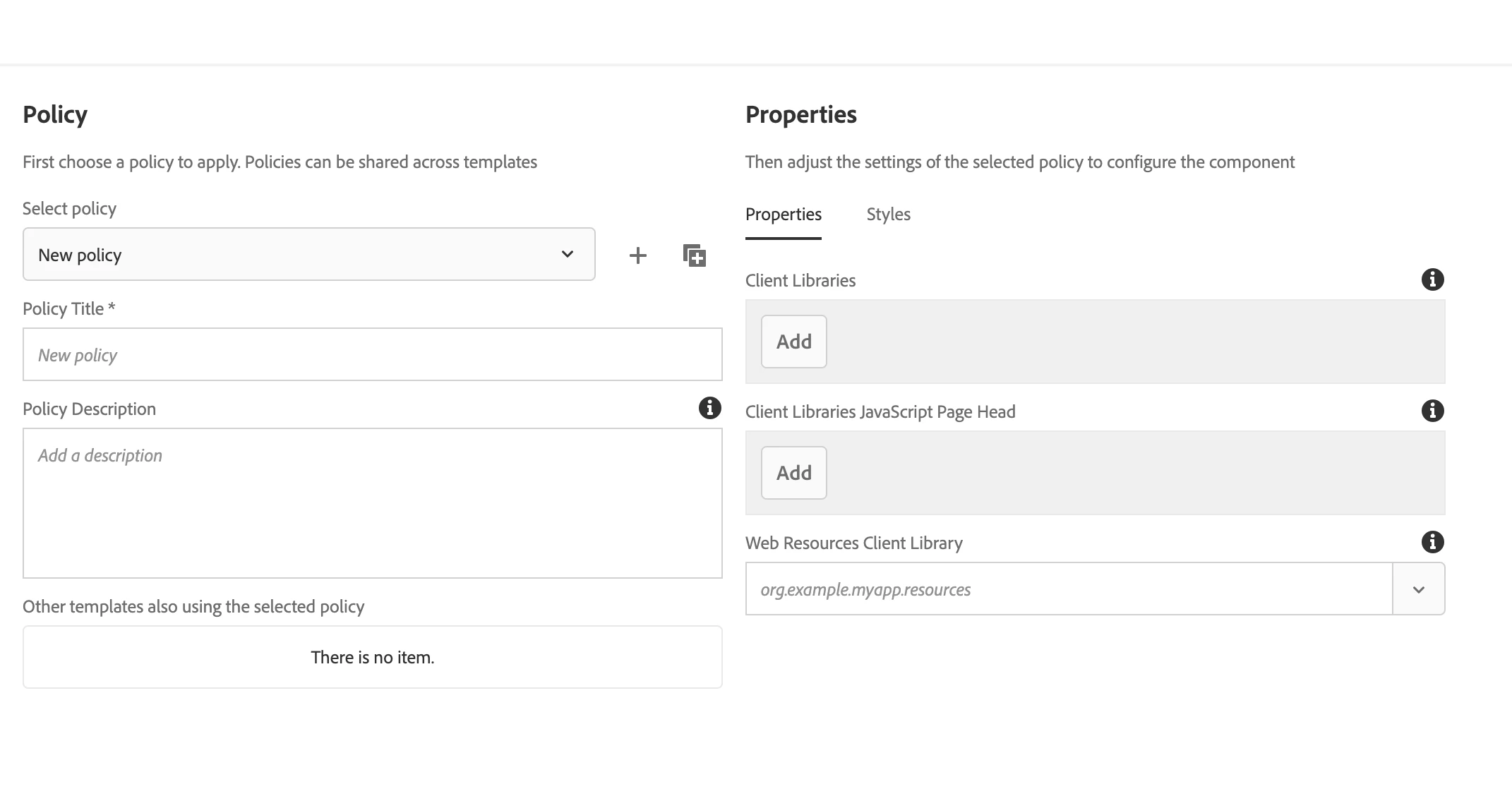
Client Libraries and Web Resources Client Library are defined from the editable template's page policy. Once configured, the page policies are stored in the /conf folder, where your page will be cq:template will be referencing. With the reference, you will be able to access the absolute path of the page policies, where you can access the Client Libraries and Web Resources Client Library set values. 

For displaying values to the page, one way you can achieve this is by creating a custom data source (so your configurations can be viewed from a drop-down; this is for view only).

I hope this helps,

Brian.
2 replies

BrianKasingli
Community Advisor and Adobe Champion
BrianKasingliCommunity Advisor and Adobe ChampionAccepted solution
Community Advisor and Adobe Champion
August 10, 2020

There's no out of the box solution, so you would need to create a custom solution.

Client Libraries and Web Resources Client Library are defined from the editable template's page policy. Once configured, the page policies are stored in the /conf folder, where your page will be cq:template will be referencing. With the reference, you will be able to access the absolute path of the page policies, where you can access the Client Libraries and Web Resources Client Library set values. 

For displaying values to the page, one way you can achieve this is by creating a custom data source (so your configurations can be viewed from a drop-down; this is for view only).

I hope this helps,

Brian.

sreedobe
sreedobeAuthor
Level 4
August 11, 2020

I am looking to override thumbnail of page properties, I was able to override other tabs such as basic, but not thumbnail.

That was the reason I am asking about out of the box clientlibs that I can inlcude as extraClientlibs.


@briankasingli 

Shashi_Mulugu
Community Advisor
Community Advisor
August 11, 2020

@sreedobe I understand that you are trying to overlay/override Page Properties tabs. But can you please elaborate the use case, because ideally, we dont overlay entire tabs/fields. We will just extend or add new tabs to it.


https://docs.adobe.com/content/help/en/experience-manager-learn/sites/developing/page-properties-technical-video-develop.html


Also see the Core components implementation, where they will just extend OOTB tabs with social media tab "/apps/core/wcm/components/page/v2/page/cq:dialog"


sreedobe
sreedobeAuthor
Level 4
August 11, 2020

@shashi_mulugu 


Use Case: Article Template

                  basic tab -> new field "article date" (required)

                                ->  existing field "tags" , make it required

                 thumbnail -> display it while creating page using template , "not" by clicking page properties once page created.

                                  -> make this required

In "article page" component dialog:

          I have pointed both basic, thumbnails to new "tabs/basic", "tabs/thumbnail" section. I was able to achieve basic tab but not thumbnail. It displays thumbnail tab on selecting "article template" to create page , but select image etc buttons do not work.


dialog xml


<?xml version="1.0" encoding="UTF-8"?> <jcr:root xmlns:jcr="http://www.jcp.org/jcr/1.0" xmlns:cq="http://www.day.com/jcr/cq/1.0" xmlns:granite="http://www.adobe.com/jcr/granite/1.0" xmlns:nt="http://www.jcp.org/jcr/nt/1.0" xmlns:sling="http://sling.apache.org/jcr/sling/1.0" jcr:primaryType="nt:unstructured" jcr:title="Page" sling:resourceType="cq/gui/components/authoring/dialog" extraClientlibs="[cq.common.wcm,core.wcm.components.page.v2.editor,cq.wcm.msm.properties,granite.contexthub.configuration,cq.siteadmin.admin.properties]" helpPath="https://www.adobe.com/go/aem_cmp_page_v2" mode="edit" trackingFeature="core-components:page:v2"> <content granite:class="cq-dialog-content-page" jcr:primaryType="nt:unstructured" sling:resourceType="granite/ui/components/coral/foundation/container"> <items jcr:primaryType="nt:unstructured"> <tabs granite:class="cq-siteadmin-admin-properties-tabs" jcr:primaryType="nt:unstructured" sling:resourceType="granite/ui/components/coral/foundation/tabs" size="L"> <items jcr:primaryType="nt:unstructured"> <basic jcr:primaryType="nt:unstructured" sling:resourceType="granite/ui/components/coral/foundation/include" path="/apps/testapp/components/structure/article-page/tabs/basic" /> <thumbnail jcr:primaryType="nt:unstructured" sling:resourceType="granite/ui/components/coral/foundation/include" path="/apps/testapp/components/structure/article-page/tabs/thumbnail" /> </items> </tabs> </items> </content> </jcr:root>


thumbnail tab xml

<?xml version="1.0" encoding="UTF-8"?> <jcr:root xmlns:sling="http://sling.apache.org/jcr/sling/1.0" xmlns:granite="http://www.adobe.com/jcr/granite/1.0" xmlns:cq="http://www.day.com/jcr/cq/1.0" xmlns:jcr="http://www.jcp.org/jcr/1.0" xmlns:nt="http://www.jcp.org/jcr/nt/1.0" cq:showOnCreate="{Boolean}true" jcr:primaryType="nt:unstructured" jcr:title="Thumbnail" sling:resourceType="granite/ui/components/coral/foundation/fixedcolumns"> <items jcr:primaryType="nt:unstructured"> <column jcr:primaryType="nt:unstructured" sling:resourceType="granite/ui/components/coral/foundation/container"> <items jcr:primaryType="nt:unstructured"> <thumbnail jcr:primaryType="nt:unstructured" sling:resourceType="cq/gui/components/common/wcm/pagethumbnail" page="${empty param.item ? requestPathInfo.suffix : param.item}" quiet="{Boolean}true"> <upload granite:class="cq-wcm-fileupload" jcr:primaryType="nt:unstructured" sling:resourceType="granite/ui/components/coral/foundation/form/fileupload" async="{Boolean}true" autoStart="{Boolean}false" multiple="{Boolean}false" name="./image/file.sftmp" sizeLimit="100000000" text="Upload Image" uploadUrl="will_be_replaced"> <granite:data jcr:primaryType="nt:unstructured" cq-msm-lockable="./image"/> </upload> <assetpicker granite:class="js-browse-activator" jcr:primaryType="nt:unstructured" sling:resourceType="granite/ui/components/coral/foundation/button" text="Select Image"> <granite:data jcr:primaryType="nt:unstructured" cq-msm-lockable="./image"/> </assetpicker> <preview jcr:primaryType="nt:unstructured" sling:resourceType="cq/gui/components/siteadmin/admin/pagepreview"/> </thumbnail> </items> </column> </items> </jcr:root>