
Opacity of AEM Component in Author mode | Community
Skip to main content
ksh_ingole7
Community Advisor
Community Advisor
January 4, 2022
Solved

Opacity of AEM Component in Author mode

  • January 4, 2022
  • 2 replies
  • 1265 views

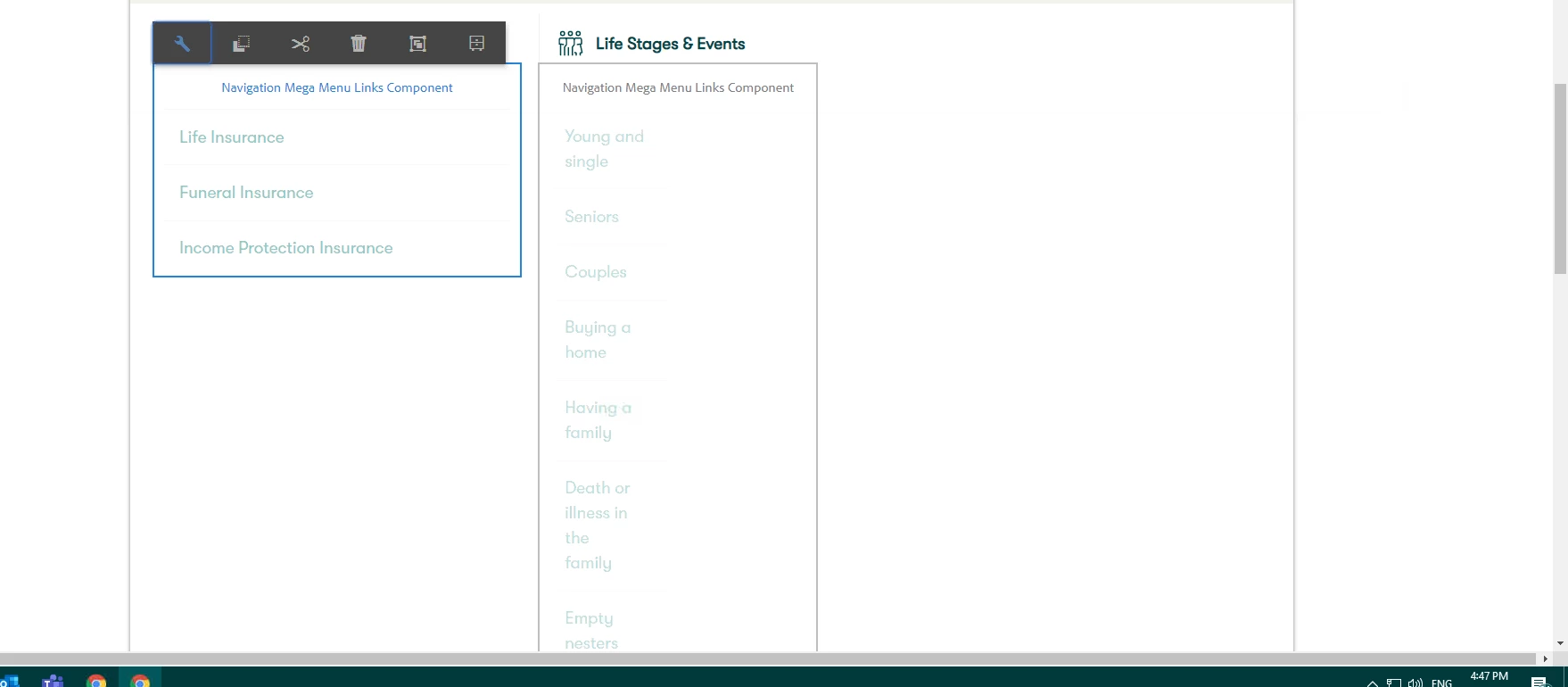
Hi, some of my components in AEM Author have opacity issue. The appear to be slightly transparent. An 0.55 opacity is set to the component in Author mode only (background-color : rgba(255,255,255,0.55)). How can I remove the opacity. Please refer to the screenshot below. Links are not appearing clearly due to the opacity value.


This post is no longer active and is closed to new replies. Need help? Start a new post to ask your question.
Best answer by milind_bachani

hi @ksh_ingole7 ,

This seems to be an issue with custom component you need to specifically override the CSS for author mode and call that particular clientlib css in author mode only, if you are using sightly do :

<sly data-sly-test.author="${wcmmode.edit || wcmmode.design}" 
data-sly-call="${clientlib.css @categories='custom.authorcss'}" >
</sly>

or you can directly add style as :

<sly data-sly-test.author="${wcmmode.edit || wcmmode.design}" >
    <style>
         // Override the CSS here for particular component 
    </style>
</sly>


2 replies

milind_bachani
Adobe Employee
milind_bachaniAdobe EmployeeAccepted solution
Adobe Employee
January 4, 2022

hi @ksh_ingole7 ,

This seems to be an issue with custom component you need to specifically override the CSS for author mode and call that particular clientlib css in author mode only, if you are using sightly do :

<sly data-sly-test.author="${wcmmode.edit || wcmmode.design}" 
data-sly-call="${clientlib.css @categories='custom.authorcss'}" >
</sly>

or you can directly add style as :

<sly data-sly-test.author="${wcmmode.edit || wcmmode.design}" >
    <style>
         // Override the CSS here for particular component 
    </style>
</sly>


Anudeep_Garnepudi
Community Advisor
Community Advisor
January 5, 2022

@ksh_ingole7  The overlay opacity will be applied to the components which are having placeholder text.

Ideal use case is to have the component placeholder text when the component is dragged and dropped for the first time(authoring for the first time) just to recognize. For the components already authored, no need of placeholder text. Refer core components.


  1. Remove the placeholder text after authoring the component (like core components).
  2. Do not render the component in edit mode (just keep placeholder always).
  3. If you want placeholder text along with component content, you need to create a custom clientlib and use categories "cq.authoring.editor.sites.page" and override the default styles.

-AG

AG