Oak Indexing : Traversal Warning : AEM 6.5.10 | Community
Skip to main content
Level 3
March 31, 2022
Solved

Oak Indexing : Traversal Warning : AEM 6.5.10

  • March 31, 2022
  • 3 replies
  • 4062 views

We have below mentioned TRAVERSAL warn in logs, due to OOB query which generates whenever we open the DAM folder. :-

Traversed 1000 nodes with filter Filter(query=select [jcr:path], [jcr:score], * from [nt:base] as a where ischildnode(a, '/content/dam/abcFolder') and [hidden] = 'false' union select [jcr:path], [jcr:score], * from [nt:base] as a where ischildnode(a, '/content/dam/abcFolder') and [hidden] is null /* xpath: /jcr:root/content/dam/abcFolder/*[((@hidden = 'false' or not(@hidden)))] */, path=/content/dam/abcFolder/*, property=[hidden=[false]]); consider creating an index or changing the query


Also, I tried to run a simplified version of this query on Explain Query:-

select [jcr:path], [jcr:score] from [nt:base] as a where ischildnode(a, '/content/dam/abcFolder')

Result :-

No indexes were used.

This is a traversal query.


Re-indexing wont help because the query is fired on [nt:base], and not [dam:Asset], due to which OOB /oak:index/damAssetLucene, is not getting used.


Any suggestions to resolve the issue (except keeping less than 1000 files in each dam folder)


Results on Vanilla Instance :-

Query :- select [jcr:path], [jcr:score] from [nt:base] as a where ischildnode(a, '/content/dam')

Explain Query Results :-

No indexes were used.

This is a traversal query.
 

This post is no longer active and is closed to new replies. Need help? Start a new post to ask your question.
Best answer by Raja-Karuppsamy

Hi @parakhma - We have faced the same issue in our platform when we upgraded to SP 12 from SP10 package. As this is known bug from the AEM SP12 (mentioned in the release notes).

To resolve the issue :

Option#1 - Recommended by Adobe, update the property the below under oak:index/damAssetLucene:

  1. tag -> string -> visualSimilaritySearch (multivalue)
  2. refresh ->boolean ->true & save the changes.

Option#2 - Increase the memory limit in the OSGi configuration (Temporary fix):

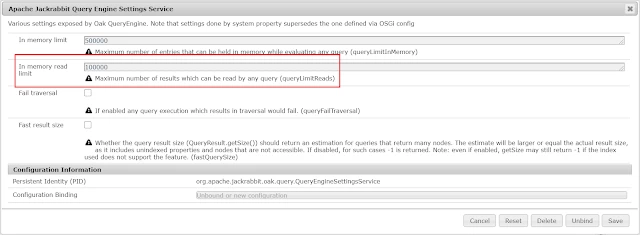
Aapche Jackrabbit Query Engine Setting service -> Add one more "0" in Memory read limit field.


Regards,

Raja

3 replies

DEBAL_DAS
New Member
March 31, 2022

Personally I always use a specific node type instead of a general one like nt:base, it really helps me to improve my query performance.


We should avoid  traversal query.


Please follow the suggestion here : https://wttech.blog/blog/2020/jcr-query-performance/ 


I will share different queries with different use cases it will help you I believe.

Debal Das, Senior AEM Consultant
ParakhMaAuthor
Level 3
March 31, 2022

This is an AEM OOB query and nothing coming from our code.

This query is generated OOB, whenever you open DAM folder in AEM

DEBAL_DAS
New Member
March 31, 2022

Got it. One of my friend has observed similar issue with asset move operation in their project and they have raised a day care ticket.

Debal Das, Senior AEM Consultant
diksha_mishra
Community Advisor
Community Advisor
March 31, 2022

What AEM version and Service pack are you using?

I ask because with SP11 this is a known issue:

https://experienceleague.adobe.com/docs/experience-manager-65/release-notes/service-pack/6.5.11.html#known-issues

You need to add the following properties to the index definition node /oak:index/damAssetLucene (no re-indexing is required) :

"tags": [
"visualSimilaritySearch"
]
"refresh": true

ParakhMaAuthor
Level 3
March 31, 2022

We are using AEM 6.5 with SP 10

Raja-Karuppsamy
Community Advisor
Raja-KaruppsamyCommunity AdvisorAccepted solution
Community Advisor
April 1, 2022

Hi @parakhma - We have faced the same issue in our platform when we upgraded to SP 12 from SP10 package. As this is known bug from the AEM SP12 (mentioned in the release notes).

To resolve the issue :

Option#1 - Recommended by Adobe, update the property the below under oak:index/damAssetLucene:

  1. tag -> string -> visualSimilaritySearch (multivalue)
  2. refresh ->boolean ->true & save the changes.

Option#2 - Increase the memory limit in the OSGi configuration (Temporary fix):

Aapche Jackrabbit Query Engine Setting service -> Add one more "0" in Memory read limit field.


Regards,

Raja

kautuk_sahni
Community Manager
Community Manager
March 31, 2022

I would recommend creating a Support Ticket for this one. 

Kautuk Sahni