Not able to see <project>-packages in crx in dev environment in AEM as cloud service | Community
Skip to main content
Level 2
May 23, 2024
Solved

Not able to see <project>-packages in crx in dev environment in AEM as cloud service

  • May 23, 2024
  • 2 replies
  • 627 views

Hi,
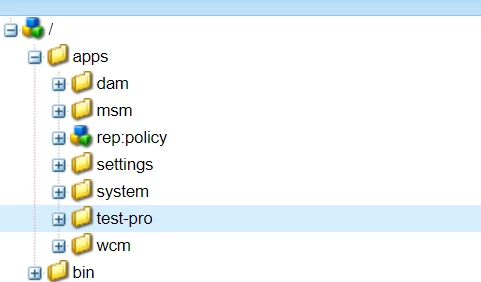
Just wanted to ask <project>-packages is hidden in crx in cloud service? but my backend is working but not able to see application/install
for ex test-pro is there but not test-pro-packages folder.

 

This post is no longer active and is closed to new replies. Need help? Start a new post to ask your question.
Best answer by joerghoh

When you build your project locally, your deployment package embeds the JAR files in content packages (typically /apps/<project>/install), and AEM 6.5 and the SDK pick them up from the repository (using the JcrInstaller).


In AEM CS this is not done anymore. There the build process extracts these binaries from the content package and ships it the same way as AEM product bundles; they are no longer part of the repository. This is the behaviour you observe.


2 replies

gkalyan
Community Advisor and Adobe Champion
May 23, 2024

@skchauhan 


AEM as a Cloud Service, the traditional CRX Package Manager (/crx/packmgr) is not directly accessible for security reasons. The /etc/packages folder where packages are typically stored is also hidden by default.
 
To manage packages (upload, install, build, delete) in AEM Cloud Service, you need to use a custom tool or service like the Package Handler instead of the traditional CRX Package Manager.

You can check this documentation about package manager in AEMaaCS
 
joerghoh
Adobe Employee
joerghohAdobe EmployeeAccepted solution
Adobe Employee
May 30, 2024

When you build your project locally, your deployment package embeds the JAR files in content packages (typically /apps/<project>/install), and AEM 6.5 and the SDK pick them up from the repository (using the JcrInstaller).


In AEM CS this is not done anymore. There the build process extracts these binaries from the content package and ships it the same way as AEM product bundles; they are no longer part of the repository. This is the behaviour you observe.