
Not able to install AEM Developer Tools | Community
Skip to main content
Mukesh_Kumar_Co
Level 3
November 16, 2017

Not able to install AEM Developer Tools

  • November 16, 2017
  • 4 replies
  • 4585 views

While installing AEM Developer Tools in Eclipse(Kepler Service Release 2) we are getting below error.

Unable to read repository at https://eclipse.adobe.com/aem/dev-tools/content.xml.

Unable to read repository at https://eclipse.adobe.com/aem/dev-tools/content.xml.

hostname in certificate didn't match: <eclipse.adobe.com> != <devedge.day.com> OR <devedge.day.com>
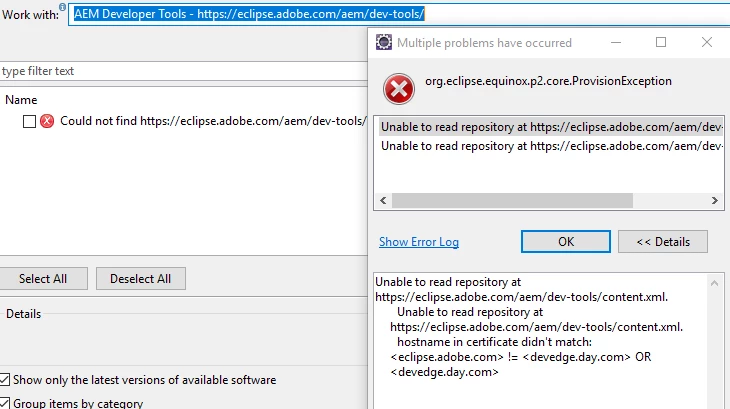
I am following steps mentioned at url AEM Developer Tools for Eclipse . Can anyone please suggest if I am missing any steps?

This post is no longer active and is closed to new replies. Need help? Start a new post to ask your question.

4 replies

kautuk_sahni
Community Manager
Community Manager
November 16, 2017

This is same question as Unable to read repository at http://eclipse.adobe.com/aem/dev-tools/content.xml , Eclipse Plugin is not working , AEM Developer tool in Eclipse: Installation errors

//

1. Adjust the Eclipse heap size in the Eclipse config file to succcessfully make the project work. I used this:

-vmargs -Xmx256M

2. Make sure that you are using the correct installation link, the correct IDE version, and you have met the heap objectives as stated in the article.

Please read all the comments by the community experts.

~kautuk

Kautuk Sahni
Mukesh_Kumar_Co
Level 3
November 16, 2017

@Kautuk, Thanks for your quick response. I have already seen these urls but unfortunately installation of plugin didn't work for me. Alternate way suggested by community member worked but I am curious why the installation of plugin is not working.

Message:

Unable to read repository at https://eclipse.adobe.com/aem/dev-tools/content.xml.

Exception Stack Trace message showing is as below:

javax.net.ssl.SSLException: hostname in certificate didn't match: <eclipse.adobe.com> != <devedge.day.com> OR <devedge.day.com>

at org.apache.http.conn.ssl.AbstractVerifier.verify(AbstractVerifier.java:228)

at org.apache.http.conn.ssl.BrowserCompatHostnameVerifier.verify(BrowserCompatHostnameVerifier.java:54)

at org.apache.http.conn.ssl.AbstractVerifier.verify(AbstractVerifier.java:149)

at org.apache.http.conn.ssl.AbstractVerifier.verify(AbstractVerifier.java:130)

at org.apache.http.conn.ssl.SSLSocketFactory.connectSocket(SSLSocketFactory.java:397)

at org.apache.http.impl.conn.DefaultClientConnectionOperator.openConnection(DefaultClientConnectionOperator.java:148)

at org.apache.http.impl.conn.AbstractPoolEntry.open(AbstractPoolEntry.java:150)

at org.apache.http.impl.conn.AbstractPooledConnAdapter.open(AbstractPooledConnAdapter.java:121)

at org.apache.http.impl.client.DefaultRequestDirector.tryConnect(DefaultRequestDirector.java:575)

at org.apache.http.impl.client.DefaultRequestDirector.execute(DefaultRequestDirector.java:425)

at org.apache.http.impl.client.AbstractHttpClient.execute(AbstractHttpClient.java:820)

at org.apache.http.impl.client.AbstractHttpClient.execute(AbstractHttpClient.java:754)

at org.eclipse.ecf.provider.filetransfer.httpclient4.HttpClientFileSystemBrowser.runRequest(HttpClientFileSystemBrowser.java:263)

at org.eclipse.ecf.provider.filetransfer.browse.AbstractFileSystemBrowser$DirectoryJob.run(AbstractFileSystemBrowser.java:69)

at org.eclipse.core.internal.jobs.Worker.run(Worker.java:53)

kautuk_sahni
Community Manager
Community Manager
November 17, 2017

Looks like the eclipse.adobe.com SSL certificate is not accepted by JVM, probably because the issuer certificate is not in the

keystore. What Java version do you use and from which vendor? Also, can you confirm that when you visit eclipse.adobe.com from the vendor the SSL certificate is accepted.

Some Good Reads:

https://stackoverflow.com/a/22901289/6433590

spring - maven repository has an invalid certificate - Stack Overflow

Kautuk Sahni
Level 2
May 24, 2018

I have faced the same issue.

Tried installing using archive in kepler which worked fine.