
No Archetypes in eclipse | Community
Skip to main content
Manu_Mathew_
Community Advisor
Community Advisor
October 29, 2021
Question

No Archetypes in eclipse

  • October 29, 2021
  • 1 reply
  • 908 views

1. Select File > New > Project

2. Select AEM > AEM Sample Multi-Mode Project

3. Select Next

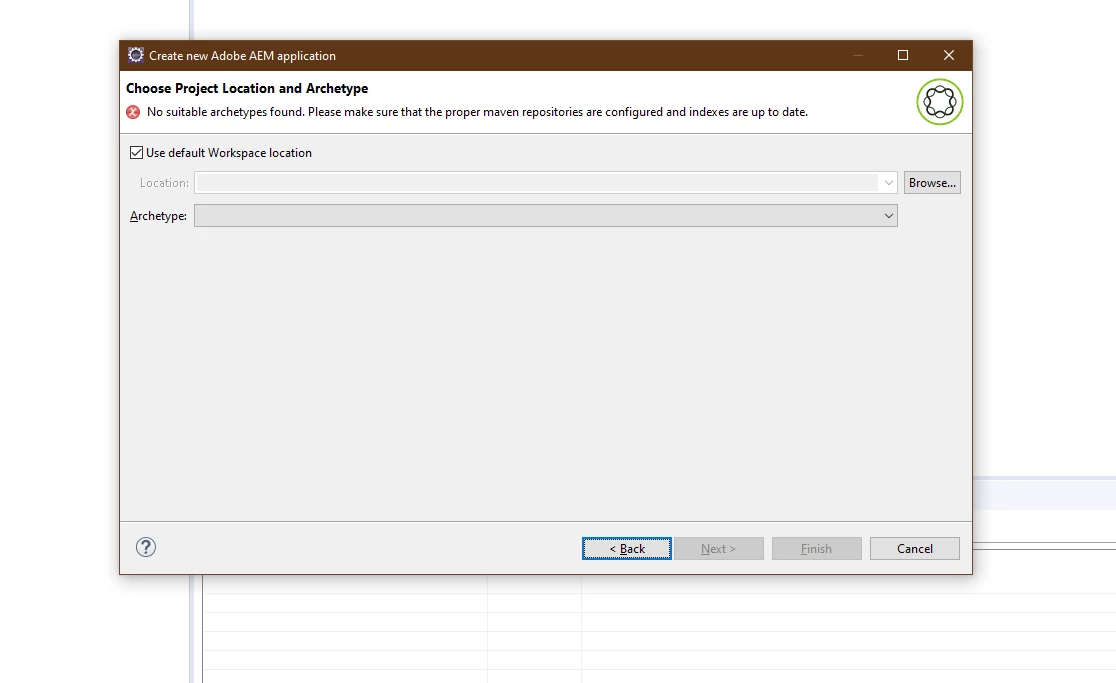
4. In the Choose Project Location and Archetype window the following error message is shown.    "No suitable archetypes found. Please make sure that the proper maven repositories are configured and indexes are up to date."
 

This post is no longer active and is closed to new replies. Need help? Start a new post to ask your question.

1 reply

Siva_Sogalapalli
Community Advisor
Community Advisor
October 29, 2021

1. Are you using any proxy or vpn where you don't have access for repo? 

2. Can you please go to Window>Preferences>.. and check User Settings points to the correct settings.xml?

3. Can you please check if you can access the repo from your browser?


or you can also create project through command line and import from eclilpse.

https://experienceleague.adobe.com/docs/experience-manager-core-components/using/developing/archetype/overview.html?lang=en 

Manu_Mathew_
Community Advisor
Community Advisor
October 29, 2021

Hi @siva_sogalapalli 


I do have access to repo in browser, also included settings.xml, cmd line is working fine. Just wanted to know why I am not able create via eclipse.


I have added this in my settings.xml: