
No advanced options in form container settings | Community
Skip to main content
arjuns71585267
Level 4
February 11, 2019
Solved

No advanced options in form container settings

  • February 11, 2019
  • 5 replies
  • 3087 views

I am following the above tutorial, I reached almost its end.

Adobe Experience Manager Help | Persisting Adobe Experience Manager 6.4 JCR data using a Custom Form Action

But I cannot advanced options in my form container and thus i cannot define the custom form action. The tutorial shows this image:
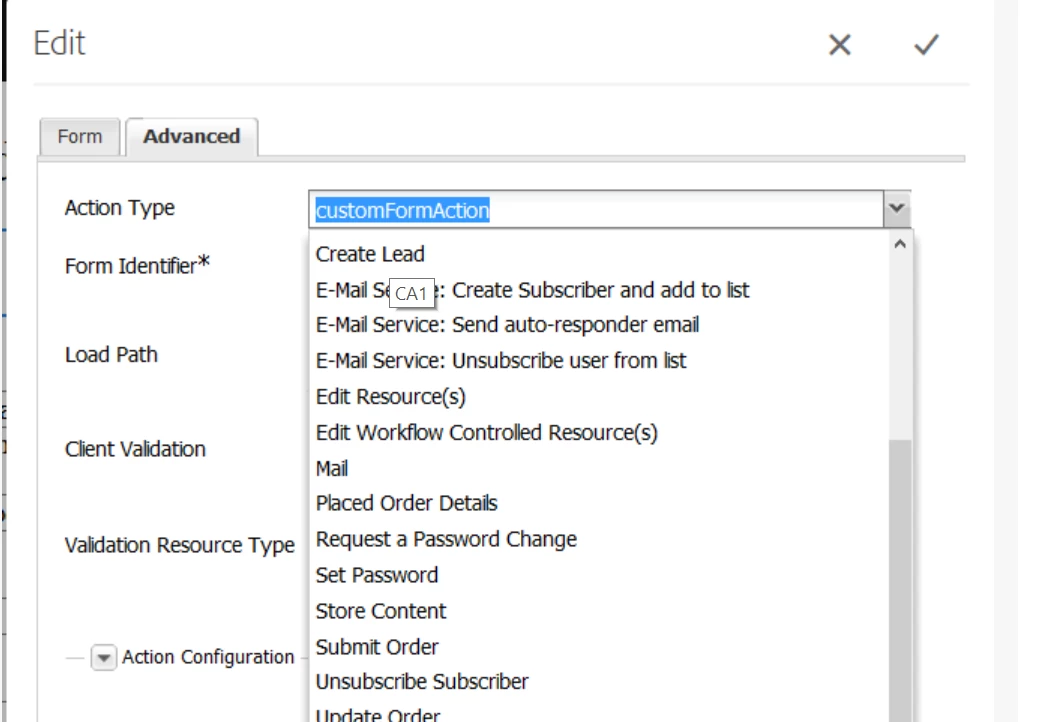
and this is the image of my instance:
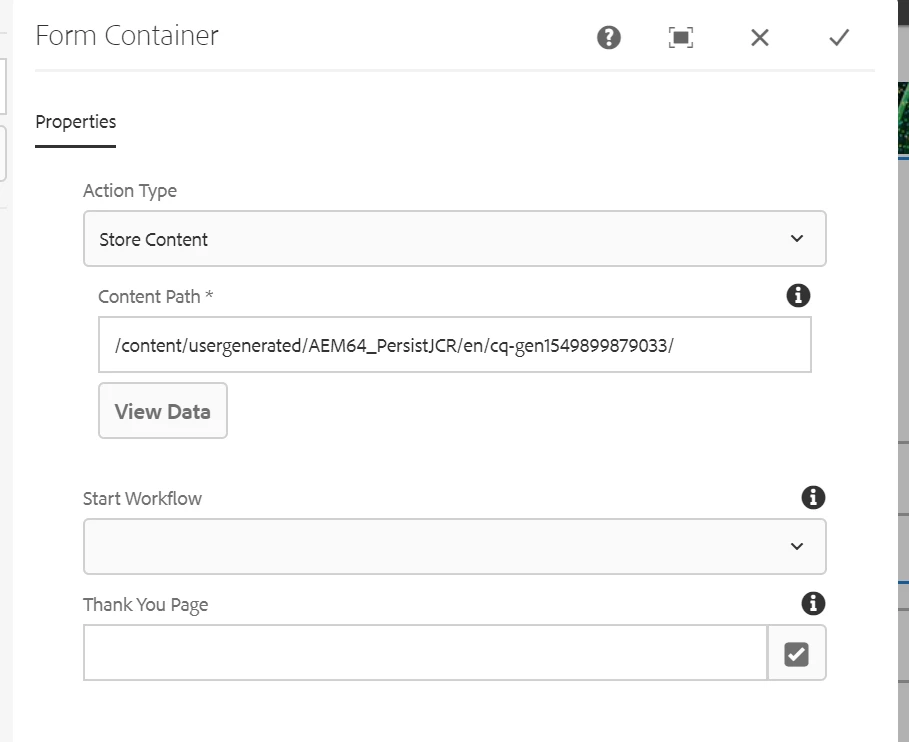
I am not able to add action due to this scenario. I am stuck. Kindly help me to find the issue and resolve it.

This post is no longer active and is closed to new replies. Need help? Start a new post to ask your question.
Best answer by Gaurav-Behl

That is because when this article was written, a specific set of libraries were used including Core Components.The screenshot of dialog is from OOB Core Components Form Container which has evolved over a period of time.  You should be able to find appropriate docs for core components that describe this.

It should not restrict you to choose specific 'action type' which is now available in the 'properties' tab of your screenshot.

I can still see formstart as a hidden param in container.html

<input type="hidden" name=":formstart" value="${resource.path}"/>

/apps/core/wcm/components/form/container/v1/container/container.html or /apps/core/wcm/components/form/container/v2/container/container.html

5 replies

Peter_Puzanovs
Community Advisor
Community Advisor
February 11, 2019

In tutorial seem to open it in Classic mode, can you please switch to classic mode and then you should see advanced.

Regards,

Peter

arjuns71585267
Level 4
February 12, 2019

I don't think that's the problem. It still persists.

arjuns71585267
Level 4
February 12, 2019

This seems like the form component coming with the tutorial doesn't have an advanced tab and also I am confused to use which text component should be used because it seem there are multiple text components.

arjuns71585267
Level 4
February 12, 2019

The form container that comes with the AEM64_PersistJCR is not having a start or end option. Only the form container from the component group Forms is having a form start and end as specified in the tutorial. And it has the advanced tab also. But the issue is this tutorial is still not working for  me. Can somebody create a video with this tutorial. or can anybody please help me out with this?

smacdonald2008

Gaurav-Behl
Gaurav-BehlAccepted solution
Level 10
February 12, 2019

That is because when this article was written, a specific set of libraries were used including Core Components.The screenshot of dialog is from OOB Core Components Form Container which has evolved over a period of time.  You should be able to find appropriate docs for core components that describe this.

It should not restrict you to choose specific 'action type' which is now available in the 'properties' tab of your screenshot.

I can still see formstart as a hidden param in container.html

<input type="hidden" name=":formstart" value="${resource.path}"/>

/apps/core/wcm/components/form/container/v1/container/container.html or /apps/core/wcm/components/form/container/v2/container/container.html