Nested multifield within multifield - Content fragment Model | Community
Skip to main content
Level 2
August 25, 2023
Solved

Nested multifield within multifield - Content fragment Model

  • August 25, 2023
  • 4 replies
  • 2440 views

I have a use-case where we are using custom datatypes ,  multifield within another multifield in a Content fragment model.


Following link was helpful and js works as expected but when there is another multifield within a multifield the values are not saved for the second multifield - 

https://jimfrenette.com/aem/content-fragments/composite-multifield/#google_vignette


java.lang.IllegalArgumentException: Value for key products can't be put into node: [Ljava.lang.Object;@5fde8369
at org.apache.sling.jcr.resource.internal.JcrModifiableValueMap.put(JcrModifiableValueMap.java:458) [org.apache.sling.jcr.resource:3.0.18]

Caused by: javax.jcr.nodetype.ConstraintViolationException: No matching property definition: products = [testing12345, name2updated, name3updated]


Is there a way to achieve this on AEM 6.5, SP 17. Is there a good documentation with Adobe for this usecase?



This post is no longer active and is closed to new replies. Need help? Start a new post to ask your question.
Best answer by ShaileshBassi

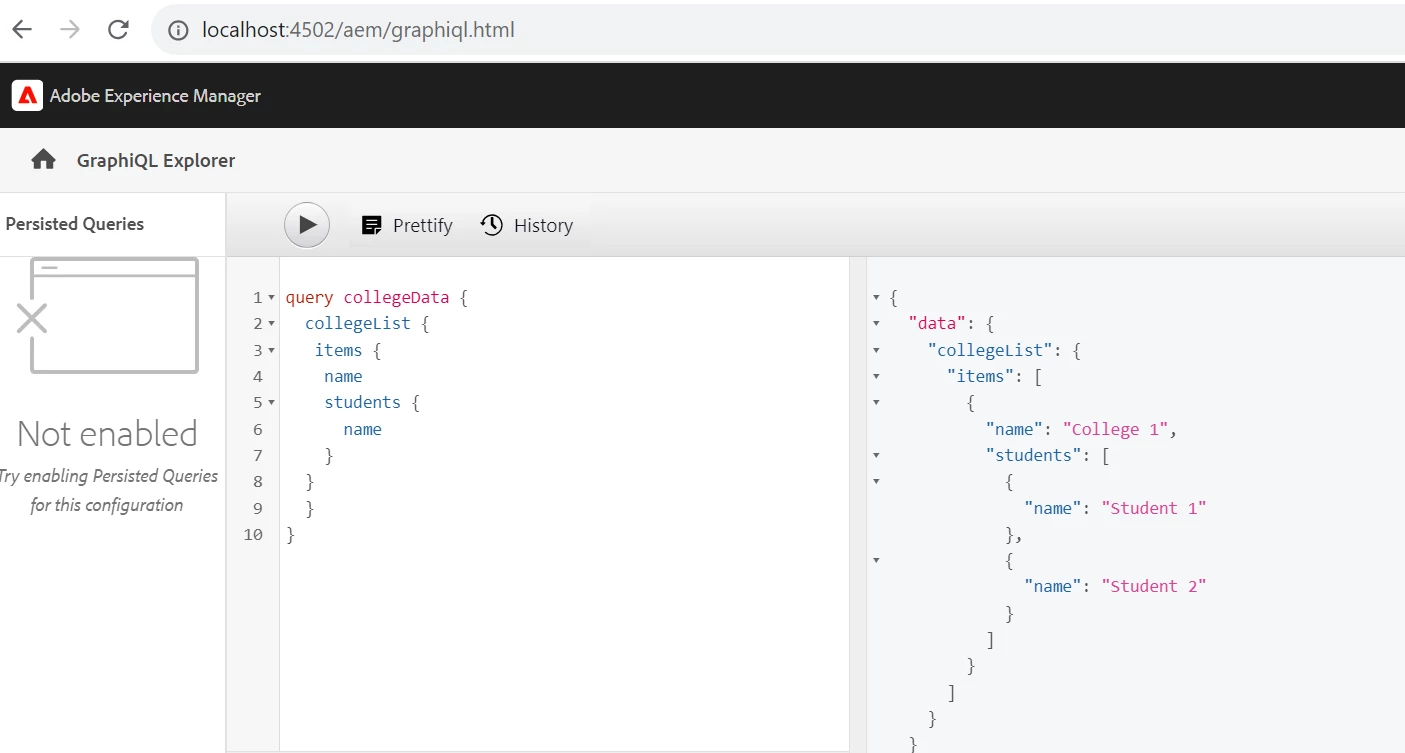
Hi @sonaliku Yes the graphQL query result provides the result in the json format.

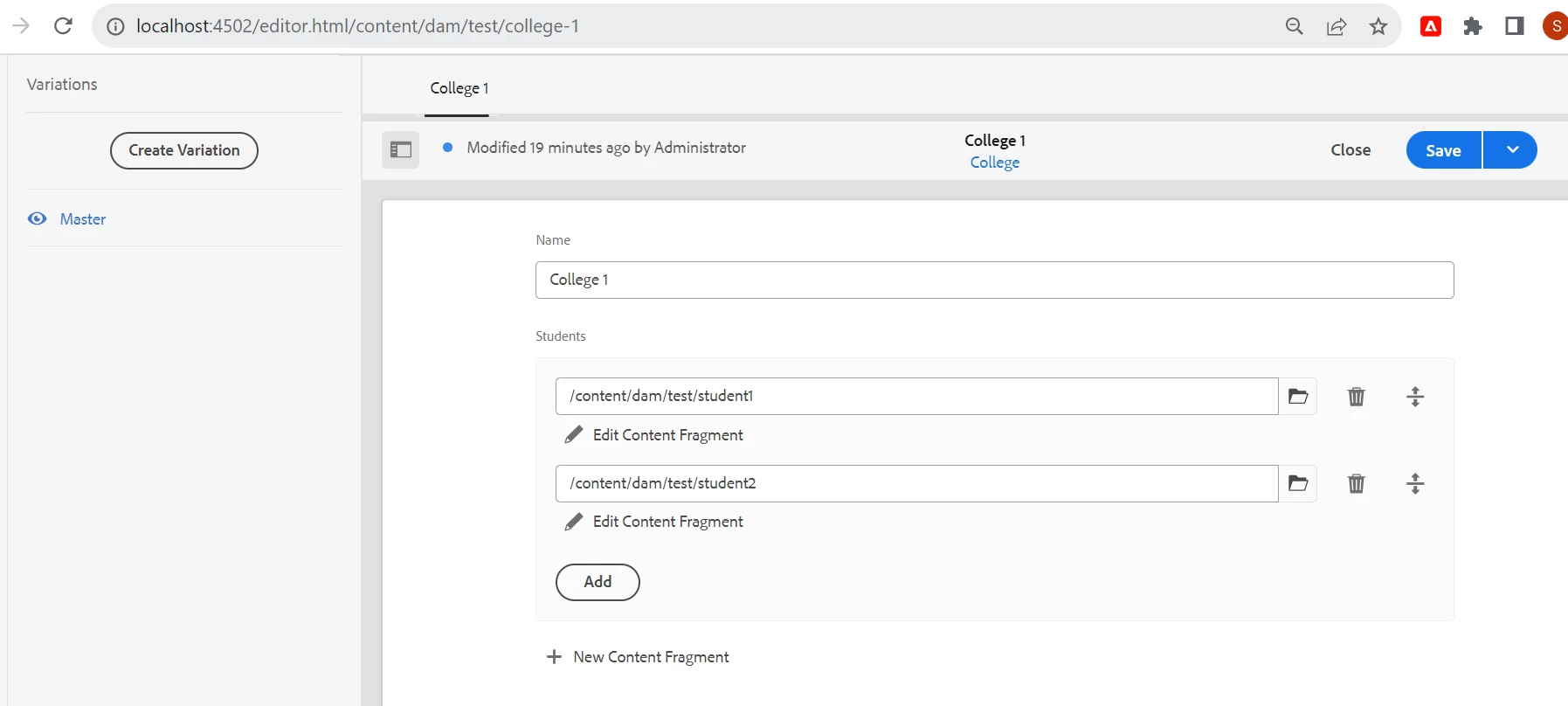
In the screenshot attached I am having the college as my main CF and student as the reference CF added as the multifield in the college CF. 
While writing the query you can specify the json format with the respective fields you wish to have in your json.


Hope this helps!

Thanks

4 replies

Harwinder-singh
Community Advisor
Community Advisor
August 25, 2023

@sonaliku , you might be trying to set this property product on a different node, possibly the jcr:content node.

Check what is the node name where you trying to add this property.

EstebanBustamante
Community Advisor and Adobe Champion
August 25, 2023

Unfortunately, these are custom implementations, so there is no official support for these use cases. Nevertheless, the issue suggests that the value or type of value being stored in the node is not accepted. Either the type of node or the value is causing the issue. Therefore, the best approach to fixing this would be to debug and understand which values are being stored in which nodes.


Hope this helps.

Esteban Bustamante
ShaileshBassi
Community Advisor
Community Advisor
August 27, 2023

Hi @sonaliku There is no OOTB way to create the multifield. Instead you can try the reference to another content fragment within the main content fragment.


Reference Document - https://experienceleague.adobe.com/docs/experience-manager-cloud-service/content/headless/journeys/author/references.html?lang=en


Hope this helps!

Thanks

sonalikuAuthor
Level 2
August 28, 2023

@shaileshbassi The use case is for CAAS to load the json structure. If we are using fragment reference , we would want to load the entire json content of the nested fragment into the current content fragment and not just the path. Do we have an example of this?

ShaileshBassi
Community Advisor
ShaileshBassiCommunity AdvisorAccepted solution
Community Advisor
August 28, 2023

Hi @sonaliku Yes the graphQL query result provides the result in the json format.

In the screenshot attached I am having the college as my main CF and student as the reference CF added as the multifield in the college CF. 
While writing the query you can specify the json format with the respective fields you wish to have in your json.


Hope this helps!

Thanks

varun249715
Adobe Employee
Adobe Employee
August 27, 2023

Its better to use fragment reference. Custom multifields might create an issue as the number of fields to be authored increases in requirement.

sonalikuAuthor
Level 2
August 28, 2023

@varun249715 Fragment reference is providing the path of the fragment based on the model selected. If this approach is used , we would want the entire json to be loaded. Any examples on that approach for CAAS?