Need to create inventory report having jcr content for 32k pages. | Community
Skip to main content
February 8, 2021
Solved

Need to create inventory report having jcr content for 32k pages.

  • February 8, 2021
  • 2 replies
  • 1047 views

Hi Team,


I am having one requirement to create inventory report in excel format which should include jcr content and the components properties for 32k pages.


I tried with infinity.json which will give the entire details however with this approach issue is we have to hit the url again and again for getting the properties.


Could you please provide any suggestion or solutions for the same.


Eg: I want all the jcr:content and the components properties of this page.
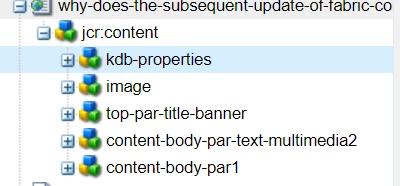
 

Thanks in advance.

@jbrar @Arun_Patidar @kautuk_sahni @BrianKasingli 


This post is no longer active and is closed to new replies. Need help? Start a new post to ask your question.
Best answer by Kiran_Vedantam

Hi @shreya_shruti,


For this use case, you need to write your custome code and add the values in an excel.


Try like this.

  1. Create a component which has an option to give the content path
  2. Trigger a servlet call [based on resource type or path] with the content path included
  3. Using the content path, get the resource and its child resource
    1. Iterate over each resource, get the properties and add it to the excel sheet

Challanges:

  1. There are multiple ways to do this activity. Selecting the correct API [Ex: to select javax.jcr.query.Query or 
     com.day.cq.search.Query] is a big challange
  2.  
    Also as mentioned by you, if you have more number of pages, the system performance will be impacted. So, either run this on lower environments or run it on few pages at a time.

Hope this helps.


Thanks,

Kiran Vedantam.

2 replies

Kiran_Vedantam
Community Advisor
Kiran_VedantamCommunity AdvisorAccepted solution
Community Advisor
February 8, 2021

Hi @shreya_shruti,


For this use case, you need to write your custome code and add the values in an excel.


Try like this.

  1. Create a component which has an option to give the content path
  2. Trigger a servlet call [based on resource type or path] with the content path included
  3. Using the content path, get the resource and its child resource
    1. Iterate over each resource, get the properties and add it to the excel sheet

Challanges:

  1. There are multiple ways to do this activity. Selecting the correct API [Ex: to select javax.jcr.query.Query or 
     com.day.cq.search.Query] is a big challange
  2.  
    Also as mentioned by you, if you have more number of pages, the system performance will be impacted. So, either run this on lower environments or run it on few pages at a time.

Hope this helps.


Thanks,

Kiran Vedantam.

Anudeep_Garnepudi
Community Advisor
Community Advisor
February 8, 2021

@shreya_shruti 

My suggestion is to create a standalone Java Class (with main method) and using JCR API create and execute a query to get all you pages. Then on each page run one more query (using current page path) to get all nodes having sling:ResourceType property, this will give all components including the jcr:content of the page. Write your logic and you logic to create and add your report data to excel sheet using same class.

Better break the pages in to multiple sets(by path) and run, as you have 32K pages.

Below is the sample code.

public class App { public static void main(String[] ag) { Repository repository = null; Session session = null; String queryString = "SELECT * FROM [cq:Page] AS page WHERE ISDESCENDANTNODE(page ,'/content/your/path') "; try{ repository = JcrUtils.getRepository("http://localhost:4502/crx/server"); session = repository.login(new SimpleCredentials("admin", "admin".toCharArray())); QueryManager qm = session.getWorkspace().getQueryManager(); Query query = qm.createQuery(queryString, Query.JCR_SQL2); QueryResult resultPages = query.execute(); RowIterator pageRows = resultPages.getRows(); javax.jcr.query.Row eachRow = null; Node resultNode = null; while(pageRows.hasNext()){ // Logic } //session.save(); if you update/create nodes save the session } catch (Exception e){ e.printStackTrace(); } finally{ session.logout(); } } }
AG