
Need a custom component of two images in a dialog with there respective alt from image description | Community
Skip to main content
keshava219
Level 3
April 13, 2022

Need a custom component of two images in a dialog with there respective alt from image description

  • April 13, 2022
  • 3 replies
  • 2249 views

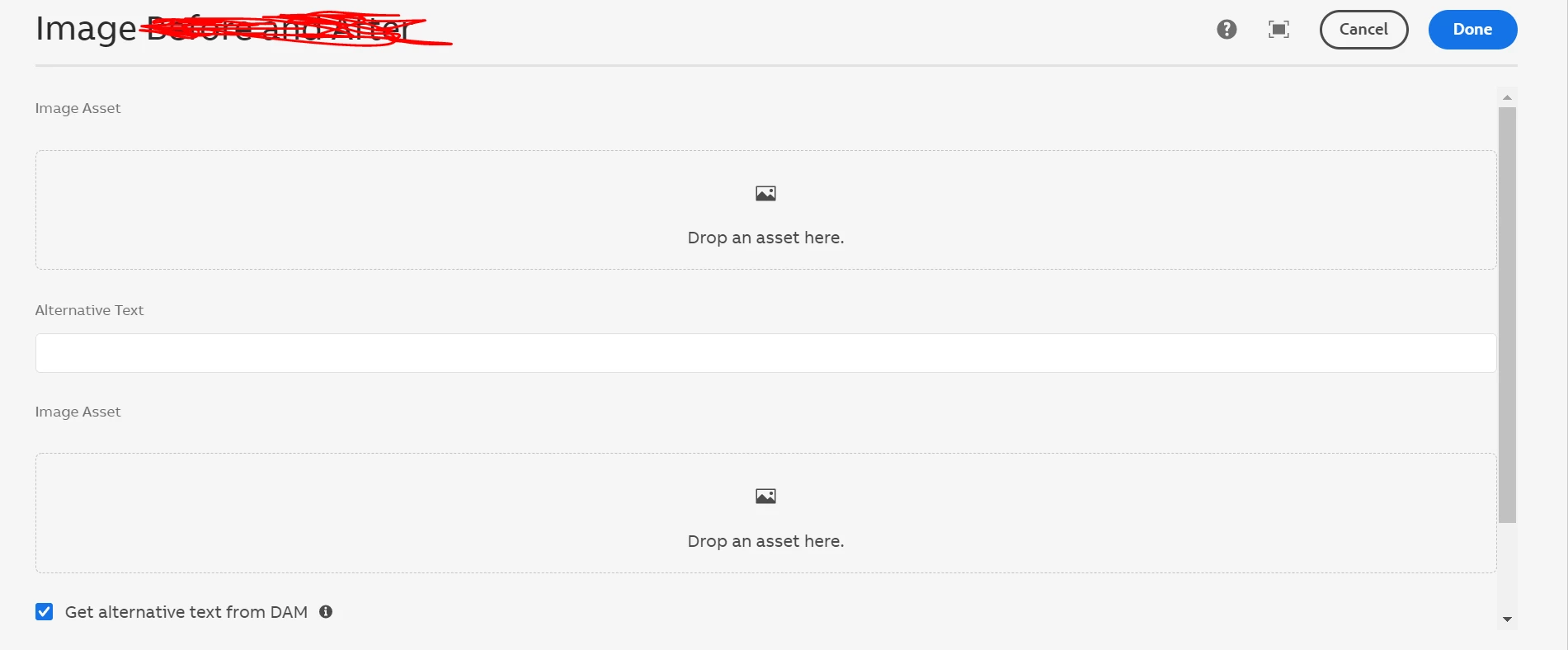
I have a requirement like two images in a dialog should return the unique alt text with respective there descritption


Went for core component there is only one image using there while doing the custom component I'm not able to return or show the unique after changing the file reference of the two images 


Please provide me any reference to achieve this approach


This post is no longer active and is closed to new replies. Need help? Start a new post to ask your question.

3 replies

Anmol_Bhardwaj
Community Advisor
Community Advisor
April 13, 2022

Please go through this answer by @kautuk_sahni  : 
https://experienceleaguecommunities.adobe.com/t5/adobe-experience-manager/aem-6-2-alt-text-for-images/m-p/301766 
As explained, we need to add alt text, it is not governed by the image, but through authoring.


However, If you don't want to use altText through authoring , you can always get a property from the image node and return it in place of altText, this way, it doesn't matter how many images you have, the property will be unique for everyone.

You can create a modal for this, which will accept an image and return altText aling with anything else you need.

keshava219
Level 3
April 13, 2022

Hi AnmolBhardwaj,

                   Thanks for the reply , In this example showing only one image of core and by  model i can written in page but my question is that in dialog can we see alt text functionality by writting custom JS like things


arunpatidar
Community Advisor
Community Advisor
April 13, 2022

Hi,

You can check the logic of image core component, there alt text can be used from asset description.

https://experienceleague.adobe.com/docs/experience-manager-core-components/using/components/image.html?lang=en


In your model, you can read asset metadata and can be used via Model.

example


if (getValueFromDAM != null && getValueFromDAM.equals("true")) {
            String fileReference = resource.getValueMap().get("fileReference", String.class);
            if (StringUtils.isNotBlank(fileReference)) {
                final Resource assetResource = request.getResourceResolver().getResource(fileReference);
                if (assetResource != null) {
                    Asset asset = assetResource.adaptTo(Asset.class);
                    if (asset != null) {
                        copyMetaProp = PropertiesUtil.toString(asset.getMetadata(DamConstants.DC_RIGHTS), null);
                    }
                }
            }
        }


Arun Patidar
keshava219
Level 3
April 13, 2022

Hi @arunpatidar , Yeah got it but on dialog while selecting two images second alt not  reflect on dialog just like in second image it reflecting to first image alt . Have any reference for multiple alt custom JS? please 


arunpatidar
Community Advisor
Community Advisor
April 13, 2022

Hi, This is bacause the javascript listener is created only for one field, you need to write same for second field as well

https://github.com/adobe/aem-core-wcm-components/blob/main/content/src/content/jcr_root/apps/core/wcm/components/image/v2/image/clientlibs/editor/js/image.js


Arun Patidar
milind_bachani
Adobe Employee
Adobe Employee
April 13, 2022

@keshava219 - While I agree to the solutions given by @arunpatidar & @anmol_bhardwaj. I would like to know why is it important to have authoring of both the images in single authoring dialog.

You can avoid writing custom JS and leveraging the core image component and drop the same component in the page twice with which you can have image1->altText1 & image2->altText2 separately.

Another way would be to create a multifield which has imagePath & imageAltText and you can handle as many images as you want in single dialog.

Thanks.