Modify SlingModel of a core component in Custom component | Community
Skip to main content
Level 3
July 18, 2023
Solved

Modify SlingModel of a core component in Custom component

  • July 18, 2023
  • 4 replies
  • 2551 views

Hi,


I have created a custom component using AEM's core component(Tabs). The use case that we have now is to modify the `id` attribute of each tab. The `id` attribute should have a value of the title of the tab transformed to lowercase and spaces separated with hyphens. 


I assume this cannot be done in the Slightly HTL file and this needs to be modified in Sling Model. I tried to access the tabs using ComponentResource but was not able to get the data of the tabs to modify.


How do we achieve this?  Any help is appreciated

This post is no longer active and is closed to new replies. Need help? Start a new post to ask your question.
Best answer by Sady_Rifat

Hello @manasabojja7 ,

To modify each Tab Item ID you need to follow the Sling Delegation Model concept. But the complexity is the "ID" field. This comes from the Component model class. So you need to create another interface and its implementation to hold your custom ID.

In the end, your model will be like this,

package com.aem.demo.core.models; import com.adobe.cq.export.json.ComponentExporter; import com.adobe.cq.export.json.ExporterConstants; import com.adobe.cq.wcm.core.components.commons.link.Link; import com.adobe.cq.wcm.core.components.models.ListItem; import com.adobe.cq.wcm.core.components.models.Tabs; import lombok.Getter; import lombok.Setter; import lombok.experimental.Delegate; import org.apache.sling.api.SlingHttpServletRequest; import org.apache.sling.api.resource.Resource; import org.apache.sling.models.annotations.DefaultInjectionStrategy; import org.apache.sling.models.annotations.Exporter; import org.apache.sling.models.annotations.Model; import org.apache.sling.models.annotations.injectorspecific.Self; import java.util.ArrayList; import java.util.Calendar; import java.util.List; @Model(adaptables = SlingHttpServletRequest.class, adapters = {TabsExtd.class, ComponentExporter.class}, resourceType = TabsExtdImpl.RESOURCE_TYPE, defaultInjectionStrategy = DefaultInjectionStrategy.OPTIONAL) @Exporter(name = ExporterConstants.SLING_MODEL_EXPORTER_NAME, extensions = ExporterConstants.SLING_MODEL_EXTENSION) public class TabsExtdImpl implements TabsExtd { public static final String RESOURCE_TYPE = "aem-demo/components/tabs"; @Self @Delegate private Tabs coreTabs; @Override public List<CustomListItem> getExtItems() { List<CustomListItem> customListItems = new ArrayList<>(); for (ListItem item : coreTabs.getItems()) { CustomListItemImpl extItem = new CustomListItemImpl(); extItem.setId(item.getTitle().toLowerCase().replace(" ", "-")); extItem.setLink(item.getLink()); extItem.setURL(item.getURL()); extItem.setTitle(item.getTitle()); extItem.setName(item.getName()); extItem.setDescription(item.getDescription()); extItem.setPath(item.getPath()); extItem.setTeaserResource(item.getTeaserResource()); customListItems.add(extItem); } return customListItems; } interface CustomListItem extends ListItem { } @Getter @Setter private class CustomListItemImpl implements CustomListItem { private String id; private Link link; private String URL; private String Title; private String description; private Calendar lastModified; private String path; private String name; private Resource teaserResource; } }
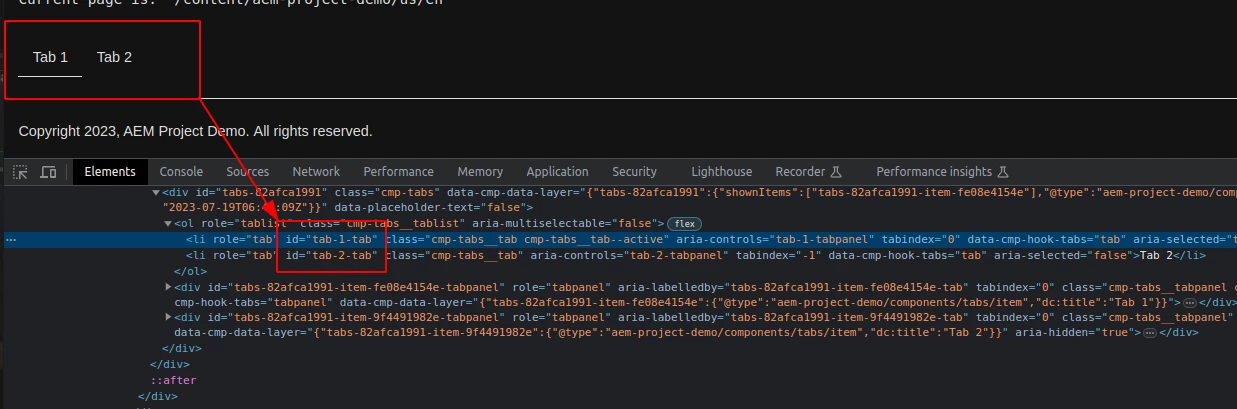
However, to make it simple I push a commit for you. You will easily pick up from this. https://github.com/Sady-Rifat/aem-demo/commit/7047cd9dcb6601359f61d13b373da552272ca8cc 

4 replies

Kiran_Vedantam
Community Advisor
Community Advisor
July 18, 2023

Hi @manasabojja7 


You can create your new component, delegating the old one. Below is the example: https://github.com/adobe/aem-core-wcm-components/wiki/Delegation-Pattern-for-Sling-Models


Thanks,

Kiran Vedantam.

DPrakashRaj
Community Advisor
Community Advisor
July 18, 2023

Since it’s a custom component then you will have its own html file on which you can call your custom sling model class. So wherever you want your custom sling loses property to be injected on html you can call it with your sling model.property. In your case it’s an Id 

Manu_Mathew_
Community Advisor
Community Advisor
July 19, 2023

@manasabojja7 You could delegate the model by using adapters-

@Model(adaptables = SlingHttpServletRequest.class, adapters = Tabs.class, resourceType = "myproject/components/myTabs")

and could use the below to include the object:

@Self
@Via(type = ResourceSuperType.class)
@Delegate(excludes = DelegationExclusion.class)
private Tabs tabs;

Sady_Rifat
Community Advisor
Sady_RifatCommunity AdvisorAccepted solution
Community Advisor
July 19, 2023

Hello @manasabojja7 ,

To modify each Tab Item ID you need to follow the Sling Delegation Model concept. But the complexity is the "ID" field. This comes from the Component model class. So you need to create another interface and its implementation to hold your custom ID.

In the end, your model will be like this,

package com.aem.demo.core.models; import com.adobe.cq.export.json.ComponentExporter; import com.adobe.cq.export.json.ExporterConstants; import com.adobe.cq.wcm.core.components.commons.link.Link; import com.adobe.cq.wcm.core.components.models.ListItem; import com.adobe.cq.wcm.core.components.models.Tabs; import lombok.Getter; import lombok.Setter; import lombok.experimental.Delegate; import org.apache.sling.api.SlingHttpServletRequest; import org.apache.sling.api.resource.Resource; import org.apache.sling.models.annotations.DefaultInjectionStrategy; import org.apache.sling.models.annotations.Exporter; import org.apache.sling.models.annotations.Model; import org.apache.sling.models.annotations.injectorspecific.Self; import java.util.ArrayList; import java.util.Calendar; import java.util.List; @Model(adaptables = SlingHttpServletRequest.class, adapters = {TabsExtd.class, ComponentExporter.class}, resourceType = TabsExtdImpl.RESOURCE_TYPE, defaultInjectionStrategy = DefaultInjectionStrategy.OPTIONAL) @Exporter(name = ExporterConstants.SLING_MODEL_EXPORTER_NAME, extensions = ExporterConstants.SLING_MODEL_EXTENSION) public class TabsExtdImpl implements TabsExtd { public static final String RESOURCE_TYPE = "aem-demo/components/tabs"; @Self @Delegate private Tabs coreTabs; @Override public List<CustomListItem> getExtItems() { List<CustomListItem> customListItems = new ArrayList<>(); for (ListItem item : coreTabs.getItems()) { CustomListItemImpl extItem = new CustomListItemImpl(); extItem.setId(item.getTitle().toLowerCase().replace(" ", "-")); extItem.setLink(item.getLink()); extItem.setURL(item.getURL()); extItem.setTitle(item.getTitle()); extItem.setName(item.getName()); extItem.setDescription(item.getDescription()); extItem.setPath(item.getPath()); extItem.setTeaserResource(item.getTeaserResource()); customListItems.add(extItem); } return customListItems; } interface CustomListItem extends ListItem { } @Getter @Setter private class CustomListItemImpl implements CustomListItem { private String id; private Link link; private String URL; private String Title; private String description; private Calendar lastModified; private String path; private String name; private Resource teaserResource; } }

However, to make it simple I push a commit for you. You will easily pick up from this. https://github.com/Sady-Rifat/aem-demo/commit/7047cd9dcb6601359f61d13b373da552272ca8cc 

Level 3
July 19, 2023

Thanks for your detailed response @sady_rifat 


I tried to do a similar implementation by delegating the Sling Model but I see a Null Pointer Exception while trying to read 

 coreTabs.getItems() as the coreTabs is null
Not sure why it's not able to read this. Any thoughts if I would be missing something?
Level 3
July 19, 2023

It is working now. Thanks for your help😊