Jsoup with slingservlet | Adobe Higher Education
Skip to main content
Level 3
June 17, 2022
Resuelto

Jsoup with slingservlet

  • June 17, 2022
  • 1 respuesta
  • 1400 visualizaciones

Hi,


By using Jsoup, we have to convert a AEM page all into inline styles that should return to AEM. Could you please help me with how can we achieve this!

Thank you

Este tema ha sido cerrado para respuestas.
Mejor respuesta de SantoshSai

Hi @satish2info-1 ,

You have to embed jsoup library in your project using dependency in parent pom.xml

<dependency>
    <groupId>org.jsoup</groupId>
    <artifactId>jsoup</artifactId>
    <version>1.15.1</version>
</dependency>

core pom.xml

<dependency>
    <groupId>org.jsoup</groupId>
    <artifactId>jsoup</artifactId>
</dependency>

Note: Following the above steps and deploying project you will face issue as below
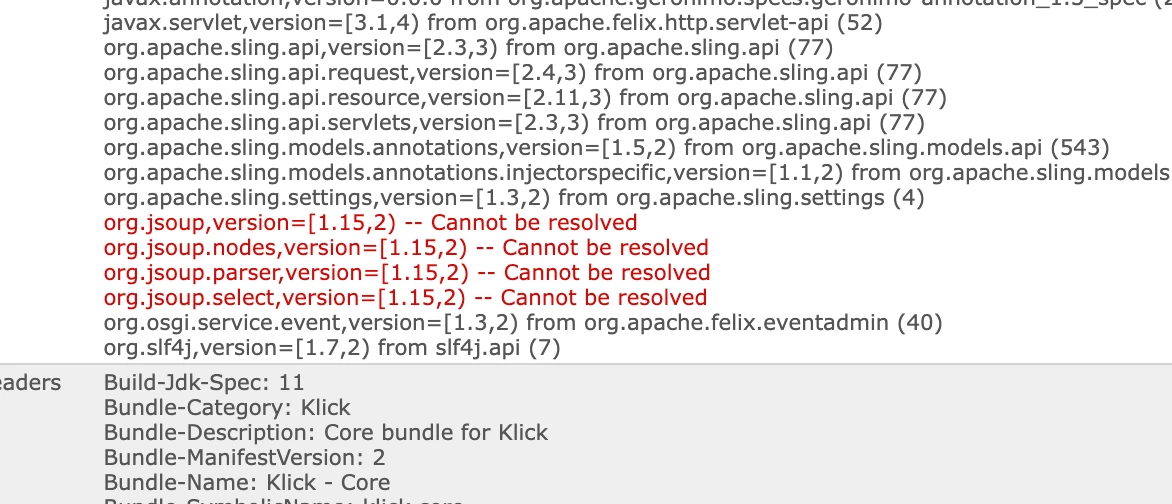
in that case make sure to add jsoup jar to AEM: for more details please check here: https://experienceleaguecommunities.adobe.com/t5/adobe-experience-manager/jsoup-jar-does-not-installed-in-osgi-bundle/m-p/276271

Ignore if you have already in your project.


Additionally, you have to parse HTML using jsoup. Below is the sample code for preparing inline styles by passing html source

import java.io.IOException;
import java.util.StringTokenizer;

import org.jsoup.Jsoup;
import org.jsoup.nodes.Document;
import org.jsoup.nodes.Element;
import org.jsoup.select.Elements;

public class AutomaticCssInliner {
    
    public static void main(String[] args) throws IOException {
        final String style = "style";
        final String html = "<html>" + "<body> <style>"
                + "body{background:#FFC} \n p{background:red}"
                + "body, p{font-weight:bold} </style>"
                + "<p>...</p> </body> </html>";
        // Document doc = Jsoup.connect("http://mypage.com/inlineme.php").get();
        Document doc = Jsoup.parse(html);
        Elements els = doc.select(style);// to get all the style elements
        for (Element e : els) {
            String styleRules = e.getAllElements().get(0).data().replaceAll(
                    "\n", "").trim(), delims = "{}";
            StringTokenizer st = new StringTokenizer(styleRules, delims);
            while (st.countTokens() > 1) {
                String selector = st.nextToken(), properties = st.nextToken();
                Elements selectedElements = doc.select(selector);
                for (Element selElem : selectedElements) {
                    String oldProperties = selElem.attr(style);
                    selElem.attr(style,
                            oldProperties.length() > 0 ? concatenateProperties(
                                    oldProperties, properties) : properties);
                }
            }
            e.remove();
        }
        System.out.println(doc);// now we have the result html without the
        // styles tags, and the inline css in each
        // element
    }

    private static String concatenateProperties(String oldProp, String newProp) {
        oldProp = oldProp.trim();
        if (!newProp.endsWith(";"))
           newProp += ";";
        return newProp + oldProp; // The existing (old) properties should take precedence.
    }
}

I have implemented an sample servlet below to fetch style for better understanding

package com.demo.core.servlets;

import javax.servlet.Servlet;
import javax.servlet.ServletException;

import com.day.cq.commons.jcr.JcrConstants;
import org.apache.sling.api.SlingHttpServletRequest;
import org.apache.sling.api.SlingHttpServletResponse;
import org.apache.sling.api.resource.Resource;
import org.apache.sling.api.servlets.HttpConstants;
import org.apache.sling.api.servlets.SlingSafeMethodsServlet;
import org.jsoup.Jsoup;
import org.jsoup.nodes.Document;
import org.jsoup.nodes.Element;
import org.jsoup.parser.Parser;
import org.osgi.framework.Constants;
import org.osgi.service.component.annotations.Component;

import org.slf4j.Logger;
import org.slf4j.LoggerFactory;

import java.io.IOException;

@Component(service = Servlet.class, property = {
Constants.SERVICE_DESCRIPTION + "=JSON Servlet to read the data from the external webservice",
"sling.servlet.methods=" + HttpConstants.METHOD_GET, "sling.servlet.paths=" + "/bin/samplejsoupparser" })
public class JsoupParserServlet extends SlingSafeMethodsServlet {

@Override
protected void doGet(final SlingHttpServletRequest req,
final SlingHttpServletResponse resp) throws ServletException, IOException {
final Resource resource = req.getResource();
resp.setContentType("text/plain");
final String html = "<th style=\"text-align:right\">4389</th>";

Document doc = Jsoup.parse(html, "", Parser.xmlParser()); // Using the default html parser may remove the style attribute
Element th = doc.select("th[style]").first();

String style = th.attr("style"); // You can put those two lines into one
String styleValue = style.split(":")[1]; // TODO: Insert a check if a value is set

resp.getWriter().write("Style = " + style + " StyleValue = " + styleValue);
}
}

Output:

Style = text-align:right StyleValue = right

Hope that helps you!

Regards,

Santosh

1 respuesta

SantoshSai
Community Advisor
SantoshSaiCommunity AdvisorRespuesta
Community Advisor
June 17, 2022

Hi @satish2info-1 ,

You have to embed jsoup library in your project using dependency in parent pom.xml

<dependency>
    <groupId>org.jsoup</groupId>
    <artifactId>jsoup</artifactId>
    <version>1.15.1</version>
</dependency>

core pom.xml

<dependency>
    <groupId>org.jsoup</groupId>
    <artifactId>jsoup</artifactId>
</dependency>

Note: Following the above steps and deploying project you will face issue as below

in that case make sure to add jsoup jar to AEM: for more details please check here: https://experienceleaguecommunities.adobe.com/t5/adobe-experience-manager/jsoup-jar-does-not-installed-in-osgi-bundle/m-p/276271

Ignore if you have already in your project.


Additionally, you have to parse HTML using jsoup. Below is the sample code for preparing inline styles by passing html source

import java.io.IOException;
import java.util.StringTokenizer;

import org.jsoup.Jsoup;
import org.jsoup.nodes.Document;
import org.jsoup.nodes.Element;
import org.jsoup.select.Elements;

public class AutomaticCssInliner {
    
    public static void main(String[] args) throws IOException {
        final String style = "style";
        final String html = "<html>" + "<body> <style>"
                + "body{background:#FFC} \n p{background:red}"
                + "body, p{font-weight:bold} </style>"
                + "<p>...</p> </body> </html>";
        // Document doc = Jsoup.connect("http://mypage.com/inlineme.php").get();
        Document doc = Jsoup.parse(html);
        Elements els = doc.select(style);// to get all the style elements
        for (Element e : els) {
            String styleRules = e.getAllElements().get(0).data().replaceAll(
                    "\n", "").trim(), delims = "{}";
            StringTokenizer st = new StringTokenizer(styleRules, delims);
            while (st.countTokens() > 1) {
                String selector = st.nextToken(), properties = st.nextToken();
                Elements selectedElements = doc.select(selector);
                for (Element selElem : selectedElements) {
                    String oldProperties = selElem.attr(style);
                    selElem.attr(style,
                            oldProperties.length() > 0 ? concatenateProperties(
                                    oldProperties, properties) : properties);
                }
            }
            e.remove();
        }
        System.out.println(doc);// now we have the result html without the
        // styles tags, and the inline css in each
        // element
    }

    private static String concatenateProperties(String oldProp, String newProp) {
        oldProp = oldProp.trim();
        if (!newProp.endsWith(";"))
           newProp += ";";
        return newProp + oldProp; // The existing (old) properties should take precedence.
    }
}

I have implemented an sample servlet below to fetch style for better understanding

package com.demo.core.servlets;

import javax.servlet.Servlet;
import javax.servlet.ServletException;

import com.day.cq.commons.jcr.JcrConstants;
import org.apache.sling.api.SlingHttpServletRequest;
import org.apache.sling.api.SlingHttpServletResponse;
import org.apache.sling.api.resource.Resource;
import org.apache.sling.api.servlets.HttpConstants;
import org.apache.sling.api.servlets.SlingSafeMethodsServlet;
import org.jsoup.Jsoup;
import org.jsoup.nodes.Document;
import org.jsoup.nodes.Element;
import org.jsoup.parser.Parser;
import org.osgi.framework.Constants;
import org.osgi.service.component.annotations.Component;

import org.slf4j.Logger;
import org.slf4j.LoggerFactory;

import java.io.IOException;

@Component(service = Servlet.class, property = {
Constants.SERVICE_DESCRIPTION + "=JSON Servlet to read the data from the external webservice",
"sling.servlet.methods=" + HttpConstants.METHOD_GET, "sling.servlet.paths=" + "/bin/samplejsoupparser" })
public class JsoupParserServlet extends SlingSafeMethodsServlet {

@Override
protected void doGet(final SlingHttpServletRequest req,
final SlingHttpServletResponse resp) throws ServletException, IOException {
final Resource resource = req.getResource();
resp.setContentType("text/plain");
final String html = "<th style=\"text-align:right\">4389</th>";

Document doc = Jsoup.parse(html, "", Parser.xmlParser()); // Using the default html parser may remove the style attribute
Element th = doc.select("th[style]").first();

String style = th.attr("style"); // You can put those two lines into one
String styleValue = style.split(":")[1]; // TODO: Insert a check if a value is set

resp.getWriter().write("Style = " + style + " StyleValue = " + styleValue);
}
}

Output:

Style = text-align:right StyleValue = right

Hope that helps you!

Regards,

Santosh

Santosh Sai