
Jcr calls seems not working and cannot add nodes to aem using ResourceFactory | Community
Skip to main content
arjuns71585267
Level 4
February 12, 2019
Solved

Jcr calls seems not working and cannot add nodes to aem using ResourceFactory

  • February 12, 2019
  • 14 replies
  • 5546 views

I was trying out tutorial Adobe Experience Manager Help | Persisting Adobe Experience Manager 6.4 JCR data using a Custom Form Action

I was able to create the form and submit the data and obtain the same under the post.POST.jsp file but I think the java method addEmployeeData is not working since there are no new employee nodes being added. Is there any way to find whether the java call is working or not?

How can I know whether my instance is trying to add jcr nodes or not?

Is there any log service associated with this bundle and where it is stored. Is there any other way to test and execute the program?

If I want to change the Java code associated with the bundle how can I do that after the bundle is deployed in the server without using maven?

I would urgently require a quick debug for this issue and my java code is exactly same as per the tutorial. I would really appreciate if somebody can help me out with this. Thanks in advance.
This post is no longer active and is closed to new replies. Need help? Start a new post to ask your question.
Best answer by arjuns71585267

Actually now I have given the user permission to every node in JCR and it is now working! Thanks a lot for saving my time! Meanwhile I think there are no issues with the jsp file. Also I would suggest to update the article with two things:

1. Permission

Give permission for all the contents of jcr to the created user.

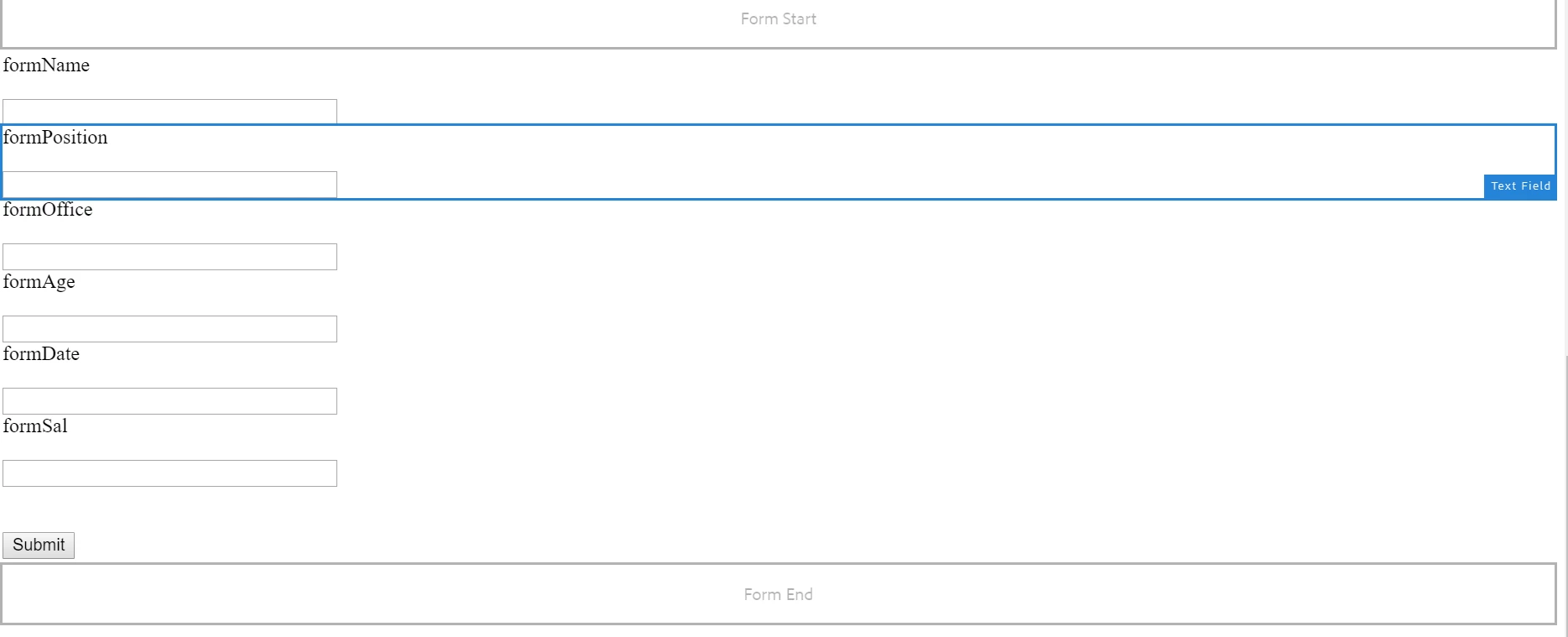
2. Actually it doesn't seem to work when we use the FormContainer that was created as part of the article, since there is no Advanced options available. I suggest using the default Form components in the form container. I have used them inorder to compensate the missing advanced tab in the container. Attaching my screenshot here for community reference.

So my suggestion is to use all the default form components instead of using the created form components.

Thanks a lot smacdonald2008​ You are awesome!

14 replies

arjuns71585267
Level 4
February 12, 2019

<%@include file="/libs/fd/af/components/guidesglobal.jsp" %>

<%@include file="/libs/foundation/global.jsp"%>

<%@page import="com.day.cq.wcm.foundation.forms.FormsHelper,

             org.apache.sling.api.resource.ResourceUtil,

             org.apache.sling.api.resource.ValueMap" %>

<%@taglib prefix="sling"

                uri="http://sling.apache.org/taglibs/sling/1.0" %>

<%@taglib prefix="cq"

                uri="http://www.day.com/taglibs/cq/1.0"

%>

<cq:defineObjects/>

<sling:defineObjects/>

<%

     String formName = request.getParameter("formName");

     String formPosition = request.getParameter("formPosition");

      String formOffice = request.getParameter("formOffice");

     String formAge = request.getParameter("formAge");

     String formDate = request.getParameter("formDate");

     String formSalary = request.getParameter("formSal"); 

out.println("Success");

out.println(formName);

out.println(formPosition);

   com.adobe.persist.core.EmployeeInter data = sling.getService(com.adobe.persist.core.EmployeeInter.class);

out.println(data);

data.addEmployeeData(formOffice, formAge,formPosition, formName, formSalary, formDate);

%>

Actually it is same as in the tutorial!

smacdonald2008
Level 10
February 12, 2019

Just tested this. As you can see it works.

Try giving that System USER all permissions.

smacdonald2008
Level 10
February 12, 2019

Show me the SLing Mapping Configuration that you did too.

arjuns71585267
arjuns71585267AuthorAccepted solution
Level 4
February 12, 2019

Actually now I have given the user permission to every node in JCR and it is now working! Thanks a lot for saving my time! Meanwhile I think there are no issues with the jsp file. Also I would suggest to update the article with two things:

1. Permission

Give permission for all the contents of jcr to the created user.

2. Actually it doesn't seem to work when we use the FormContainer that was created as part of the article, since there is no Advanced options available. I suggest using the default Form components in the form container. I have used them inorder to compensate the missing advanced tab in the container. Attaching my screenshot here for community reference.

So my suggestion is to use all the default form components instead of using the created form components.

Thanks a lot smacdonald2008​ You are awesome!