
java.io.IOException: classFile.delete() failed | Community
Skip to main content
akhilraj
Level 5
September 26, 2024
Solved

java.io.IOException: classFile.delete() failed

  • September 26, 2024
  • 4 replies
  • 6296 views

Hi,


One of our production publishers failed with 500 internal errors.


Upon checking the logs we found below:


org.apache.sling.engine.impl.SlingRequestProcessorImpl service: Uncaught SlingException

java.io.IOException: classFile.delete() failed
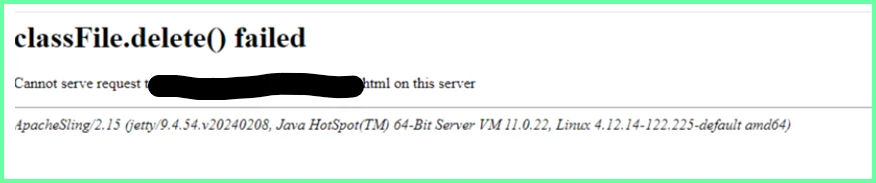
 

 This particular issue was resolved automatically after 10 minutes, but still we restarted the instances.

.

What could be the possible root cause of this, and what actions can we take to prevent the recurrence of this issue?


This post is no longer active and is closed to new replies. Need help? Start a new post to ask your question.
Best answer by akhilraj

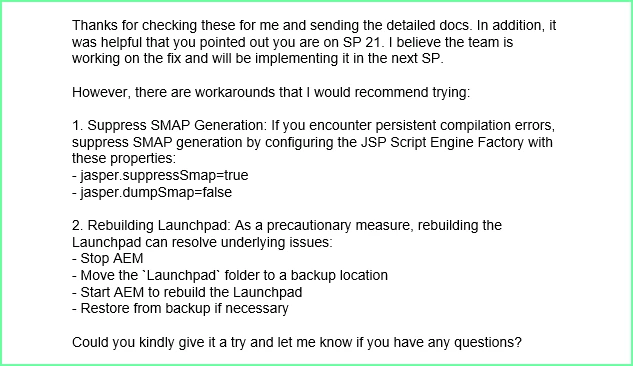
Hi Everyone, Below is the update received from Adobe.

4 replies

SureshDhulipudi
Community Advisor
Community Advisor
September 26, 2024

Is this happening only in production instances?, are you able to replicate this issue in lower environment.

Please raise a Support ticket with AMS (adobe managed services) to check with their engineering team.


akhilraj
akhilrajAuthor
Level 5
October 3, 2024

It happened only  once in one of the Prod publisher and issue resolved automatically within 5 min.


We have raised with Adobe now

BrianKasingli
Community Advisor and Adobe Champion
September 26, 2024

I had this problem on one of our onPrem publish environments before, like back in 2021

We found out that it was related to AEM’s Java class generation (e.g., scripts, components, or HTL templates compiled to Java files). When these class files cannot be deleted properly, it may cause errors, especially under high traffic or during deployments.

How we solved it:

  • Check Error Logs for Compilation Errors: Investigate the logs further to identify whether specific components or scripts failed to compile and generate the class files.

    Look for issues related to HTL (HTML Template Language) or JSP files.

  • Clear Sling Cache: AEM caches compiled scripts and components, and sometimes clearing this cache can resolve the issue.

    •  You can manually clear the Sling Script Cache by navigating to:
      /system/console/slingjsp
    • Click on "Clear JSP Script Cache" to force recompilation of the files.
    • Check the Temporary Directory: Look into the AEM temporary directory (/tmp/aem-cache, /crx-quickstart/tmp, etc.) for any issues with leftover files or a full directory.

It was not 100% understandable for why this happened, but we decided to update the latest AEM service pack, and this problem did not surface anymore.

December 11, 2024

We had the same issue on one of our Prod publishers on SP21. Clearing the JSP cache worked for us as well. I must however mention that the URL to clear it has been changed to /system/console/fsclassloader.

joerghoh
Adobe Employee
Adobe Employee
September 29, 2024

Is this AEM 6.5 SP21?

akhilraj
akhilrajAuthor
Level 5
October 3, 2024

Yes, we have recently upgraded SP to 21

kautuk_sahni
Community Manager
Community Manager
October 15, 2024

@akhilraj Did you find the suggestions helpful? Please let us know if you require more information. Otherwise, please mark the answer as correct for posterity. If you've discovered a solution yourself, we would appreciate it if you could share it with the community. Thank you!

Kautuk Sahni
akhilraj
akhilrajAuthorAccepted solution
Level 5
October 18, 2024

Hi Everyone, Below is the update received from Adobe.