Issue with "Manage Publication" Stuck on Scheduling in AEM 6.5 | Community
Skip to main content
Level 2
March 28, 2025
Solved

Issue with "Manage Publication" Stuck on Scheduling in AEM 6.5

  • March 28, 2025
  • 1 reply
  • 343 views

Hi Adobe Community,

We are experiencing an issue with the "Manage Publication" functionality in Adobe Experience Manager (AEM) 6.5 with Service Pack 6.5.16.0. When attempting to schedule content publication, the process gets stuck after the scheduling step, displaying a blank screen instead of the expected page.

No error messages appear in the server logs, but I noticed an "Uncaught TypeError" in the browser console (screenshot attached). I have also logged in as an admin user and checked the logs, but there are no clear error indicators.
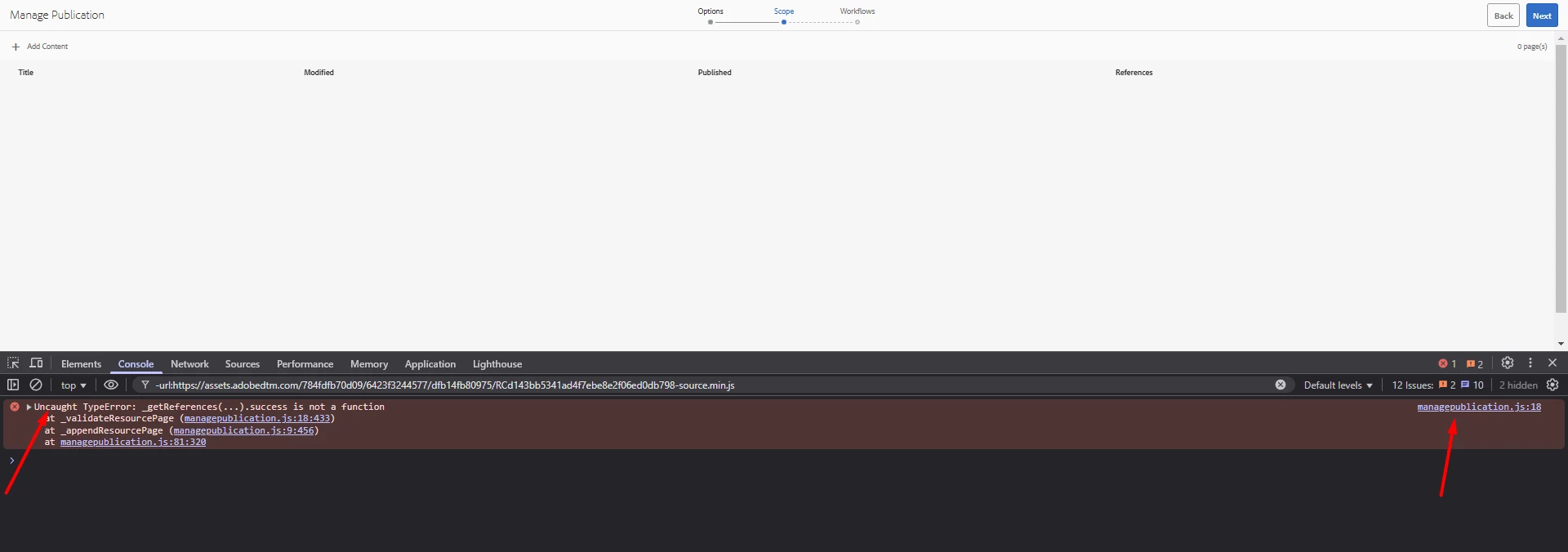
 

This issue is disrupting our content workflow. Has anyone encountered a similar problem? Any insights or troubleshooting suggestions would be greatly appreciated!


Thanks in advance for your help!


This post is no longer active and is closed to new replies. Need help? Start a new post to ask your question.
Best answer by giuseppebaglio

The error message

Uncaught TypeError getReferences(...).success is not a function

suggests that the JavaScript code for the Manage Publication functionality is expecting a callback method ("success") that isn't available. This can occur when there's an API mismatch—possibly due to a change in how asynchronous responses are handled (for example, with jQuery or a related client library). Since you're on AEM 6.5 SP6.5.16.0, it's possible that either an update or a customization has led to this inconsistency.


TL;DR
The error points to a JavaScript API compatibility issue. Reviewing the client library versions, checking for customizations, and comparing them with a clean AEM instance should help pinpoint the root cause. If the issue is inherent to AEM v6.5.16.0, reaching out to Adobe Support or checking for an available hotfix may be necessary.


Long version - Troubleshooting Steps

  1. Check Client Library Versions
    Verify that the client libraries (especially those related to Granite UI and any custom scripts) haven't been inadvertently updated or overridden. A mismatch here might cause the AJAX API to return a promise that uses ".then()" or ".done()" rather than the older ".success()" method.
  2. Identify the Source of the Error
    - Use your browser's developer tools to trace the error to its source file and line number.
    - Determine if the failing call is part of out-of-the-box AEM functionality or a custom implementation.
    - If it's custom code, review recent changes that might have affected the use of deprecated methods.
  3. Review AEM Documentation & Community Forums
    Look for any known issues or patches in Adobe's documentation or community discussions regarding the Manage Publication scheduling. There have been instances where AEM Service Pack updates introduced changes to client-side APIs.
  4. Test on a Clean Instance
    If possible, replicate the issue on a vanilla AEM instance with the same service pack. This can help isolate whether the problem is due to customizations or a broader issue within that specific version.
  5. Consider a Patch or Upgrade
    If the problem is identified as a bug in the out-of-the-box functionality, check if Adobe has released a hotfix or if an upgrade to a newer Service Pack or cumulative fix is available. Contact Adobe Support for further assistance if needed.
 

1 reply

giuseppebaglio
giuseppebaglioAccepted solution
Level 10
March 28, 2025

The error message

Uncaught TypeError getReferences(...).success is not a function

suggests that the JavaScript code for the Manage Publication functionality is expecting a callback method ("success") that isn't available. This can occur when there's an API mismatch—possibly due to a change in how asynchronous responses are handled (for example, with jQuery or a related client library). Since you're on AEM 6.5 SP6.5.16.0, it's possible that either an update or a customization has led to this inconsistency.


TL;DR
The error points to a JavaScript API compatibility issue. Reviewing the client library versions, checking for customizations, and comparing them with a clean AEM instance should help pinpoint the root cause. If the issue is inherent to AEM v6.5.16.0, reaching out to Adobe Support or checking for an available hotfix may be necessary.


Long version - Troubleshooting Steps

  1. Check Client Library Versions
    Verify that the client libraries (especially those related to Granite UI and any custom scripts) haven't been inadvertently updated or overridden. A mismatch here might cause the AJAX API to return a promise that uses ".then()" or ".done()" rather than the older ".success()" method.
  2. Identify the Source of the Error
    - Use your browser's developer tools to trace the error to its source file and line number.
    - Determine if the failing call is part of out-of-the-box AEM functionality or a custom implementation.
    - If it's custom code, review recent changes that might have affected the use of deprecated methods.
  3. Review AEM Documentation & Community Forums
    Look for any known issues or patches in Adobe's documentation or community discussions regarding the Manage Publication scheduling. There have been instances where AEM Service Pack updates introduced changes to client-side APIs.
  4. Test on a Clean Instance
    If possible, replicate the issue on a vanilla AEM instance with the same service pack. This can help isolate whether the problem is due to customizations or a broader issue within that specific version.
  5. Consider a Patch or Upgrade
    If the problem is identified as a bug in the out-of-the-box functionality, check if Adobe has released a hotfix or if an upgrade to a newer Service Pack or cumulative fix is available. Contact Adobe Support for further assistance if needed.