
Impersonate user error in https
We access author instance through a VIP URL in https.
The load balancer then passes the request in http to dispatcher on port 4502 and dispatcher forwards the request to the author.
Login and other functionalities work fine. But when we try to impersonate another user we have an error. See screenshot.
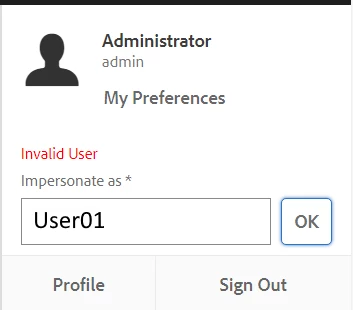
The user is valid, the error shown is misleading.
On console in Chrome we have this error message:
granite.js:272 Mixed Content: The page at 'https://mysite.mydomain.com/sites.html/content/mysite' was loaded over HTTPS, but requested an insecure XMLHttpRequest
endpoint 'http://mysite.mydomain.com/home/users/d/USERIDCVFBGDNKLO.impersonate.json?_charset_=utf-8&impersonate=NAME&path=%2Fsites.html%2Fcontent%2Fmysite'.
This request has been blocked; the content must be served over HTTPS.
XMLHttpRequest.send @ granite.js:272
send @ jquery.js:10259
ajax @ jquery.js:9743
(anonymous) @ foundation.js:20026
dispatch @ jquery.js:5232
elemData.handle @ jquery.js:4884
If I do the same thing in http from http://mysite.mydomain.com/sites.html/content/mysite I have no errors and I can impersonate that user and others too.
I think that the browser here is blocking the redirect. The problem is due to the fact that the response which has a status code 302, in the response header has the location url in http instead of https.
I think that maybe this is due to the fact that the author receives the request in http on port 4502, so a solution could be to configure https on author.
But this would also mean to change load balancer configuration and firewall configuration. I would not incur into the risk that some consoles or functionalities are no longer working after https configuration.
Is there a way to force the location header in https with dispatcher or load balancer ?
Which solution is best ?
Regards.