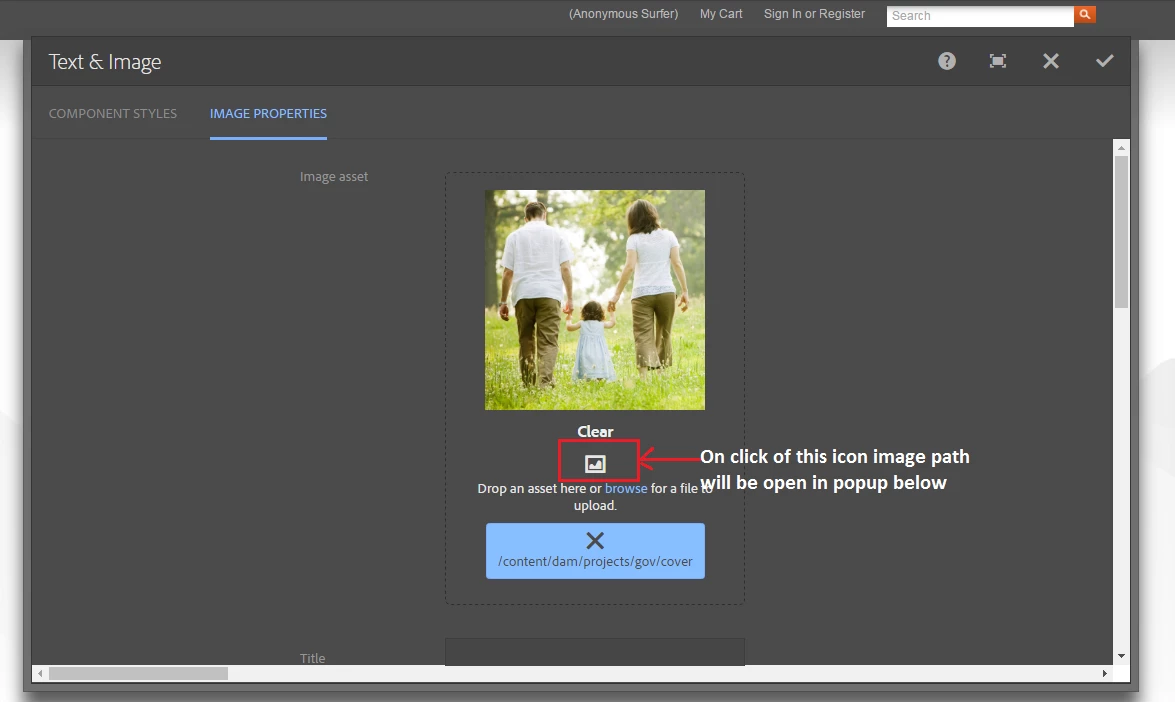


Image Path in Touch UI dialog (AEM 6.1 and AEM 6.2)
In classic ui dialog we have icon which gives us the image path but in touch ui image field is not having that feature. With below code we can find the image in touch ui image field
Steps:
1) Create a clientlib folder under /apps/<your-project>/clientlibs or in /etc/designs/<your-project>/clientlibs and add categories as cq.authoring.dialog
2) Create js folder under clientlibs
3) Add a file touch-image-path.js
4) Add below script inside touch-image-path.js
$(function() {
$(document).on('click', '.cq-FileUpload-icon', function(e) {
try {
e.stopPropagation();
$(".imagePathPopUp").remove(); // Removes if any existing popup is opened
var imagePath = $(this).parent().parent().find(".cq-FileUpload-thumbnail-img").find(".cq-dd-image").attr("src"); // Gets the image path from parent image tag
if(typeof imagePath !='undefined') {
if(imagePath.indexOf("/jcr") > -1) { // To remove unwanted path which does not want to know
imagePath = imagePath.split("/jcr")[0];
}else if(imagePath.indexOf("/_jcr") > -1) { // Sometimes jcr:content may come as _jcr_content
imagePath = imagePath.split("/_jcr")[0];
}
if(imagePath.indexOf("?") > -1) {
imagePath = imagePath.split("?")[0]
}
//Forming the popup html
var imagePopUp = "<div class=\"imagePathPopUp coral-Tooltip coral-Tooltip--info\" style=\"word-wrap:break-word\"><i class=\"closeImagePopUp coral-Icon coral-Icon--close\"></i><br>"+imagePath+"</div>";
$(this).parent().append(imagePopUp);
// Close button click event to remove the popup
$(".imagePathPopUp .closeImagePopUp").click(function(){
$(".imagePathPopUp").remove();
});
}
}catch (err){
console.log("Something is wrong");
}
})
});
5) Add js.txt file and add the js file name