Solved
how to use Coral UI/multified and data like this?
so I have the following CQdialog and it gives me something like in the screenshot (see below).
Any ideas on how to convert the multified to Coral UI and still get the same data format? Thanks!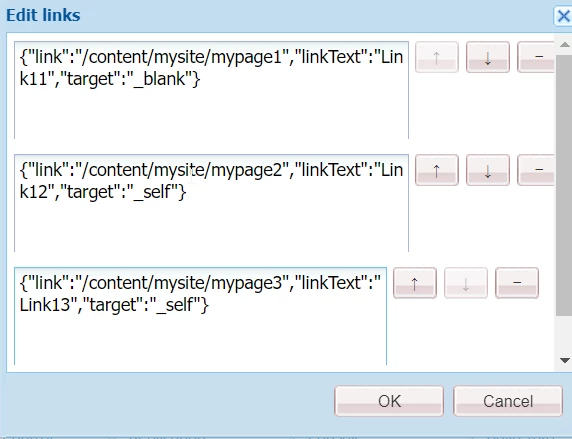
<links jcr:primaryType="nt:unstructured" sling:resourceType="granite/ui/components/foundation/form/multifield" fieldLabel="Links Configurations">
    <field jcr:primaryType="nt:unstructured" sling:resourceType="granite/ui/components/foundation/form/fieldset" acs-commons-nested="" name="./links">
        <layout jcr:primaryType="nt:unstructured" sling:resourceType="granite/ui/components/foundation/layouts/fixedcolumns" method="absolute" />
        <items jcr:primaryType="nt:unstructured">
            <column jcr:primaryType="nt:unstructured" sling:resourceType="granite/ui/components/foundation/container">
                <items jcr:primaryType="nt:unstructured">
                    <link jcr:primaryType="nt:unstructured" sling:resourceType="granite/ui/components/coral/foundation/form/pathbrowser" fieldDescription="Select Image Path" fieldLabel="Path" name="./link" rootPath="/content" />
                    <link-text jcr:primaryType="nt:unstructured" sling:resourceType="granite/ui/components/coral/foundation/form/textfield" fieldDescription="Enter the link text to display. " fieldLabel="Tile Link Text" name="./linkText" />
                    <targetSelect
                        jcr:primaryType="nt:unstructured"
                        sling:resourceType="granite/ui/components/coral/foundation/form/select"
                        emptyOption="{Boolean}false"
                        emptyText="Select yes or no"
                        fieldLabel="Open in New Window"
                        multiple="{Boolean}false"
                        name="./target"
                    >
                        <items jcr:primaryType="nt:unstructured">
                            <self jcr:primaryType="nt:unstructured" selected="{Boolean}true" text="no" value="_self" />
                            <blank jcr:primaryType="nt:unstructured" text="yes" value="_blank" />
                        </items>
                    </targetSelect>
                </items>
            </column>
        </items>
    </field>
    <typehint jcr:primaryType="nt:unstructured" sling:resourceType="granite/ui/components/coral/foundation/form/hidden" name="./links@TypeHint" value="String[]" />
</links>