
Solved
How to set min max item in Multifield AEM 6.3?
Hi all,
I have a problem with multifield, that is set min max item in multifield AEM 6.3?
Please help me.
Thank you so much!
Hi all,
I have a problem with multifield, that is set min max item in multifield AEM 6.3?
Please help me.
Thank you so much!
Hi,
I was able to set min size and max size restrictions in multifield in AEM 6.3.
Max size restriction: Following sample code can be used to put max size restriction in a multifield -
1. Add a new property - "maxlinksallowed" to the multifield node in your cq:dialog. Refer the screenshot below -
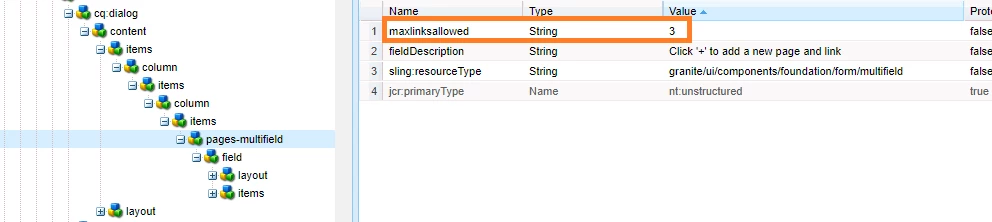
2. Put the below sample code in a clientlibs JS file with category "cq.authoring.dialog".
$(document).on("dialog-ready", function () {
$(".js-coral-Multifield-add").click(function() {
var field = $(this).parent();
var size = field.attr("data-maxlinksallowed");
if (size) {
var ui = $(window).adaptTo("foundation-ui");
var totalLinkCount = $(this).prev('ol').children('li').length;
if (totalLinkCount >= size) {
ui.alert("Warning", "Maximum " + size + " links are allowed!", "notice");
return false;
}
}
});
});
Below is the screenshot of sample output:
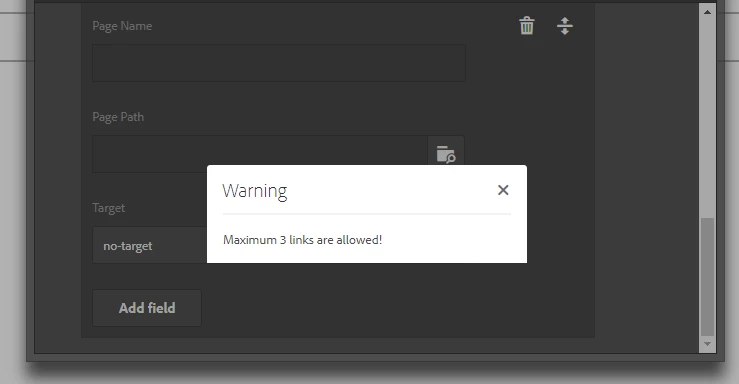
Min size restriction: Following sample code can be used to put min size restriction in a multifield -
1. Add a new property - "minlinksallowed" to the multifield node in your cq:dialog. Refer the screenshot below -

2. Put the below sample code in a clientlibs JS file with category "cq.authoring.dialog".
(function (document, $, ns) {
"use strict";
$(document).on("click", ".cq-dialog-submit", function (e) {
e.stopPropagation();
e.preventDefault();
var $form = $(this).closest("form.foundation-form"), title = $form.find("[name='./jcr:title']").val(), message, clazz = "coral-Button ";
var fieldd = $(".coral-Multifield");
var sizee = fieldd.attr("data-minlinksallowed");
if(($(this).prev('ol').children('li').length) < sizee){
message = "Minimum" + sizee + " links are required. Are you sure to submit?";
clazz = clazz + "coral-Button--warning";
}
ns.ui.helpers.prompt({
title: Granite.I18n.get("Confirm"),
message: message,
actions: [{
id: "CANCEL",
text: "CANCEL",
className: "coral-Button"
},{
id: "SUBMIT",
text: "SUBMIT",
className: clazz
}
],
callback: function (actionId) {
if (actionId === "SUBMIT") {
$form.submit();
}
}
});
});
})(document, Granite.$, Granite.author);
Below is the screenshot of sample output:
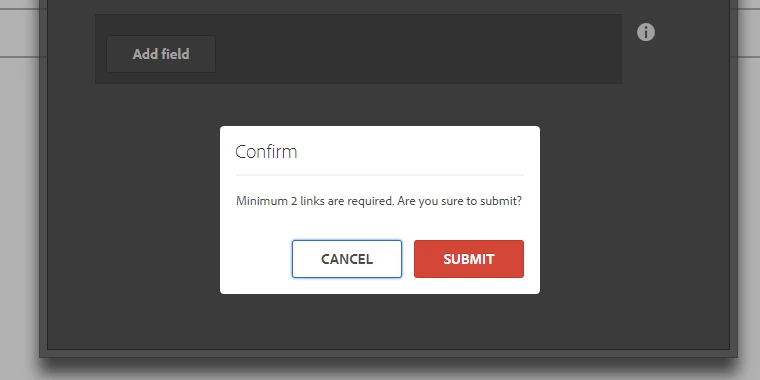
Regards,
Enter your E-mail address. We'll send you an e-mail with instructions to reset your password.