JakubWang
Level 2
March 19, 2019
Répondu

How to restore deleted page in AEM 6.3

As in subject.

Fot the life of mine I can't find anything about that in the documentation nor in forums and the feature is nowhere to be found in the touch ui.

Ce sujet a été fermé aux réponses.
Meilleure réponse par Gaurav-Behl

Probably, you're checking the same in TOUCH UI.

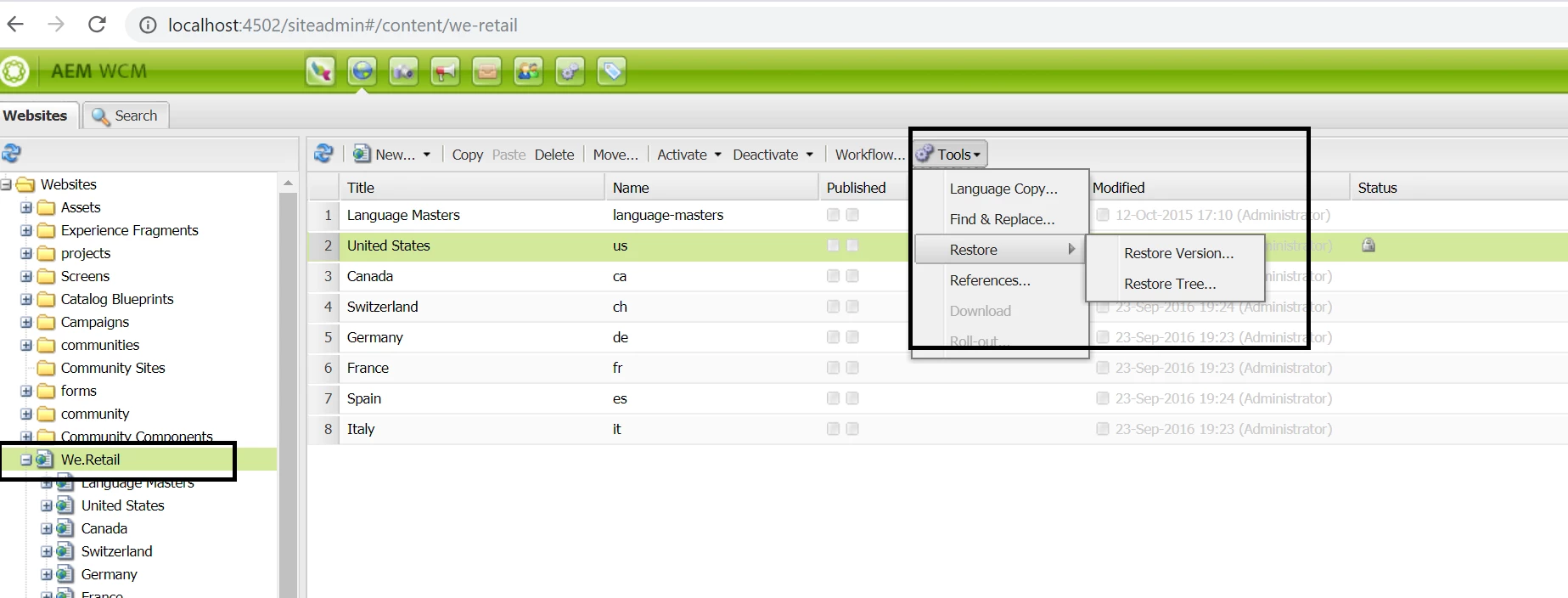
Open http://localhost:4502/siteadmin#/content  -- this would enable CLASSIC UI. Then follow the links shared by Arun/Vishu. You'd see the "deleted" page under the selected parent page with an option to recover.

13 commentaires

arunpatidar
Community Advisor
Community Advisor
March 19, 2019
Adobe Employee
March 19, 2019

Hello,

You can use the Restore version option [1]

[1] Working with Page Versions

JakubWang
JakubWangAuteur
Level 2
March 19, 2019

If I don't see the page to begin with how can I use any of the page versions features.

I'm new to this experience and I must be missing something embarrassingly simple here.

JakubWang
JakubWangAuteur
Level 2
March 19, 2019

The links you've shared look nothing like the UI I see on my end.

I use AEM Sites 6.3 and it looks completely different and there is no Tools menu at all.

Gaurav-Behl
Gaurav-BehlRéponse
Level 10
March 19, 2019

Probably, you're checking the same in TOUCH UI.

Open http://localhost:4502/siteadmin#/content  -- this would enable CLASSIC UI. Then follow the links shared by Arun/Vishu. You'd see the "deleted" page under the selected parent page with an option to recover.

June 5, 2020

thanks for the info !! 🙂

JakubWang
JakubWangAuteur
Level 2
March 19, 2019

Thanks,

Yes I'm using Touch UI (even though I have Classic UI selected in my account preferences).

I don't have access to local environment. I'm an Author who is managing content on live site. Is there anything I can do to enable Classic UI there?

Gaurav-Behl
Level 10
March 19, 2019

Login to the server on which you've deleted the page using -  http://<servername>/siteadmin#/content

**This link uses "siteadmin#" and not "sites.html"

Revert in case you still face issues.

JakubWang
JakubWangAuteur
Level 2
March 19, 2019

That was it. Thank you. Much appreciated.

So simple but yet so counter intuitive and not explained anywhere in plain English.

harryl53317155
Level 2
May 30, 2019

How can we restore a deleted page within a touch UI ( not using WCM, classic UI)? Does AEM have a concept of "Trash" can?

arunpatidar
Community Advisor
Community Advisor
May 30, 2019

No, but from versions, you can restore

Working with Page Versions

Arun Patidar