How to restore deleted page in AEM 6.3 | Community
Skip to main content
JakubWang
Level 2
March 19, 2019
Solved

How to restore deleted page in AEM 6.3

  • March 19, 2019
  • 12 replies
  • 21022 views

As in subject.

Fot the life of mine I can't find anything about that in the documentation nor in forums and the feature is nowhere to be found in the touch ui.

This post is no longer active and is closed to new replies. Need help? Start a new post to ask your question.
Best answer by Gaurav-Behl

Probably, you're checking the same in TOUCH UI.

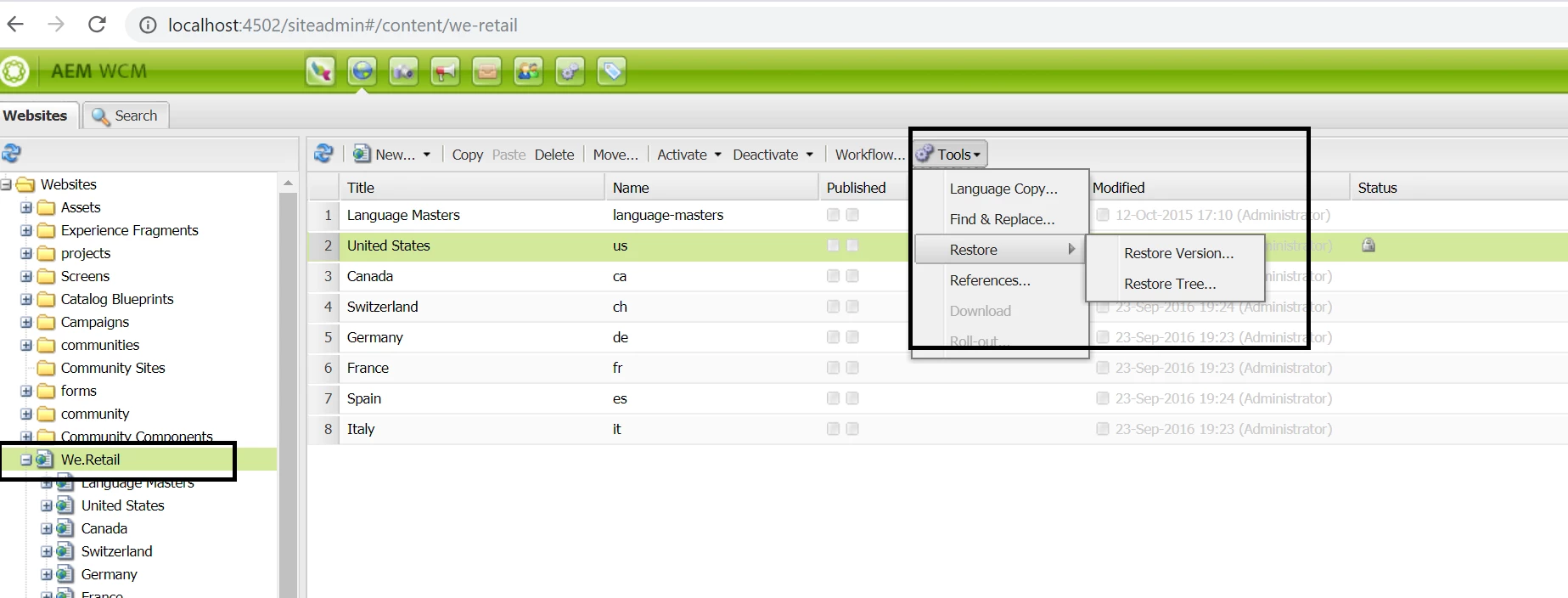
Open http://localhost:4502/siteadmin#/content  -- this would enable CLASSIC UI. Then follow the links shared by Arun/Vishu. You'd see the "deleted" page under the selected parent page with an option to recover.

12 replies

harryl53317155
Level 2
May 30, 2019

Thanks for the quick response.  Yes, we knew we can restore a page to previous versions. Restoring a deleted page is pretty different; do you know when Adobe will add this functionality?  thanks.

March 3, 2023

On Touch UI this option is not available.


what we need to do on AEM as a cloud service - AEMCaas ? It does not have Classic UI.