How to remove/exclude the deprecated libraries that is not directly utilised in the codebase | Community
Skip to main content
Level 2
January 29, 2026
Solved

How to remove/exclude the deprecated libraries that is not directly utilised in the codebase

  • January 29, 2026
  • 8 replies
  • 324 views

Hi, 

Deprecated Library Detected

The following library is deprecated, but used in your code and so must be removed:

  • Library: ch.qos.logback
  • Deprecated Since: 2022-01-27
  • Scheduled Removal Date: 2026-02-26

Recommended Action:

  • Replace deprecated packages with their recommended newer versions, in order to keep your application secure and performant.
     

logback library is not used in our codebase. But, I think it is linked and slf4j for logger in our codebase. Please help me in how to scan locally to check if the library is getting used and remove it. 

Thanks.
Best answer by EstebanBustamante

Hi ​@khn 


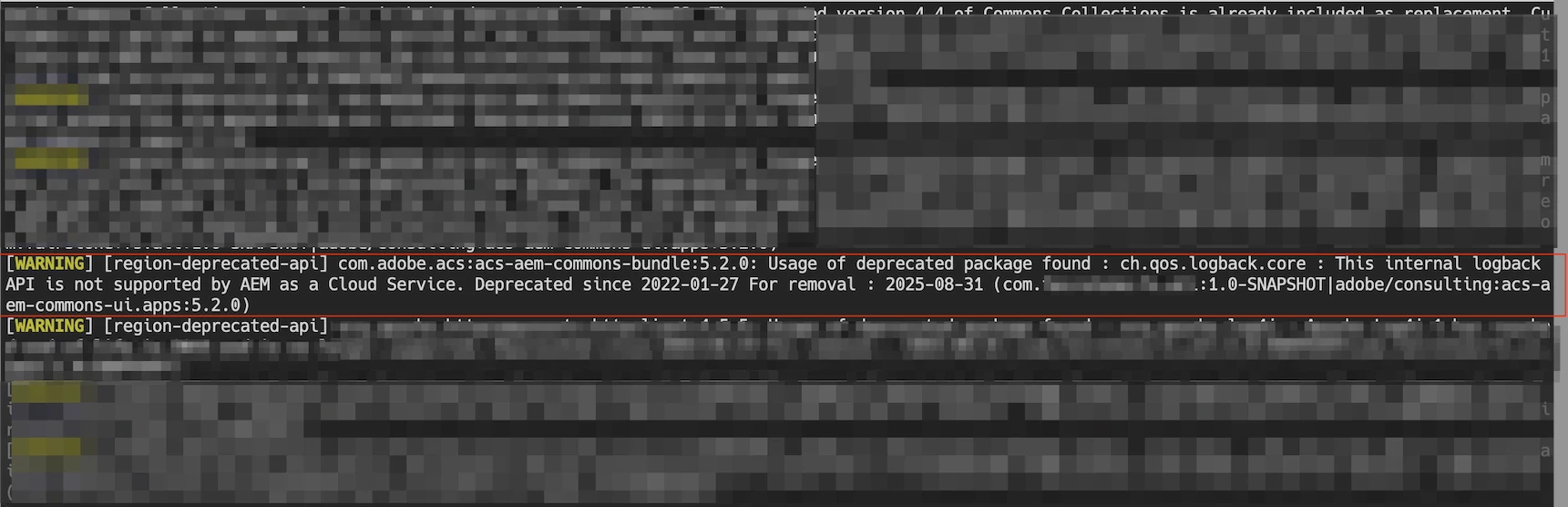
I used the aemanalyser plugin, which scans the project during the build process and reports WARN messages. This plugin is included in the AEM Archetype; however, if you’re using an older version of the archetype, you may need to add it manually.

You can reference it here:
https://github.com/adobe/aem-project-archetype/blob/d224df300898f3f552f9021f7e1b536d6a2fc17f/src/main/archetype/all/pom.xml#L242


After enabling it, you should see warnings similar to the following:


Hope this helps

8 replies

Level 2
January 29, 2026

if you not able to find in felix console,try to add this dependecy in pom.xml and try to run maven build.

!--scriptorstartfragment-->

<dependency>

  <groupId>org.apache.sling</groupId>

  <artifactId>org.apache.sling.commons.log</artifactId>

  <scope>provided</scope>

  <exclusions>

    <exclusion>

      <groupId>ch.qos.logback</groupId>

      <artifactId>logback-classic</artifactId>

    </exclusion>

    <exclusion>

      <groupId>ch.qos.logback</groupId>

      <artifactId>logback-core</artifactId>

    </exclusion>

  </exclusions>

</dependency>!--scriptorendfragment-->

gkalyan
Community Advisor and Adobe Champion
January 29, 2026

@khn 

Try running the below command in the terminal, this should give all the dependencies in a tree structure for you find where ch.qos.logback is referenced.

mvn dependency:tree -Dincludes=ch.qos.logback


Once you found it, you can use the exclusion tags ​@Kirthika suggested.


Here is a list of deprecated list you can reference from  

https://javadoc.io/doc/ch.qos.logback/logback-classic/1.5.18/deprecated-list.html


Level 1
January 30, 2026

Hi All,

We have also received an alert in our AEM as a cloud service environment and regarding the library mentioned (ch.qos.logback) we are not able to find anything in our codebase. In the production logs, We are able to see this library from OOTB classes.

Logs:-

*INFO* [FelixLogListener] Events.Service.com.adobe.granite.logging Service [1676, [ch.qos.logback.core.filter.Filter]] ServiceEvent UNREGISTERING

*INFO* [FelixLogListener] Events.Service.com.adobe.aem.developer.console.support Service [com.adobe.aem.developer.console.support.impl.apifirst.logging.DynamicLogFilter,6173, [ch.qos.logback.classic.turbo.TurboFilter]] ServiceEvent REGISTERED


Still not sure how to update the library.


Thanks,

Level 2
January 30, 2026

Hi ​@Roshan2410002 

I think this is not related to the code base, it's rendering from the OOTB of adobe.so you can report it to adobe :

Mark the finding as Accepted / Vendor‑Managed Risk, as the deprecated ch.qos.logback library is used exclusively by Adobe OOTB bundles in AEM as a Cloud Service, is outside customer control, and cannot be remediated at the application level; all supporting analysis and evidence will be documented.

Because OOTB default one we can't deprecated by our own code.

khnAuthor
Level 2
January 30, 2026

Hi ​@Kirthika ,
It is ootb dependency which is supporting slf4j for logging. Can we somehow update the version of this dependency. If we remove this will this impact our logging system.


EstebanBustamante
Community Advisor and Adobe Champion
EstebanBustamanteCommunity Advisor and Adobe ChampionAccepted solution
Community Advisor and Adobe Champion
February 2, 2026

Hi ​@khn 


I used the aemanalyser plugin, which scans the project during the build process and reports WARN messages. This plugin is included in the AEM Archetype; however, if you’re using an older version of the archetype, you may need to add it manually.

You can reference it here:
https://github.com/adobe/aem-project-archetype/blob/d224df300898f3f552f9021f7e1b536d6a2fc17f/src/main/archetype/all/pom.xml#L242


After enabling it, you should see warnings similar to the following:


Hope this helps

Esteban Bustamante
Anudeep_Garnepudi
Community Advisor
Community Advisor
February 3, 2026
AG
khnAuthor
Level 2
February 3, 2026

Hi ​@Anudeep_Garnepudi ,

Thanks for sharing the document. Even the new version of acs-aem-commons uses the older version of logback. 

PGURUKRISHNA
Level 4
February 5, 2026

Hey ​@khn 

Step 1: Run this command to find where logback comes from:

mvn dependency:tree -Dincludes=ch.qos.logback


Step 2: Add exclusion to the dependency identified in step 1. Most likely it's a test dependency. Add this to your pom.xml:

<dependency>
<groupId>uk.org.lidalia</groupId>
<artifactId>slf4j-test</artifactId>
<version>1.0.1</version>
<scope>test</scope>
<exclusions>
<exclusion>
<groupId>ch.qos.logback</groupId>
<artifactId>*</artifactId>
</exclusion>
</exclusions>
</dependency>


Step 3: Verify:

mvn dependency:tree -Dincludes=ch.qos.logback


Done. No output = logback removed.

Pagidala GuruKrishna
khnAuthor
Level 2
February 11, 2026

Hi ​@PGURUKRISHNA ,

I tried this. Excluded the logback in the acs-commons, slf4j and also explicitly exclude while importing still shows in the bundles.

PGURUKRISHNA
Level 4
February 11, 2026

Hey ​@khn 

  1. Scan to identify the source:

    mvn dependency:tree -Dincludes=ch.qos.logback


  2. If using ACS Commons, update to version 6.11.0 or higher:

    <dependency>
    <groupId>com.adobe.acs</groupId>
    <artifactId>acs-aem-commons-bundle</artifactId>
    <version>6.11.0</version>
    </dependency>


  3. Add exclusions to any dependency pulling logback:

    <dependency>
    <groupId>uk.org.lidalia</groupId>
    <artifactId>slf4j-test</artifactId>
    <version>1.0.1</version>
    <scope>test</scope>
    <exclusions>
    <exclusion>
    <groupId>ch.qos.logback</groupId>
    <artifactId>*</artifactId>
    </exclusion>
    </exclusions>
    </dependency>


  4. Verify removal:

    mvn dependency:tree -Dincludes=ch.qos.logback


  5. If it still appears after all exclusions, raise a support ticket with Adobe to clarify the remediation path for platform-level dependencies.

Pagidala GuruKrishna
khnAuthor
Level 2
February 11, 2026

Issue is resolved. In the project entire acs-commons-all was embedded instead of that I embedded the individual packages and updated the acs-commons version to 6.16.0


<!-- ACS AEM Commons - Individual packages for AEMaaCS (excludes onprem bundle) --><embedded>    <groupId>com.adobe.acs</groupId>    <artifactId>acs-aem-commons-bundle</artifactId>    <target>/apps/aem-library-vendor-packages/container/install</target></embedded><embedded>    <groupId>com.adobe.acs</groupId>    <artifactId>acs-aem-commons-ui.apps</artifactId>    <type>zip</type>    <target>/apps/aem-library-vendor-packages/application/install</target></embedded><embedded>    <groupId>com.adobe.acs</groupId>    <artifactId>acs-aem-commons-ui.content</artifactId>    <type>zip</type>    <target>/apps/aem-library-vendor-packages/content/install</target></embedded><embedded>    <groupId>com.adobe.acs</groupId>    <artifactId>acs-aem-commons-ui.config</artifactId>    <type>zip</type>    <target>/apps/aem-library-vendor-packages/application/install</target></embedded>Thanks.


kautuk_sahni
Community Manager
Community Manager
February 17, 2026

@khn I wanted to follow up and see if your issue has been resolved. If you were able to find a solution—either from the responses above or on your own—we’d appreciate it if you could share the details for the benefit of others. Additionally, if any reply was helpful, marking it as accepted helps future members quickly identify effective solutions. Thank you for helping improve the community experience.

Kautuk Sahni