How to pass a value from Sling Model to AEM Dialog ? | Community
Skip to main content
This post is no longer active and is closed to new replies. Need help? Start a new post to ask your question.
Best answer by MukeshYadav_

Hi @touseefk2181136 ,

You may use ajax call /content/data/shops.infinity.json as suggested by @h_kataria  OR you may use below approach.


From front-end just pass shopName and shopAddress only in shopData object to Servlet always.

Then in servlet itself first check if that shop name exist by fetching(making http call to /content/data/shops.infinity.json) all shop data then filter to check shop Id present OR you may use queryBuilder to search for shopId with shopName.

If shopId present you can append else generate the shopId

Thanks


Hi @touseefk2181136    PFA,


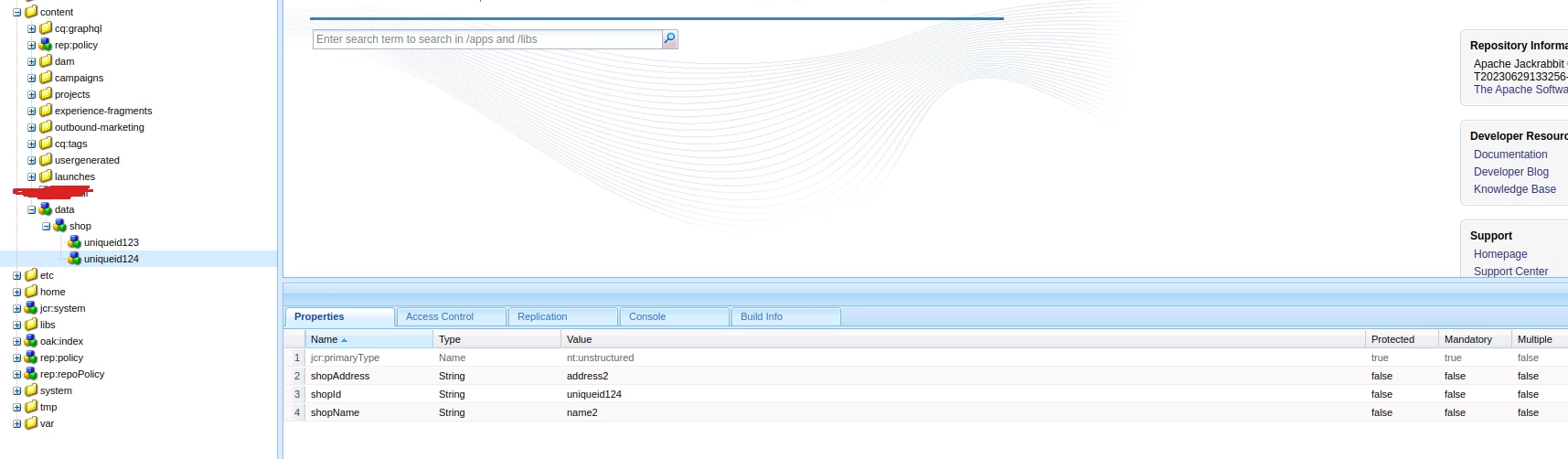
You may easily extract the shop id from path(string operation- split) of search result. Even we can use shopName as well shopAddress to check if present by grouping property in query.
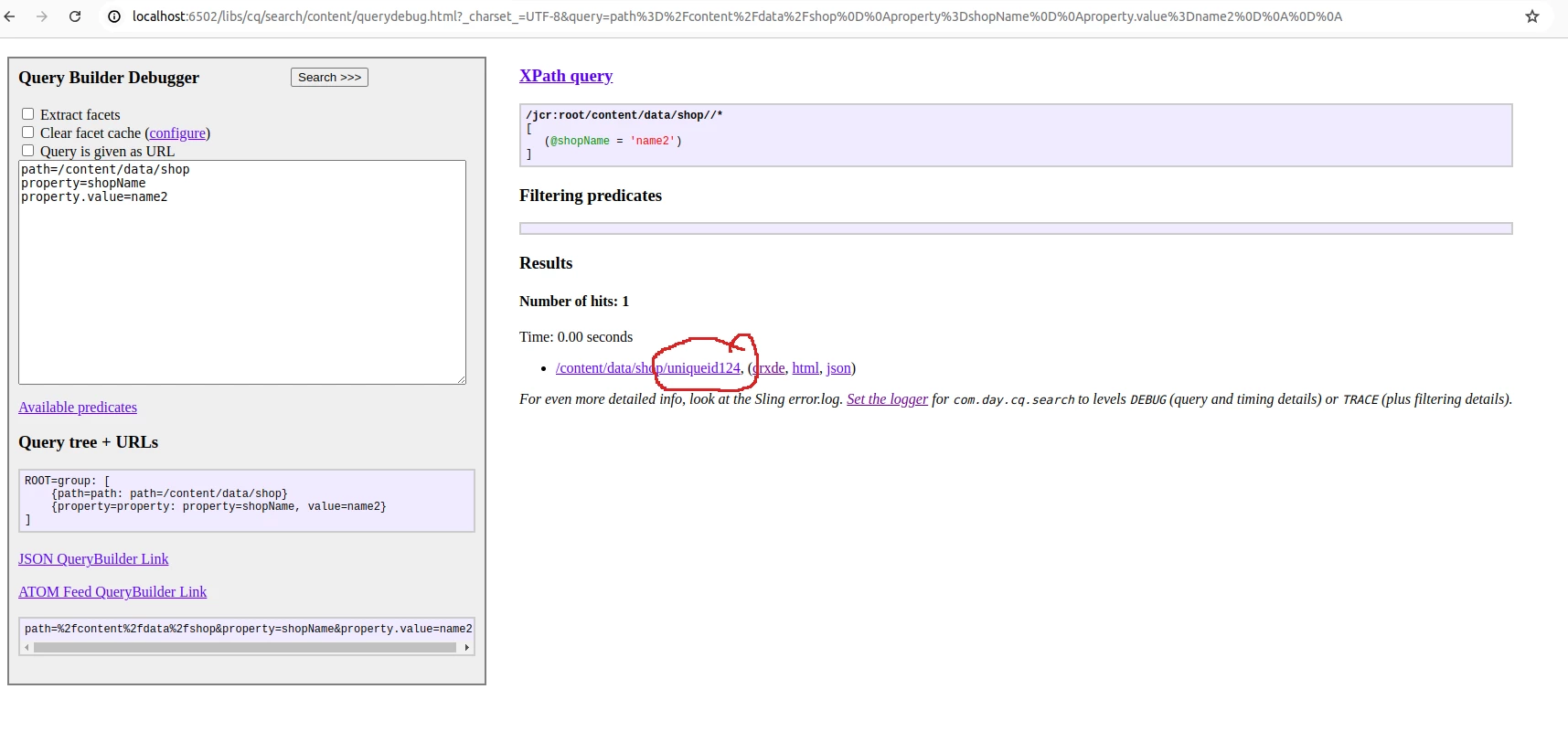
path=/content/data/shop
property=shopName
property.value=name2


OR


path=/content/data/shop
group.1_property=shopName
group.1_property.value=name2
group.2_property=shopAddress
group.2_property.value=address2
p.limit=-1


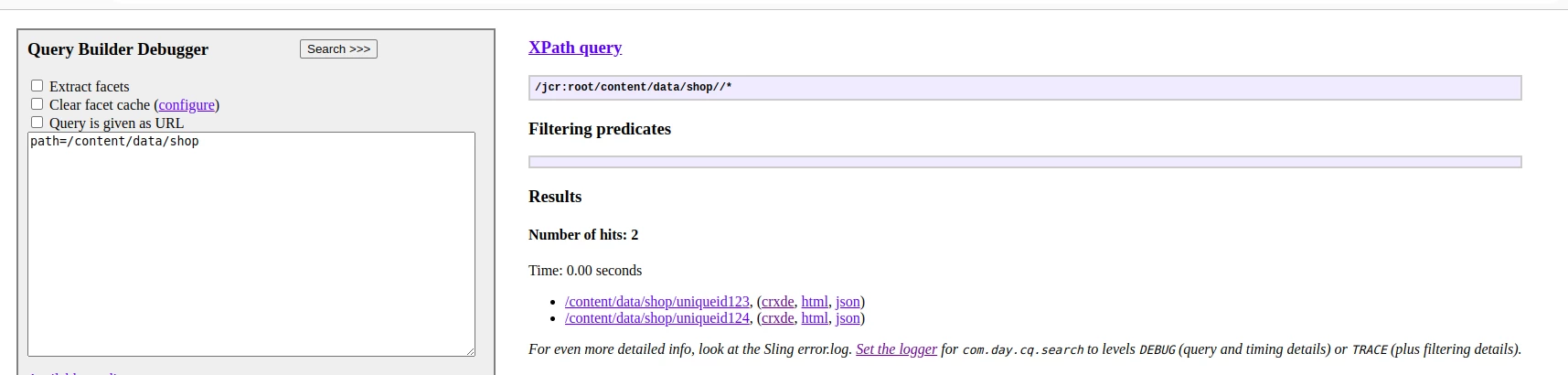
OR if you want only if shop node has id node as a child or not and  that unique id if present then we can use simple query as below
 

6 replies

Level 3
June 23, 2024

Hi @touseefk2181136 ,


You might want to check out this - https://experienceleaguecommunities.adobe.com/t5/adobe-experience-manager/how-to-use-component-s-dialogue-field-value-directly-into-its-js/td-p/618595

Let me know if you are still facing any issues in fetching the values to JS.


h_kataria
Community Advisor
Community Advisor
June 23, 2024

To answer it better, could you please provide details on how your sling Model is getting this shopId which you are trying to retrieve in your dialog js and what are you planning to do with this shopId once it is available in your js? 

touseefk2181136
Level 3
June 23, 2024

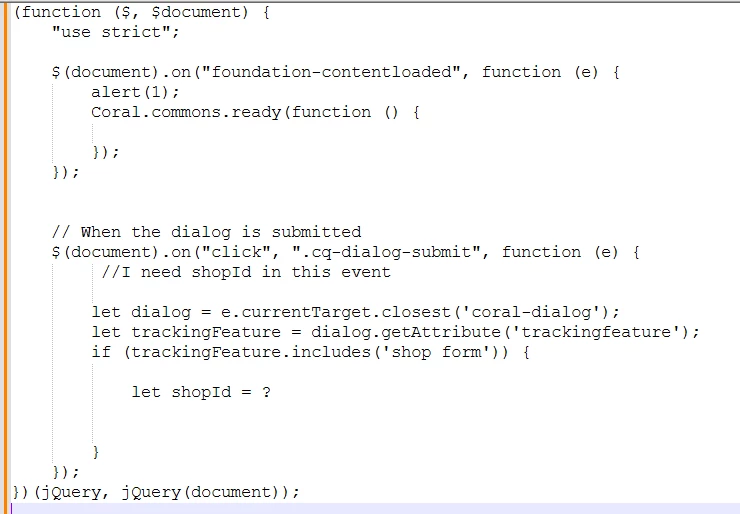
@h_kataria In my sling model, I get shop record from jcr like /content/data/shops by name. Now on the AEM dialog of my component I have fields like shop name, address etc. When user submits (click on Done or OK) AEM dialog I need to post that data to a servlet, I need to include shopId in the payload. In the servlet, I need to check if shop id exists, update the record otherwise create new shop record. Following is my client lib js code which will save shop record. But I tried using hidden field in HTL but AEM dialogue 's html doesn't that hidden field.


(function ($, $document) { "use strict"; $(document).on("foundation-contentloaded", function (e) { Coral.commons.ready(function () { }); }); // When the dialog is submitted $(document).on("click", ".cq-dialog-submit", function (e) { let dialog = e.currentTarget.closest('coral-dialog'); let trackingFeature = dialog.getAttribute('trackingfeature'); if (trackingFeature.includes('shop form')) { let shopName = dialog.querySelector('input[name="./shopName"]').value; let Addres = dialog.querySelector('input[name="./Addres"]').value var shopData = { 'shopName': shopName, 'shopId': // I need shopId here, 'Addres': shopAddress }; $.ajax({ type: 'POST', url: '/bin/test/shopservlet', data: shopData, success: function (response) { console.log('Data saved successfully: ', response); alert("The shop has been saved successfully") }, error: function (error) { console.error('Error while saving data: ', error); alert("Error while saving data") } }); } }); })(jQuery, jQuery(document));
touseefk2181136
Level 3
June 23, 2024


@h_kataria Yes shopId is not part of my AEM dialog, it is autogenerated. It is GUID, when we pass data to the shop servlet to save, the shop id is generated if it is not part of the payload  already.  Following is the structure my node

abhishekanand_
Community Advisor
Community Advisor
June 23, 2024

Hi @touseefk2181136 


After going through the entire thread i guess the best option for you would be to follow the below steps as this is how i tried and worked

  • Create a Sling Model that includes the properties you want to expose. Ensure it's adaptable from the resource and includes the desired value
  • Use the Sling Model to render the value in the component's HTML
  • Write JavaScript to read the value from the HTML and perform any required actions
  • Ensure your JavaScript file is included in your component. You can use the data-sly-call block in your HTL to include the client library

If you are facing any issue in this let me know

Abhishek Anand
touseefk2181136
Level 3
June 24, 2024

@abhishekanand_ Ok, I am doing this as per your  points

1. Exposed property in sling model


@Model(adaptables = Resource.class) public class ShopModel { @Inject private String shopId; public String getShopId() { return shopId; } }


2. Render value in html


<div data-shop-id="${shopModel.shopId}"></div>


3. Write JavaScript to read value. 


let shopId = document.querySelector('div[data-shop-id]').getAttribute('data-shop-id');


Where I need to write this JavaScript ? If I write this in dialog.js which is my clientlib for AEM dialog then above html data attribute for shop is not available in 'document' object because its scope is coral dialog. 

Kindly explain point 3 and write sample code. 
4. Include the JavaScript File in Your Componen


<sly data-sly-use.clientLib="/libs/granite/sightly/templates/clientlib.html" data-sly-call="${clientLib.js @ categories='clientlib-dialog'}"></sly>


Again, after point 2, I am unable proceed document object doesn't have data attribute for shop id.

Thank you.
 

abhishekanand_
Community Advisor
Community Advisor
June 24, 2024

Hi


You can include a js at the component slightly as well, or if you want to keep your js seperate you can do that as well


<!-- /apps/myproject/components/mycomponent/mycomponent.html -->

<div class="my-component" data-myproperty="${myComponentModel.myProperty @ context='unsafe'}">

</div>

<sly data-sly-call="${'myproject.clientlib.js' @ category='myproject.mycomponent'}"></sly>


  • <!-- Inline script to ensure the data attributes are available -->

<script>

    document.addEventListener('DOMContentLoaded', function() {

        var myComponent = document.querySelector('.my-component');

        if (myComponent) {

            var myPropertyValue = myComponent.getAttribute('data-myproperty');

            console.log('The value from the Sling Model is:', myPropertyValue);


            // Use myPropertyValue as needed

        }

    });

</script>

Abhishek Anand
MukeshYadav_
Community Advisor
Community Advisor
June 24, 2024

Hi @touseefk2181136 ,

Seems as per you use case below code should work. From frontend just pass shopName and address and made changes in servlet as below.


package com.yourproject.core.servlets;//change as per you code base

import com.day.cq.search.PredicateGroup;
import com.day.cq.search.Query;
import com.day.cq.search.QueryBuilder;
import com.day.cq.search.result.SearchResult;
import com.google.gson.Gson;
import org.apache.sling.api.SlingHttpServletRequest;
import org.apache.sling.api.SlingHttpServletResponse;
import org.apache.sling.api.resource.ResourceResolver;
import org.apache.sling.api.servlets.SlingAllMethodsServlet;
import org.apache.sling.servlets.annotations.SlingServletPaths;
import org.osgi.service.component.annotations.Component;
import org.osgi.service.component.annotations.Reference;
import org.slf4j.Logger;
import org.slf4j.LoggerFactory;
import com.google.gson.JsonObject;
import javax.jcr.Session;
import javax.servlet.Servlet;
import java.util.HashMap;
import java.util.Map;
import java.util.stream.Collectors;

@Component(service = Servlet.class)
@SlingServletPaths(
value = "/bin/test/shopservlet"
)
public class ShopServlet extends SlingAllMethodsServlet {
private static final long serialVersionUID = 1L;
private static final Logger log = LoggerFactory.getLogger(ShopServlet.class);
@Reference
private QueryBuilder builder;

@Override
protected void doPost(SlingHttpServletRequest request, SlingHttpServletResponse response) {

try {
String requestBody = request.getReader().lines().collect(Collectors.joining(System.lineSeparator()));
JsonObject shopdata = new Gson().fromJson(requestBody, JsonObject.class);
ResourceResolver resolver = request.getResourceResolver();
Session session = resolver.adaptTo(Session.class);
Map<String, String> map = new HashMap<String, String>();

map.put("path", "/content/data/shop");
map.put("property", "shopName");
map.put("property.value", shopdata.get("shopName").getAsString());
map.put("p.limit", "-1");

Query query = builder.createQuery(PredicateGroup.create(map), session);

SearchResult result = query.getResult();
int hits = result.getHits().size();
if (hits > 0) {
String shopId = result.getHits().get(0).getPath().split("/")[4];
//shopId will get appended in shopdata if shopId exist with that shopname else shopdata won't have shopId
shopdata.addProperty("shopId",shopId);
}

//write your existing servlet logic code
//here now shopData will have shopId if exist else it won't have so your existing servlet logic will work


} catch (Exception e) {
log.error(e.getMessage());
}
}

}

However if you insist to use shopid in frontend put below new servlet to you code base and make another ajax call in your js to get shop id and append according before making call to /bin/test/shopservlet

package com.yourproject.core.servlets;//change this as per your code base

import com.day.cq.search.PredicateGroup;
import com.day.cq.search.Query;
import com.day.cq.search.QueryBuilder;
import com.day.cq.search.result.SearchResult;
import org.apache.sling.api.SlingHttpServletRequest;
import org.apache.sling.api.SlingHttpServletResponse;
import org.apache.sling.api.resource.ResourceResolver;
import org.apache.sling.api.servlets.SlingAllMethodsServlet;
import org.apache.sling.servlets.annotations.SlingServletPaths;
import org.osgi.service.component.annotations.Component;
import org.osgi.service.component.annotations.Reference;
import org.slf4j.Logger;
import org.slf4j.LoggerFactory;

import javax.jcr.Session;
import javax.servlet.Servlet;
import java.util.HashMap;
import java.util.Map;

@Component(service = Servlet.class)
@SlingServletPaths(
value = "/bin/test/fetchshopid"
)
public class FetchShopIdServlet extends SlingAllMethodsServlet {
private static final long serialVersionUID = 1L;
private static final Logger log = LoggerFactory.getLogger(FetchShopIdServlet.class);
@Reference
private QueryBuilder builder;

@Override
protected void doGet(SlingHttpServletRequest request, SlingHttpServletResponse response) {

try {
String shopName = request.getParameter("shopname");
ResourceResolver resolver = request.getResourceResolver();
Session session = resolver.adaptTo(Session.class);
Map<String, String> map = new HashMap<String, String>();

map.put("path", "/content/data/shop");
map.put("property", "shopName");
map.put("property.value", shopName);
map.put("p.limit", "-1");

Query query = builder.createQuery(PredicateGroup.create(map), session);

SearchResult result = query.getResult();
int hits = result.getHits().size();
if (hits > 0) {
String shopId = result.getHits().get(0).getPath().split("/")[4];
response.getWriter().write(shopId);
} else {
response.getWriter().write("null");//or whatever you want to return either 0 or something
}

} catch (Exception e) {
log.error(e.getMessage());
}
}

}

Ajax call endpoint :- http://localhost:6502/bin/test/fetchshopid?shopname=name2
You may pass shopName as query param to check if that shopName exist
Above Servlet will return shopid if exist else will return null string

Thanks

MukeshYadav_
Community Advisor
Community Advisor
June 24, 2024

Hi @touseefk2181136 ,

You can just pass shopName and shopAddress to /bin/test/shopservlet and made changes in servlet as per below code.


package com.your-project-path.core.servlets;//your your code base package

import com.day.cq.search.PredicateGroup;
import com.day.cq.search.Query;
import com.day.cq.search.QueryBuilder;
import com.day.cq.search.result.SearchResult;
import com.google.gson.Gson;
import org.apache.sling.api.SlingHttpServletRequest;
import org.apache.sling.api.SlingHttpServletResponse;
import org.apache.sling.api.resource.ResourceResolver;
import org.apache.sling.api.servlets.SlingAllMethodsServlet;
import org.apache.sling.servlets.annotations.SlingServletPaths;
import org.osgi.service.component.annotations.Component;
import org.osgi.service.component.annotations.Reference;
import org.slf4j.Logger;
import org.slf4j.LoggerFactory;
import com.google.gson.JsonObject;
import javax.jcr.Session;
import javax.servlet.Servlet;
import java.util.HashMap;
import java.util.Map;
import java.util.stream.Collectors;

@Component(service = Servlet.class)
@SlingServletPaths(
value = "/bin/test/shopservlet"
)
public class ShopServlet extends SlingAllMethodsServlet {
private static final long serialVersionUID = 1L;
private static final Logger log = LoggerFactory.getLogger(ShopServlet.class);
@Reference
private QueryBuilder builder;

@Override
protected void doPost(SlingHttpServletRequest request, SlingHttpServletResponse response) {

try {
String requestBody = request.getReader().lines().collect(Collectors.joining(System.lineSeparator()));
JsonObject shopdata = new Gson().fromJson(requestBody, JsonObject.class);
ResourceResolver resolver = request.getResourceResolver();
Session session = resolver.adaptTo(Session.class);
Map<String, String> map = new HashMap<String, String>();

map.put("path", "/content/data/shop");
map.put("property", "shopName");
map.put("property.value", shopdata.get("shopName").getAsString());
map.put("p.limit", "-1");

Query query = builder.createQuery(PredicateGroup.create(map), session);

SearchResult result = query.getResult();
int hits = result.getHits().size();
if (hits > 0) {
String shopId = result.getHits().get(0).getPath().split("/")[4];
shopdata.addProperty("shopId",shopId);
}

//write your existing servlet logic code here now shopData will have shopId if exist else it won't have so your existing servlet logic will work


} catch (Exception e) {
log.error(e.getMessage());
}
}

}

OR you can use below servlet to get the shopId in js . To get shopId make a call to below servlet
package com.yourproject.core.servlets;

import com.day.cq.search.PredicateGroup;
import com.day.cq.search.Query;
import com.day.cq.search.QueryBuilder;
import com.day.cq.search.result.SearchResult;
import org.apache.sling.api.SlingHttpServletRequest;
import org.apache.sling.api.SlingHttpServletResponse;
import org.apache.sling.api.resource.ResourceResolver;
import org.apache.sling.api.servlets.SlingAllMethodsServlet;
import org.apache.sling.servlets.annotations.SlingServletPaths;
import org.osgi.service.component.annotations.Component;
import org.osgi.service.component.annotations.Reference;
import org.slf4j.Logger;
import org.slf4j.LoggerFactory;

import javax.jcr.Session;
import javax.servlet.Servlet;
import java.util.HashMap;
import java.util.Map;

@Component(service = Servlet.class)
@SlingServletPaths(
value = "/bin/test/fetchshopid"
)
public class FetchShopIdServlet extends SlingAllMethodsServlet {
private static final long serialVersionUID = 1L;
private static final Logger log = LoggerFactory.getLogger(FetchShopIdServlet.class);
@Reference
private QueryBuilder builder;

@Override
protected void doGet(SlingHttpServletRequest request, SlingHttpServletResponse response) {

try {
String shopName = request.getParameter("shopname");
ResourceResolver resolver = request.getResourceResolver();
Session session = resolver.adaptTo(Session.class);
Map<String, String> map = new HashMap<String, String>();

map.put("path", "/content/data/shop");
map.put("property", "shopName");
map.put("property.value", shopName);
map.put("p.limit", "-1");

Query query = builder.createQuery(PredicateGroup.create(map), session);

SearchResult result = query.getResult();
int hits = result.getHits().size();
if (hits > 0) {
String shopId = result.getHits().get(0).getPath().split("/")[4];
response.getWriter().write(shopId);
} else {
response.getWriter().write("null");//or whatever you want to return either 0 or something
}

} catch (Exception e) {
log.error(e.getMessage());
}
}

}

Make an ajax call from js to get shopId with shopname as query parameter. It will return shopId or null if doesn't exist
Endpoint-
http://localhost:6502/bin/test/fetchshopid?shopname=name2
kautuk_sahni
Community Manager
Community Manager
June 25, 2024

@touseefk2181136 Did you find the suggestion helpful? Please let us know if you require more information. Otherwise, please mark the answer as correct for posterity. If you've discovered a solution yourself, we would appreciate it if you could share it with the community. Thank you!  

Kautuk Sahni