how to package a new namespace that's been created on staging to our Production environment | Community
Skip to main content
sindhug14537977
Level 2
September 4, 2019
Solved

how to package a new namespace that's been created on staging to our Production environment

  • September 4, 2019
  • 7 replies
  • 7031 views

I've created a new namespace on our staging environment and used it for custom metadata properties.

I've seen many articles to import the new namespaces using AEM namespace editor.

Is there a way to package the one we created on our Staging and install it on PROD. (assuming that AMS wouldn't provide access to namespace editor on PROD Environment).

Thank You!
This post is no longer active and is closed to new replies. Need help? Start a new post to ask your question.
Best answer by sindhug14537977

okay i tried something else again.

i went into the package that i got from my local instance with new namespaces added to "\jcr_root\_jcr_system\content.xml"

when i tried installing this package to another instance, it didn't add any new namespaces.

but i found a nodetypes.cnd file in this package "\META-INF\vault\nodetypes.cnd".

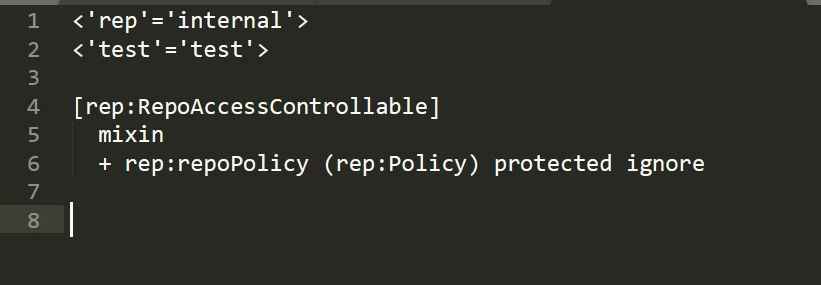
i added the new namespaces in this file like this:

installed the package with new changes. and YASSSSS! my new namespaces are available on this instance.

please let me know if this is not a best practise and have to be done differently.

Thank You!

7 replies

anujg3325839
Adobe Employee
Adobe Employee
September 5, 2019

HI

ASFAIK .. there is no specifc tool for exporting the namespce. you can go to http://localhost:4502/crx/explorer/ui/namespace_editor.jsp and see all namespaces, you might wanty to use  small JS script to extract those namespaces and print them into a nice CND. 

once you get the CND, you can use the import node type (/crx/explorer/nodetypes/index.jsp) and paste the CND's.

this should work for you..

sample script - please test.

  1. (function(){
  2.   var namespacesCnd = "";
  3.   document.querySelectorAll("#mainTable > tbody table > tbody > tr")
  4.   .forEach(tr => {
  5.    var url = tr.children[0].innerHTML.replace(" ", "").trim();
  6.    var prefix = tr.children[1].innerHTML.replace(" ", "").trim();
  7.   namespacesCnd += "<'" + prefix +"'='" + url +"'>\n"
  8.   });
  9.   console.log(namespacesCnd)
  10. })()
Adobe Employee
September 5, 2019

Namespaces are stored under /jcr:system/rep:namespaces.

I think you can create a package or migrate to target using the crx2oak tool (--include-paths=jcr:system/rep:namespaces)

Adobe Employee
September 5, 2019

You need to use crx2oak to migrate the namespaces

sindhug14537977
Level 2
September 5, 2019

Vish.dhaliwal

Adding or Deleting namespaces from AEM using CRX/DE is not possible. it gets deleted. but once we save and refresh, they are back to their normal state.

i tried packaging them from my local and installed the package on our dev server. it doesn't install the new ones that i created.

sindhug14537977
Level 2
September 5, 2019

@husams51669576

is there a reference article or something you could provide for this please.

i found this: Using the CRX2Oak Migration Tool

but it doesn't specify anything about namespace migration.

Please let me know if you find any.

Thank You!

sindhug14537977
sindhug14537977AuthorAccepted solution
Level 2
September 5, 2019

okay i tried something else again.

i went into the package that i got from my local instance with new namespaces added to "\jcr_root\_jcr_system\content.xml"

when i tried installing this package to another instance, it didn't add any new namespaces.

but i found a nodetypes.cnd file in this package "\META-INF\vault\nodetypes.cnd".

i added the new namespaces in this file like this:

installed the package with new changes. and YASSSSS! my new namespaces are available on this instance.

please let me know if this is not a best practise and have to be done differently.

Thank You!

Adobe Employee
September 5, 2019

Yes, I wasn't sure about the package. You should try with crx2oak as I mentioned in my comment earlier. Use --merge-paths=jcr:system/rep:namespaces in the crx2oak migration command.