How to import the templates from /conf into IntelliJ or VSCode? | Community
Skip to main content
Level 2
November 30, 2021

How to import the templates from /conf into IntelliJ or VSCode?

  • November 30, 2021
  • 2 replies
  • 3548 views

Hi AEM Community, I used the Editable Template to create a new template, and when I'm done, the new template is to be found under /conf in CRXDE. Then I tried to import the new template into an IDE - ideally either IntelliJ or VSCode, but had a hard time doing so.


****What I've tried****

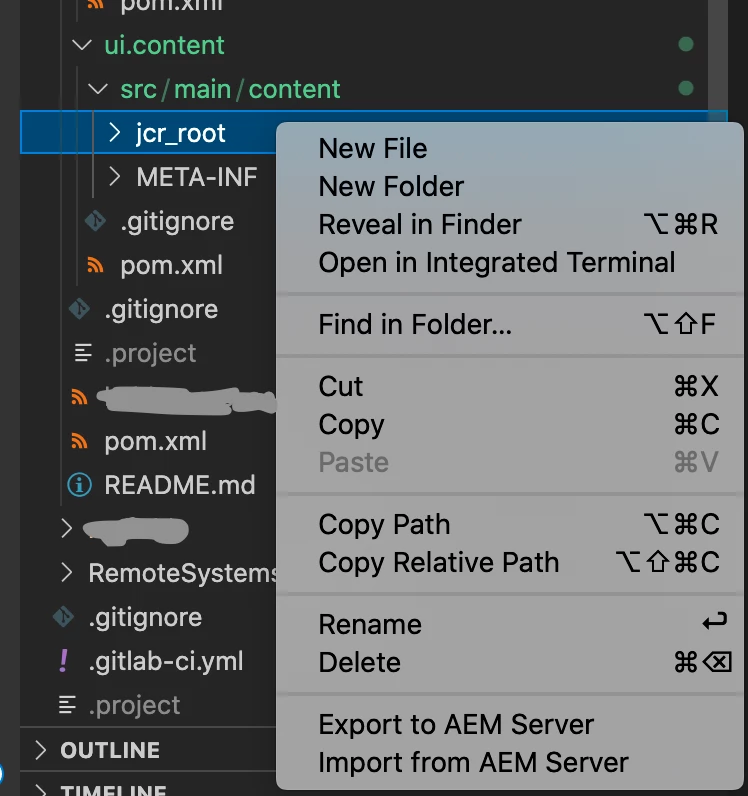
I tried to use the VSCode AEM Sync extension which is very nice and did part of the job as shown below. I right-click on jcr_root and do "Import from AEM Server"
 
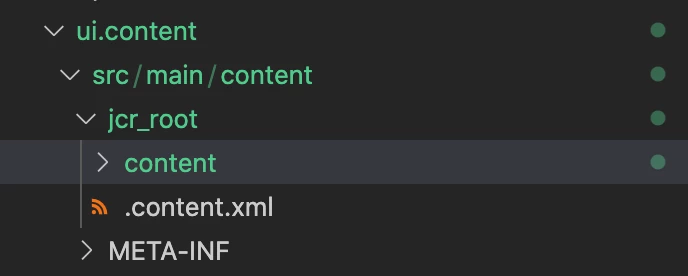
it only imported the /content/jcr_root/content, not the /conf

****What I expected - a working example from another project****
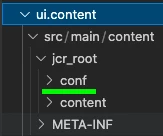
What I expected was something like from the WKND project as follows:
****More Info****
If I right-clicked for "Import from AEM Server" the path above jcr_root, I received an error message, that's why doing it on the ui.content level or the src/main/content level isn't an option here

****So my question is****
How can I get the /conf into my IDE?

It doesn't have to be VSCode AEM Sync, if anybody knows how to achieve the same goal with IntelliJ (via e.g. IntelliVault)?

This post is no longer active and is closed to new replies. Need help? Start a new post to ask your question.

2 replies

RajaShankar
Community Advisor
Community Advisor
November 30, 2021

Hi @infiniteshi  

I have the same Weknd Site setup in my local and to sync the CRXDE to Local for /Conf Folder

I just right clicked on top of 

/ui.content/src/main/content/conf/<myapp> as shown below then selected import from server

I just cloned the template type of page to another copy page in crxde the same got copied/improted from crxde to local perfectly.Please refer below


Hope this helps.


Level 2
December 2, 2021

Hi 

Thank you very much for the reply! I can't reproduce the first step of your success procedure


@rajashankar wrote:

Hi @infiniteshi  

I have the same Wknd Site setup in my local and to sync the CRXDE to Local for /Conf Folder

I just right clicked on top of 

/ui.content/src/main/content/conf/<myapp> as shown below then selected import from server


because the problem on my end is that I don't have /ui.content/src/main/content/conf/<myapp> available in VSCode. I only have /ui.content/src/main/content/content<...>

The import didn't bring /conf in even though it is available in CRXDE. Any suggestion?

Leela-Pavan-Kumar
Level 4
December 10, 2021

Hi,


Install "AEM Sync" from Extensions in Marketplace then you will able to see those  "Sync file from AEM" and "Sync file to AEM" options as mentioned by @rajashankar.


Check this for more info : AEM Development with Visual Studio Code  


Hope this helps!


Siva_Sogalapalli
Community Advisor
Community Advisor
December 1, 2021

You can follow below videos where you can find step by step details on how to sync code between AEM & Intellij/Visual studio/Eclipse. I always follow this doc and works for me 🙂 


https://experienceleague.adobe.com/docs/experience-manager-learn/foundation/development/set-up-a-loc... 

Time stamps: 


for Intellij Repo setup: https://github.com/Adobe-Marketing-Cloud/tools/tree/master/repo#installation 


Once you setup Repo, then you can easily sync content between. 

Hope this docs help you.