How to get cq:dialog dropdown checked value in html and javascript | Community
Skip to main content
Level 4
November 4, 2022
Solved

How to get cq:dialog dropdown checked value in html and javascript

  • November 4, 2022
  • 2 replies
  • 1244 views

I am using a dropdown in cq:dialog with two fields as shown below in the picture: 
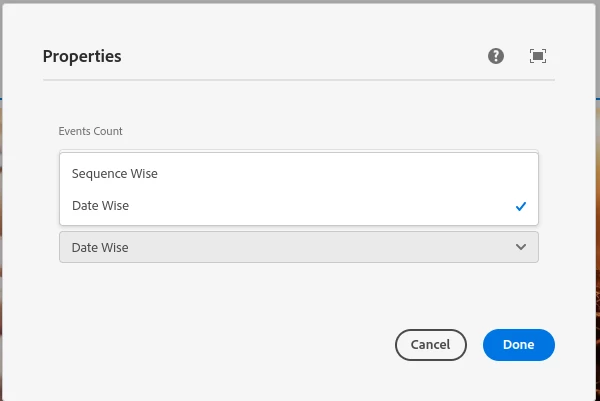
The problem is that I want to get the selected value in html and javascript but not able to access those values. I tried using ${properties.propertyName} but it didn't work. Is there a way I can check which value is checked? 

This post is no longer active and is closed to new replies. Need help? Start a new post to ask your question.
Best answer by nikita24tailor

It's solved, just needed ${properties.propertyName}. Before this, I was using ${properties.nodeName}

2 replies

Lokesh_Vajrala
Community Advisor
Community Advisor
November 4, 2022

@nikita24tailor Check if the property with selected value is persisted to JCR when you submitted the dialog in CRXDE -  http://localhost:4502/crx/de/index.jsp#/content/PAGE_PATH/jcr:content/COMPONENT_PATH 

nikita24tailorAuthorAccepted solution
Level 4
November 4, 2022

It's solved, just needed ${properties.propertyName}. Before this, I was using ${properties.nodeName}

Adobe Employee
November 4, 2022

Hi @nikita24tailor ,

Try to implement a slingmodel for that particular resource and using @valuemap attribute mapping, map that value with getter method and read the same in sightly.

Article for reference :
https://sourcedcode.com/blog/aem/aem-sling-model-injectors-annotations-cheat-sheet-reference-guide