How to find whether particular image rendition exists or not using query debugger or SQL2 query? | Community
Skip to main content
Level 2
June 11, 2018
Solved

How to find whether particular image rendition exists or not using query debugger or SQL2 query?

  • June 11, 2018
  • 7 replies
  • 4318 views

Hi All,

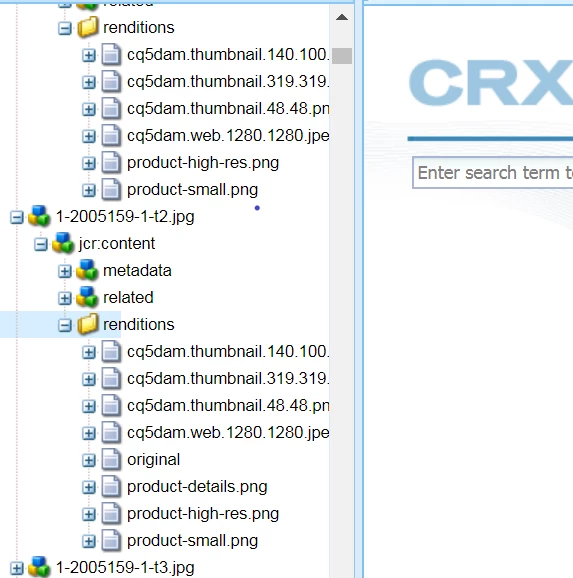
I want to search for image nodes which don't have particular image rendition.

For example.,

Suppose I have a path as '/content/dam/mycompany/catalog/part'.

I want to find the images which don't have product-details.png rendition under rendition folder.

Can anyone please help me to get the SQL2 query or query using AEM query debugger?
Thanks,

Prajakta

This post is no longer active and is closed to new replies. Need help? Start a new post to ask your question.
Best answer by aneetarora

Hi prajaktak28172563

Indeed the query I gave was an oversimplified one. It did give the results but not as refined.

To get the expected results, you don't really need to make the query as excessive as above.

Please try the query below

SELECT * FROM [dam:Asset] AS s where isdescendantnode([/content/dam/mycompany/catalog]) and s.[jcr:content/renditions/*] is not null and s.[jcr:content/renditions/product-details.png/jcr:primaryType] not like '%nt:file%'

This query basically checks if the renditions exist for an Asset AND any asset which might have the missing product-details.png rendition.

Best Regards,

Aneet

7 replies

arunpatidar
Community Advisor
Community Advisor
June 11, 2018

Hi Prajakta,

You can do this with query debugger but for your requirement you need to create a custom predicate, which traverse through rendition node and check for product-detail.png

refer Is there way to know nodes without jcr:content node?

Thanks

Arun

Arun Patidar
Adobe Employee
June 11, 2018

Hello prajaktak28172563

You can simply execute a query like below to get your results

SELECT * FROM [nt:file] AS s where isdescendantnode([/content/dam/mycompany/catalog/part]) and s.[jcr:path] NOT LIKE '%product-details.png%'

This query would automatically consider only renditions as nt:file is the nodetype being used.

I hope this helps.

Regards,

Aneet

Lokesh_Shivalingaiah
Level 10
June 12, 2018

Above query should work! Let us know if it didnt..

PrajaktaAuthor
Level 2
June 12, 2018

Hi aneeta45259594 and bsloki,

I tried the query given by you but it's not returning any results.

My requirement is to find the image nodes which don't have product-details.png image rendition.

The logic in your query is saying to return all the renditions other than product-details.png which will not give the correct results.

Suppose one of the renditions folder has this rendition. Due to the above query, all the renditions other than product-details.png under that folder will be there in result which is not the requirement.

Thanks,

Prajakta

PrajaktaAuthor
Level 2
June 12, 2018

Hi All,

I tried with the below query

select par.[jcr:path] from [nt:folder] As par WHERE ISDESCENDANTNODE(par, "/content/dam/mycompany/catalog/part/120/051/591") AND par.[jcr:path] not in

(select parent.[jcr:path] from [nt:folder] As parent Inner Join [nt:file] AS child ON ISCHILDNODE(child, parent)

WHERE ISDESCENDANTNODE(parent, "/content/dam/mycompany/catalog/part/120/051/591")

AND parent.[jcr:path] like "%jcr:content/renditions" AND child.[jcr:path] like "%product-details.png")

and got the error as

Thanks,

Prajakta

aneetaroraAdobe EmployeeAccepted solution
Adobe Employee
June 12, 2018

Hi prajaktak28172563

Indeed the query I gave was an oversimplified one. It did give the results but not as refined.

To get the expected results, you don't really need to make the query as excessive as above.

Please try the query below

SELECT * FROM [dam:Asset] AS s where isdescendantnode([/content/dam/mycompany/catalog]) and s.[jcr:content/renditions/*] is not null and s.[jcr:content/renditions/product-details.png/jcr:primaryType] not like '%nt:file%'

This query basically checks if the renditions exist for an Asset AND any asset which might have the missing product-details.png rendition.

Best Regards,

Aneet

PrajaktaAuthor
Level 2
June 13, 2018

Hi aneeta45259594,

Thanks for your help. It worked for me.