How to customize paraformat plugin in aem | Community
Skip to main content
Mario248
Level 7
November 20, 2024
Solved

How to customize paraformat plugin in aem

  • November 20, 2024
  • 3 replies
  • 804 views

I need to customize paraformat plugin in aem. for example I want to add class attribute to h1,h2,h3,p tag. Below is the OOTB behaviour 
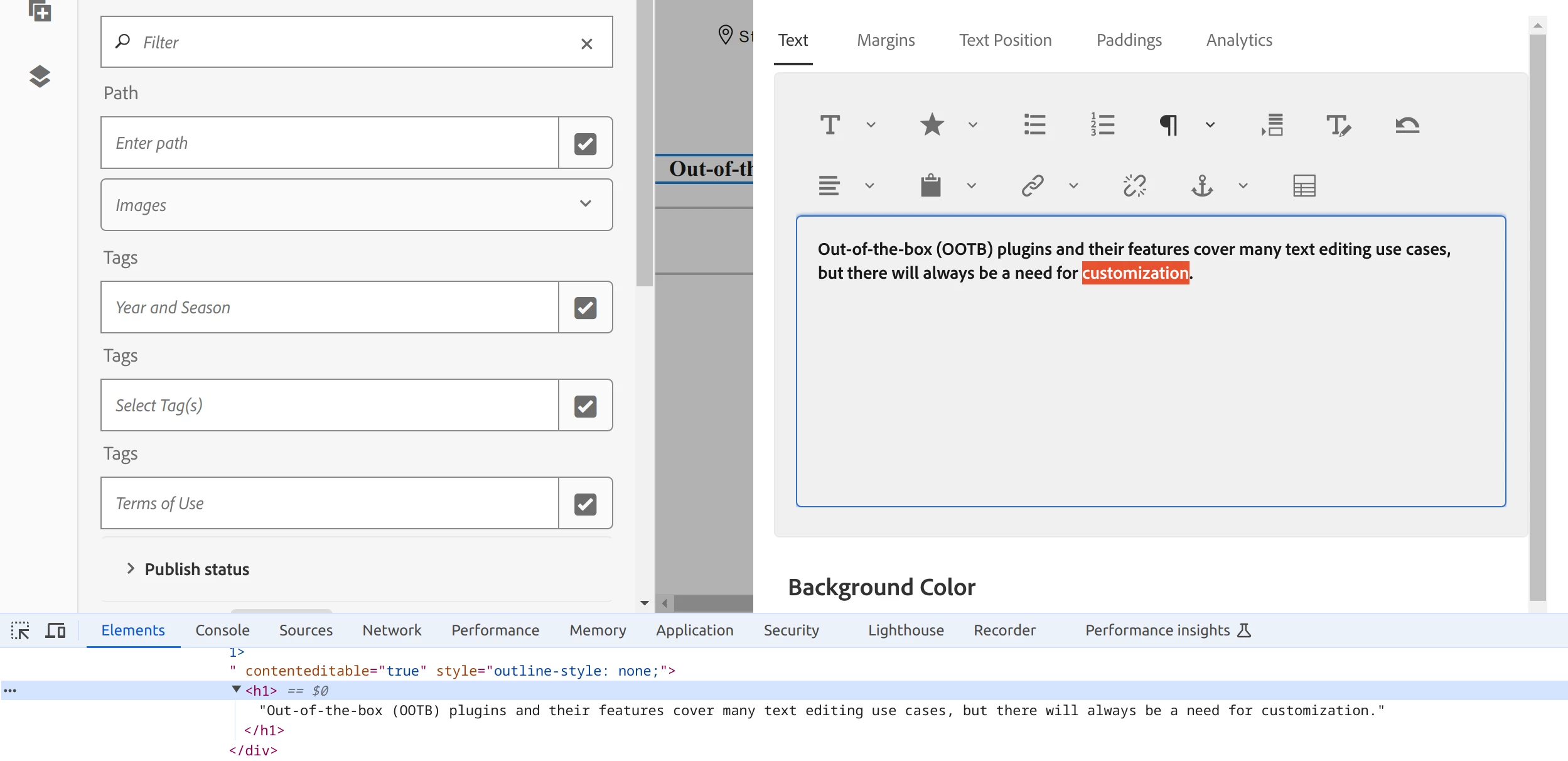
<h1>Out-of-the-box (OOTB) plugins and their features cover many text editing use cases, but there will always be a need for customization.</h1>

I want to have to class attribute something like below

<h1 class="xyz">Out-of-the-box (OOTB) plugins and their features cover many text editing use cases, but there will always be a need for customization.</h1>

 Is it possible to add class attribute without making any code change. for example I tried to add property in dialog like 



but it is not picked. I guess there is no JS logic to read "class" property hence I tried to find a JS file and make a modification and I found plugin js - /libs/clientlibs/granite/coralui2/optional/rte/js/core/plugins/ParagraphFormatPlugin.js but here I dont see any place or logic to add class attribute. 

 

Ref - https://experienceleague.adobe.com/en/docs/experience-manager-65/content/sites/administering/operations/configure-rich-text-editor-plug-ins#paraformats

This post is no longer active and is closed to new replies. Need help? Start a new post to ask your question.
Best answer by MukeshYadav_

Hi @mario248 ,

If you just want to add a class attribute to the selected text. You may refer step mentioned here. This way selected text will be wrapped up in a span with specified class and from backend css can be applied

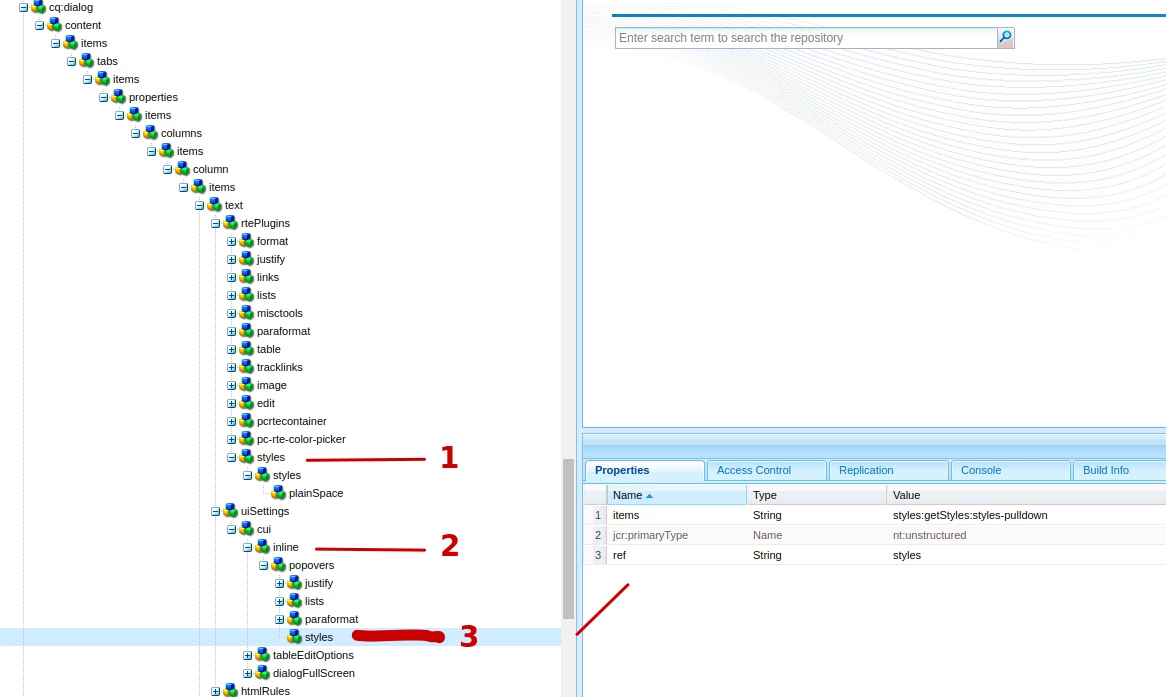
1. Under rtePlugins node of dialog


<styles jcr:primaryType="nt:unstructured" features="*"> <styles jcr:primaryType="nt:unstructured"> <plainSpan jcr:primaryType="nt:unstructured" cssName="defaultSpan" text="Default (add span tag)"/> <lead jcr:primaryType="nt:unstructured" cssName="lead" text="Lead"/> </styles> </styles>


2. Under inline add #styles, add inside dialogFullScreen as well if required in maximised view

3. under popover add below


<styles jcr:primaryType="nt:unstructured" items="styles:getStyles:styles-pulldown" ref="styles"/>


https://gist.github.com/briankasingli/1a7e3e12deaa2e076645b09d30039b46

Note to get css applied in dialog as well while editiong css can be as below

.cq-RichText-editable .class-name-menioned-in-styles{
color: #d04a02;
text-decoration:underline;
text-decoration-color: #d04a02!;
}

Below css to display on page after dialog submit

.class-name-menioned-in-styles{
color: #d04a02;
text-decoration:underline;
text-decoration-color: #d04a02!;
}

Thanks  

3 replies

arunpatidar
Community Advisor
Community Advisor
November 20, 2024
Mario248
Mario248Author
Level 7
November 20, 2024

Thanks for your response. I am planing create a custom plugin by extending "CUI.rte.plugins.ParagraphFormatPlugin" by referring "/libs/clientlibs/granite/coralui2/optional/rte/js/core/plugins/ParagraphFormatPlugin.js" but here I could not find the HTML markup code or HTML rendering logic. Do you have any idea where is it located ? maybe different file altogether?  

MukeshYadav_
Community Advisor
MukeshYadav_Community AdvisorAccepted solution
Community Advisor
November 20, 2024

Hi @mario248 ,

If you just want to add a class attribute to the selected text. You may refer step mentioned here. This way selected text will be wrapped up in a span with specified class and from backend css can be applied

1. Under rtePlugins node of dialog


<styles jcr:primaryType="nt:unstructured" features="*"> <styles jcr:primaryType="nt:unstructured"> <plainSpan jcr:primaryType="nt:unstructured" cssName="defaultSpan" text="Default (add span tag)"/> <lead jcr:primaryType="nt:unstructured" cssName="lead" text="Lead"/> </styles> </styles>


2. Under inline add #styles, add inside dialogFullScreen as well if required in maximised view

3. under popover add below


<styles jcr:primaryType="nt:unstructured" items="styles:getStyles:styles-pulldown" ref="styles"/>


https://gist.github.com/briankasingli/1a7e3e12deaa2e076645b09d30039b46

Note to get css applied in dialog as well while editiong css can be as below

.cq-RichText-editable .class-name-menioned-in-styles{
color: #d04a02;
text-decoration:underline;
text-decoration-color: #d04a02!;
}

Below css to display on page after dialog submit

.class-name-menioned-in-styles{
color: #d04a02;
text-decoration:underline;
text-decoration-color: #d04a02!;
}

Thanks  

kautuk_sahni
Community Manager
Community Manager
November 25, 2024

@mario248  Did you find the suggestion helpful? Please let us know if you require more information. Otherwise, please mark the answer as correct for posterity. If you've discovered a solution yourself, we would appreciate it if you could share it with the community. Thank you!

Kautuk Sahni