How to customize a page in CRXDE Lite ? | Community
Skip to main content
August 16, 2022
Solved

How to customize a page in CRXDE Lite ?

  • August 16, 2022
  • 1 reply
  • 798 views

Hi everyone,


I have some issues with my Adobe Experience Manager (6.3).
Currently, I have the default template:
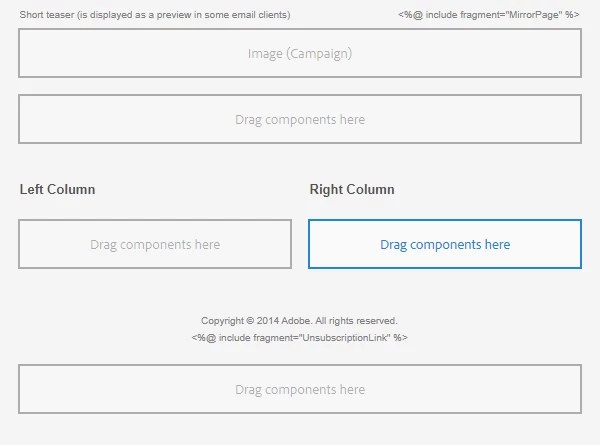


My aim is to freely customize my template (make 3 columns or more, center an image) and link it to Adobe Campaign but I do not know the language to use.


With this default template, Adobe Campaign can recognize the page:

 

But when I try to modify it, either Adobe Campaign do not find it anymore or I lose the access to the component.


If I create a page in Adobe Experience Manager, it will be created a page under "content" in CRXDE Lite with all the default component (teaser, redirect, par, parLeft, parRight, footer). So I guess that if I want to make more column by default, I have to check in the CRXDE Lite.

I tried to analyze the relationship between the properties within the component (sling:ressourceType) but I only understand that the par component is linked to the parsys component in "mcm/campaign/components/parsys" and create automatically the default page.


I use Adobe Experience Manager 6.3.0 and Adobe Campaign Classic 7.0


Thank You for your help.

This post is no longer active and is closed to new replies. Need help? Start a new post to ask your question.
Best answer by ksh_ingole7

Hi @ㅤㅤㅤ 


You can create a custom Grid Layout or a column control component to control the number of columns that a user can add on the page. Based on the number of columns play around with the styles of the columns in different viewports. 


Refer this article : https://experienceleague.adobe.com/docs/experience-manager-65/authoring/siteandpage/responsive-layout.html?lang=en

1 reply

ksh_ingole7
Community Advisor
ksh_ingole7Community AdvisorAccepted solution
Community Advisor
December 7, 2023

Hi @ㅤㅤㅤ 


You can create a custom Grid Layout or a column control component to control the number of columns that a user can add on the page. Based on the number of columns play around with the styles of the columns in different viewports. 


Refer this article : https://experienceleague.adobe.com/docs/experience-manager-65/authoring/siteandpage/responsive-layout.html?lang=en