How to create and use frontend pipeline in Cloud manager | Community
Skip to main content
Level 2
October 19, 2024
Solved

How to create and use frontend pipeline in Cloud manager

  • October 19, 2024
  • 2 replies
  • 1563 views

I am using SPA site in AEMaaCs

Currently we are hosting whole AEM  code base in a single repository . AEM core, dispatcher ,ui.frontend, ui.apps everything in a single repository


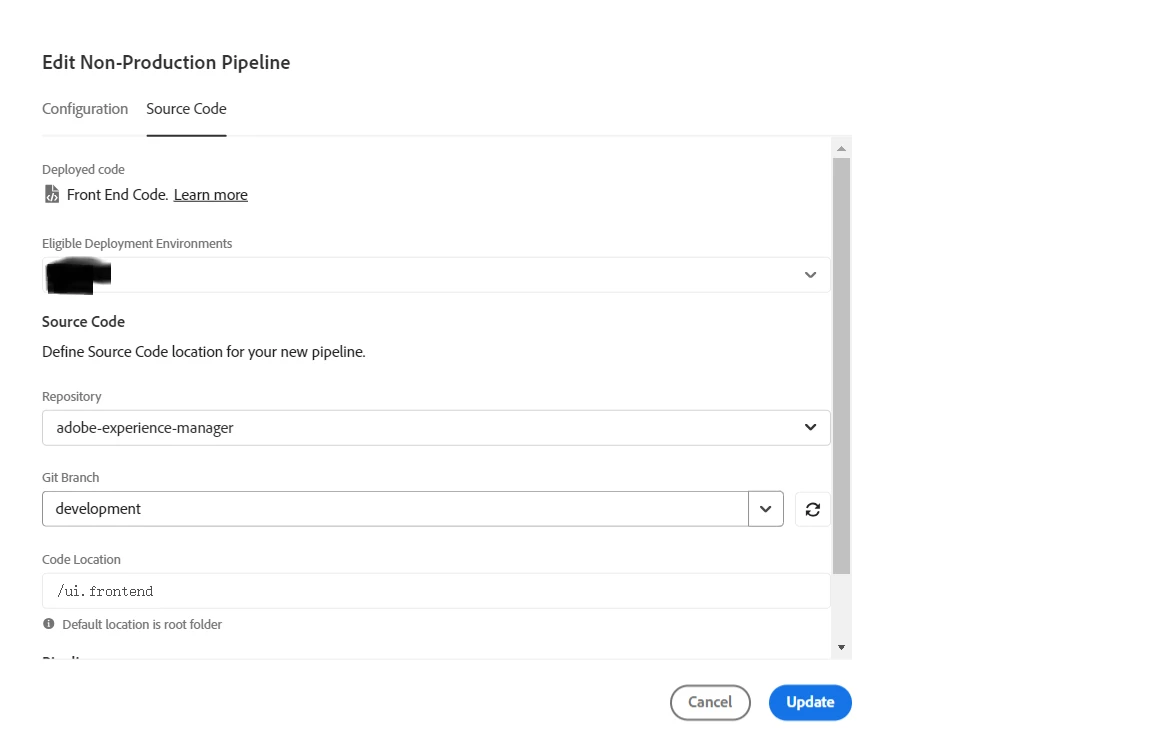
Now when i try to run a frontend pipeline with below settings  and build is failing


Should i separate frontend code into a different repository and use "Site Themes" to manage SPA components js files ?

https://experienceleague.adobe.com/en/docs/experience-manager-cloud-service/content/sites/administering/site-creation/quick-site/overview 


If i need to convert my current ui.frontend folder into a "Site Themes" structure , how to do it ?


Please advice. Thankyou 


This post is no longer active and is closed to new replies. Need help? Start a new post to ask your question.
Best answer by narendiran_ravi

@narendiran_ravi 

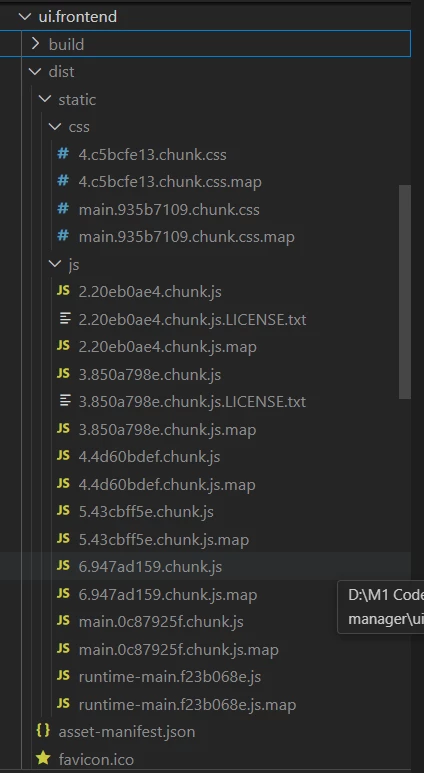
my 'dist' folder has this type of structure and files .

Do i need to add sling configs  HtmlPageItemsConfig and SiteConfig as mentioned in the given link ?

If those configs are needed , my main.hash.chunk.css and main.hash.chunk.js names changes for each modifications. So how to call these names in HtmlPageItemsConfig or calling these files on a page is done automatically ? 

Do you have a main.js and main.css files in your SPA 'dist' folder ?


below is  clientlib.config.js code  .

===========================================
const path = require('path');
const fs = require('fs-extra');
const getEntrypoints = require('./utils/entrypoints');

const BUILD_DIR = path.join(__dirname, 'build');
const DIST_DIR = path.join(__dirname, 'dist');
const CLIENTLIB_DIR = path.join(
  __dirname,
  '..',
  'ui.apps',
  'src',
  'main',
  'content',
  'jcr_root',
  'apps',
  'wknd-spa-react',
  'clientlibs'
);
const ASSET_MANIFEST_PATH = path.join(BUILD_DIR, 'asset-manifest.json');

async function copyBuildToDist() {
  try {
    // Ensure dist folder exists or create it, then empty it
    await fs.ensureDir(DIST_DIR);
    await fs.emptyDir(DIST_DIR);

    // Copy the contents of the build directory to the dist directory
    await fs.copy(BUILD_DIR, DIST_DIR);

    console.log('Build content successfully copied to dist.');
  } catch (err) {
    console.error('Error copying build to dist:', err);
  }
}

const entrypoints = getEntrypoints(ASSET_MANIFEST_PATH);

// Config for `aem-clientlib-generator`
module.exports = {
  context: BUILD_DIR,
  clientLibRoot: CLIENTLIB_DIR,
  libs: {
    name: 'clientlib-react',
    allowProxy: true,
    categories: ['wknd-spa-react.react'],
    serializationFormat: 'xml',
    cssProcessor: ['default:none', 'min:none'],
    jsProcessor: ['default:none', 'min:none'],
    assets: {
      // Copy entrypoint scripts and stylesheets into the respective ClientLib
      // directories (in the order they are in the entrypoints arrays). They
      // will be bundled by AEM and requested from the HTML. The remaining
      // chunks (placed in `resources`) will be loaded dynamically
      js: entrypoints.filter(fileName => fileName.endsWith('.js')),
      css: entrypoints.filter(fileName => fileName.endsWith('.css')),

      // Copy all other files into the `resources` ClientLib directory
      resources: {
        cwd: '.',
        files: ['**/*.*'],
        flatten: false,
        ignore: entrypoints
      }
    }
  }
};
copyBuildToDist();



Hi @vishnu9 ,

I checked the structure of the ui.frontend module for the SPA project. It looks like all JS and CSS files, including the main files, have a hash in their filenames. I suggest following the custom Webpack approach for the build to remove the hash from the main file and output the built code inside the dist folder, as needed for the FE pipeline.

Please refer to the WKND project without SPA enabled for an example: WKND GitHub - ui.frontend.

The clientlib.config.js file is only needed when you need to copy the generated files to the apps directory, so they can be included as part of the full-stack build. Since you're using the FE-only pipeline, this file is not required.

2 replies

narendiran_ravi
Level 6
October 19, 2024

Creating a separate repository to convert the existing full-stack project to be compatible with the front-end pipeline is unnecessary. Instead, some modifications are needed in the existing project:

  1. Parent pom.xml: Update the parent POM file to remove ui.frontend from the build
  2. Context-Aware Configuration (ca config): Make adjustments to accommodate the changes related to the front-end pipeline.
  3. ui.frontend Module: Update this module to align with the front-end pipeline requirements.

please refer to the official documentation: Enable Front-End Pipeline in AEM.

Vishnu9Author
Level 2
November 7, 2024

@narendiran_ravi 


steps in that document are working for Wknd slightly project 


Tested with  SPA based wknd project ,

in this type of project it generates build folder insted of dist folder , because of this pipeline was failing. 

So wrote code in clientlib.config.js to copy contents of build to dist then pipeline run was succesfull but how to integrate  the js chunks  and css chunks into HtmlPageItemsConfig .

And also these chunks have  names like main.hash.css , main.hash.js,runtime.hash.js , etc 

These hashes gets changed for every deployment , how to handle this dynamic nature of file names


narendiran_ravi
Level 6
November 7, 2024

@vishnu9 ,

Glad to hear it’s working in your SPA project with the modifications you made!

 In our project, we dynamically load the chunk files and handle the generation of these chunk files through our Webpack configuration.

output: {
filename: 'theme/js/[name].js',
chunkFilename: 'theme/resources/[name].[hash].js',
path: path.resolve(__dirname, 'dist'),
}

Since the chunk files are included dynamically when the main file loads, is there any need to load them separately in the HtmlPageItemsConfig?

kautuk_sahni
Community Manager
Community Manager
November 11, 2024

@vishnu9 Did you find the suggestion helpful? Please let us know if you require more information. Otherwise, please mark the answer as correct for posterity. If you've discovered a solution yourself, we would appreciate it if you could share it with the community. Thank you!

Kautuk Sahni