How to avoid non prod domains from getting crawled and indexed on to the search engines? | Community
Skip to main content
Level 3
July 13, 2023
Solved

How to avoid non prod domains from getting crawled and indexed on to the search engines?

  • July 13, 2023
  • 3 replies
  • 5195 views

When I search about my website with environment name, the non prod domain is getting crawled and indexed in search engine. How do I avoid this? Please help.


Thanks,

Rakesh

Best answer by bilal_ahmad

Hello @rakesh_h2 There are multiple ways you can avoid your non-prod domains to get crawled on search engines, mainly google.


1. Disallowing everything in robots.txt - This is a must do for non-prod environments!

2. Using 'noindex', 'nofollow' meta tags in pages(this is a non practical solution in your case because you want to restrict the whole domain rather than a few pages). You usually use this for approach specific pages to not index(live domains)

3. By not providing sitemap.xml - this is also not a very practical solution, cause usually we have business logic and dispatcher configurations in place to generate/deliver sitemap.xml.

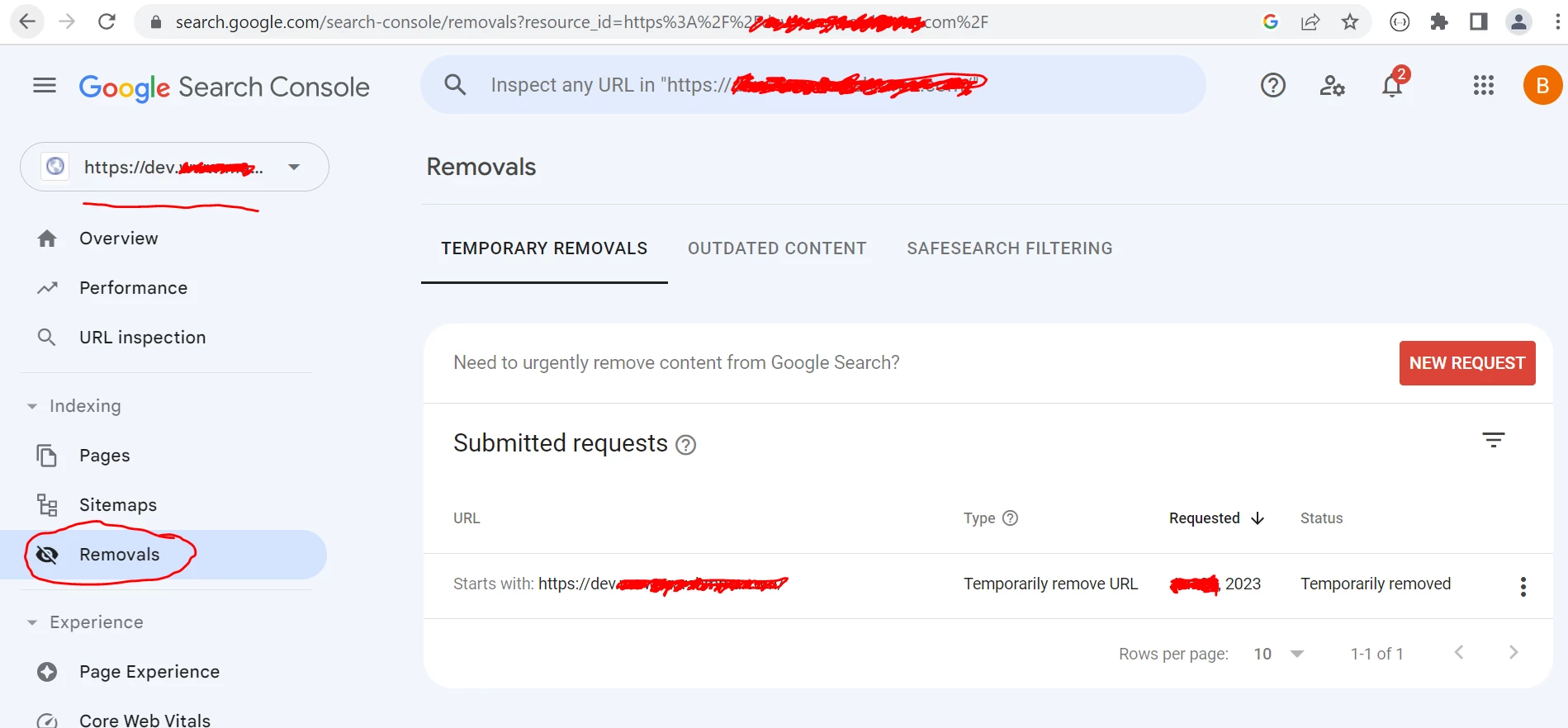
4. Use Google Search Console - This might turn out to be the best bet you can have. Register yourself on this console(free of cost) and create  a property to verify your non-prod domains. Once your domains are verified, place a request for removal. This will remove you non-prod domains(They will no longer appear in google search). Once they stop appearing from google search, remove the site verification code(keep it if you want to. It's up to you).

Now your robots.txt with


User-agent: * Disallow: /


will work perfectly fine. Make sure you have this in-place post you remove, else they will get re-indexed and start appearing in google search.

Thanks
- Bilal


3 replies

Mahedi_Sabuj
Community Advisor
Community Advisor
July 13, 2023

Hi @rakesh_h2, Let me share few approaches:

1. You can restrict your lower environment to certain whitelisted IP address.

2. You can also add a robots.txt to your dispatcher:
https://www.domain.com/robots.txt


User-agent: * Disallow: /


3. You can implement dispatcher level basic auth.


Mahedi Sabuj
rakesh_h2Author
Level 3
July 13, 2023

@mahedi_sabuj I have robots.txt in DAM which is the same for all the environments.

User-agent: *

Disallow: /bin/

Sitemap: ......./in.sitemap.xml

rakesh_h2Author
Level 3
July 13, 2023

1. So I have to keep the respective robots.txt file in DAM of the respective AEM Environment and publish it? Is that it? [MS]: Yes, You are correct.

2. I have a custom domain also defined for each environment like dev.mysite.com, qa.mysite.com etc. Would the above configuration work in that case? [MS]: Yes, It should work. We follow the same structure for our project as well.


@mahedi_sabuj When do we keep multiple robots.txt file based on environments and configure sling resolver factory to pick the right file?

ayush-anand
Level 4
July 13, 2023

@rakesh_h2 There Are multiple approaches to restrict non prod domains from getting crawled. One of them is to enable the required robots meta tag in the page source using custom logic to enable them only on non-prod environments.


<meta name="robots" content="noindex, nofollow, noarchive, nosnippet, nocache" />


More approaches are very well explained in this link.
https://www.albinsblog.com/2021/01/different-approaches-to-block-non-prod-urlsfrom-search-indexing.html?m=1


Hope this helps.


Regards,

Ayush

bilal_ahmad
bilal_ahmadAccepted solution
Level 5
July 13, 2023

Hello @rakesh_h2 There are multiple ways you can avoid your non-prod domains to get crawled on search engines, mainly google.


1. Disallowing everything in robots.txt - This is a must do for non-prod environments!

2. Using 'noindex', 'nofollow' meta tags in pages(this is a non practical solution in your case because you want to restrict the whole domain rather than a few pages). You usually use this for approach specific pages to not index(live domains)

3. By not providing sitemap.xml - this is also not a very practical solution, cause usually we have business logic and dispatcher configurations in place to generate/deliver sitemap.xml.

4. Use Google Search Console - This might turn out to be the best bet you can have. Register yourself on this console(free of cost) and create  a property to verify your non-prod domains. Once your domains are verified, place a request for removal. This will remove you non-prod domains(They will no longer appear in google search). Once they stop appearing from google search, remove the site verification code(keep it if you want to. It's up to you).


Now your robots.txt with


User-agent: * Disallow: /


will work perfectly fine. Make sure you have this in-place post you remove, else they will get re-indexed and start appearing in google search.

Thanks
- Bilal


Level 2
August 13, 2024

Hi Bilal,


I have followed all the steps you mentioned except 4th one but I can still see pages/domain showing in google search.


Thanks,

Abhishek