How to allow list of components on parsys using policy in AEM | Community
Skip to main content
Level 3
July 22, 2025
Solved

How to allow list of components on parsys using policy in AEM

  • July 22, 2025
  • 4 replies
  • 489 views

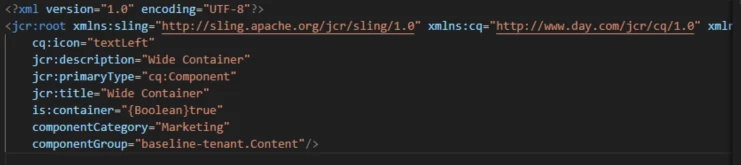
I have contaner component, for that container I need allow few list of components, for that I have created a component with cq:designDialog with allowed component. in html I added parsys below are the files.
cd:designDialog
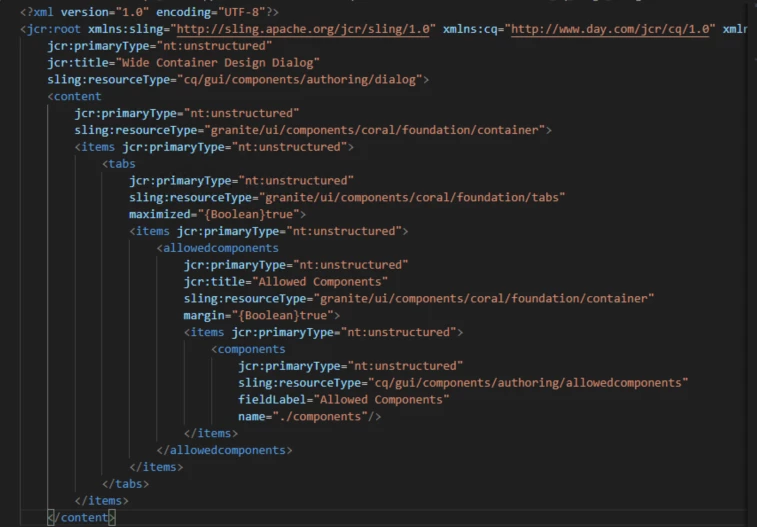
 

HTML

component.xml
 

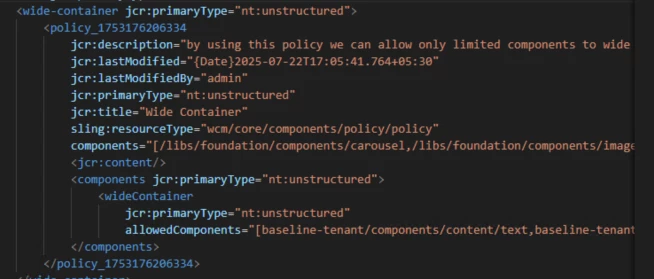
cq:policy of my component
but whenever try to add  allowed components components on page through that parsys, I didn't see any allowed components
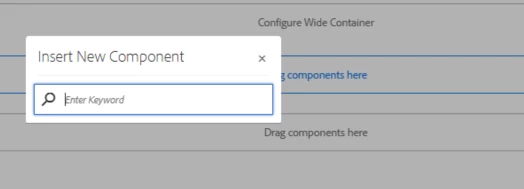
any help to fix this


4 replies

SantoshSai
Community Advisor
Community Advisor
July 22, 2025

Hi @anilkumar9,

It’s possible the policies haven't been properly deployed or linked.

Please try the following steps:

  1. Verify if the policies are deployed on your instance via CRXDE Lite at /conf/your-site/settings/wcm/policies/....

    • Check if your container component's policy exists.

    • Make sure the policy path is correctly referenced in the component via cq:policy.

  2. If the policy is missing or not working:

    • Delete all the policies under your site config (/conf/your-site/settings/wcm/policies/...).

    • Rebuild or redeploy the template/policy structure to reset them.

  3. Also ensure your filter.xml includes the policies and template-types nodes so they're deployed from your codebase to AEM.

Sometimes, even if everything looks correct, the UI won’t show allowed components unless the policy linkage is established properly in CRX.

Santosh Sai
Level 4
July 23, 2025

Hi @anilkumar9 ,


According to my understanding, In Editable Templates, cq:designDialog is ignored, so your allowed-components setup won’t work. Instead, you must define allowed components via the Template Editor's policies. I think you can try to configure allowed components using the Editable Template’s policy editor.

kautuk_sahni
Community Manager
Community Manager
August 4, 2025

@anilkumar9 Just checking in — were you able to resolve your issue? We’d love to hear how things worked out. If the suggestions above helped, marking a response as correct can guide others with similar questions. And if you found another solution, feel free to share it — your insights could really benefit the community. Thanks again for being part of the conversation!

Kautuk Sahni