How to add async to the clientlibs that are added from the template's page policy. | Adobe Higher Education
Skip to main content
Level 2
November 19, 2025
Respondido

How to add async to the clientlibs that are added from the template's page policy.

  • November 19, 2025
  • 3 respostas
  • 286 Visualizações

Hi everyone,
instance: Aem-cloud.

I’m using the Core Page Component v2 (core/wcm/components/page/v2/page) as the supertype for my page component. The client libraries are being included through the Template Page Policy (Design dialog → Page Policy → Client Libraries).
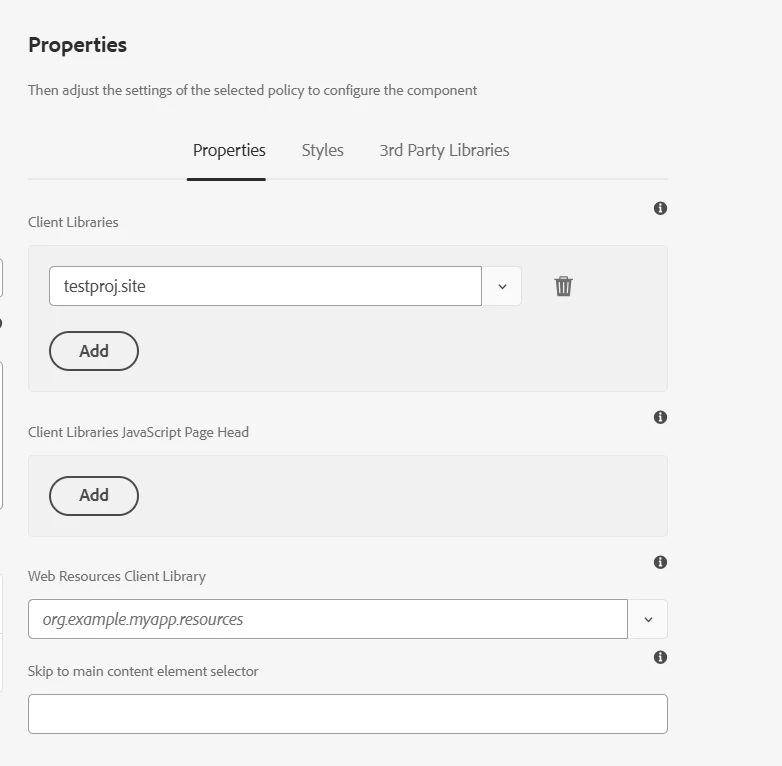

currently rendered as: 
<script src="/etc.clientlibs/testProj/clientlibs/clientlib-site.lc-232230oi9i39i23293i39-lc.min.js"></script>

Expected: 
<script  async src="/etc.clientlibs/testProj/clientlibs/clientlib-site.lc-232230oi9i39i23293i39-lc.min.js"></script>


Question:
Is there any recommended way to add the async or defer attribute to these clientlibs.
Can this be achieved via HTL override, or any other approach?

Any suggestions or best practices would be appreciated.


Melhor resposta por muskaanchandwani

Hello @syntaxerror_07 

Please refer to the below Documentation :

https://experienceleague.adobe.com/en/docs/experience-manager-core-components/using/developing/including-clientlibs#including

Core Components provide a dedicated HTL helper to include clientlibs with modern attributes like async and defer.

<sly data-sly-use.clientlibs="${'com.adobe.cq.wcm.core.components.models.ClientLibraries' @ categories='wknd.base', defer=true}"> ${clientlibs.jsAndCssIncludes @ context="unsafe"} </sly>


This is the recommended pattern for performance‑optimized clientlib loading as per the above Documentation.

Use the Core Components ClientLibraries model or clientlib.js template from your page component HTL and pass async=true or defer=true there;

3 Respostas

giuseppebaglio
Level 10
November 19, 2025

hi @syntaxerror_07,

you can use WCM.IO Clientlibs UI Extensions, which provide native HTL support for script attributes like async and defer:

<sly data-sly-use.clientlib="/apps/wcm-io/wcm/ui/clientlibs/sightly/templates/clientlib.html" data-sly-call="${clientlib.js @ categories=['my-clientlib-category'],async=true,type='module'}"/> <sly data-sly-call="${clientlib.js @ categories=['my-clientlib-category-2'],defer=true,nomodule=true}"/>

AEMasCS is supported since v1.2x and it also supports attributes like async, type, nonce, integrity, crossorigin, referrerpolicy.

 
Level 2
November 19, 2025

Hi @syntaxerror_07 , 


You can use the attributes to add defer. please refer below link. 

https://experienceleague.adobe.com/en/docs/experience-manager-core-components/using/developing/including-clientlibs#attributes


<sly data-sly-use.clientlibs="${'com.adobe.cq.wcm.core.components.models.ClientLibraries' @ categories='wknd.base', media='print', async=true, defer=true, onload='console.log(\'loaded: \' + this.src)', crossorigin='anonymous'}"> ${clientlibs.jsAndCssIncludes @ context="unsafe"} </sly>
muskaanchandwani
Adobe Employee
Adobe Employee
November 20, 2025

Hello @syntaxerror_07 

Please refer to the below Documentation :

https://experienceleague.adobe.com/en/docs/experience-manager-core-components/using/developing/including-clientlibs#including

Core Components provide a dedicated HTL helper to include clientlibs with modern attributes like async and defer.

<sly data-sly-use.clientlibs="${'com.adobe.cq.wcm.core.components.models.ClientLibraries' @ categories='wknd.base', defer=true}"> ${clientlibs.jsAndCssIncludes @ context="unsafe"} </sly>


This is the recommended pattern for performance‑optimized clientlib loading as per the above Documentation.

Use the Core Components ClientLibraries model or clientlib.js template from your page component HTL and pass async=true or defer=true there;

Level 2
November 21, 2025

@muskaanchandwani, @manikandan90 , Thanks this worked is there anyway too add preload attribute to the link tag for css files.

<link as="style" href="https://localhost:4502/main.css" rel="preload stylesheet" type="text/css">

I implemented custom sling Model,  but if there is any way to add using OOTB like for js async.

giuseppebaglio
Level 10
November 21, 2025

If you want to avoid custom development, you can achieve it with WCM.IO Clientlibs UI Extensions


You can add the package as a dependency in your project <root-folder>/pom.xml:

<!-- https://mvnrepository.com/artifact/io.wcm/io.wcm.wcm.ui.clientlibs --> <dependency> <groupId>io.wcm</groupId> <artifactId>io.wcm.wcm.ui.clientlibs</artifactId> <version>1.4.0</version> </dependency>

You should update the `pom.xml` file by configuring the filevault-package-maven-plugin Maven plugin.

... <plugin> <groupId>org.apache.jackrabbit</groupId> <artifactId>filevault-package-maven-plugin</artifactId> <extensions>true</extensions> <configuration> ... <embeddeds> ... <!-- Include any other extra packages --> <embedded> <groupId>com.vendor.x</groupId> <artifactId>vendor.plug-in.all</artifactId> <type>zip</type> <target>/apps/vendor-packages/container/install</target> </embedded> <embeddeds> </configuration> </plugin> ...


More info on the embedding in this guide: Including Third-Party Packages