How do I Reassign Admin Role in Adobe Learning Manager? | Community
Skip to main content
JFarmer1728
August 21, 2025
Solved

How do I Reassign Admin Role in Adobe Learning Manager?

  • August 21, 2025
  • 2 replies
  • 402 views

Hello,


I am leaving my company. I am currently the administrator. I would like to reassign the administrator role to two other users.


I keep receiving this error message when I attempt to log in to the Adobe Admin Console.
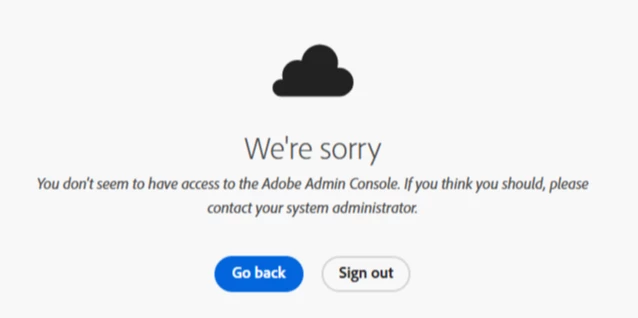


I have been one of only two admins for nearly 10 years. The other one is recently deceased, and I deleted the profile in Adobe Learning Manager.


Please advise.


Kind regards,


Jeremy Farmer

Best answer by HrishikeshKagne

Hi @jfarmer1728 ,

If you’re the last active admin and can’t access the Admin Console, you need to reach out directly to Adobe Customer Care (https://helpx.adobe.com/contact.html). Choose “Enterprise Support” or log a ticket through the Adobe Admin Console support portal using your organization’s Adobe contract/account details. Adobe will verify ownership (company domain, contract info) and then reassign/add new administrators for you. This is the only way to resolve the issue when no other admin exists.

2 replies

HrishikeshKagne
Community Advisor
Community Advisor
August 21, 2025

Hi @jfarmer1728 ,

In Adobe Learning Manager, you can’t reassign the Admin role directly from within the app if you’ve lost access to the Admin Console. Since you’re the last active admin, you’ll need to contact Adobe Support/Customer Care so they can update the admin assignments for your organization. Provide proof of ownership (like your company domain or contract details), and they’ll help you add the new users as administrators. This is the only way to resolve the issue when no other admin exists.

Hrishikesh Kagane
JFarmer1728
August 21, 2025

Thank you @hrishikeshkagne 

How do I contact Adobe Support/Customer Care? The links previously provided for support say that I need to contact the system administrator.

HrishikeshKagne
Community Advisor
HrishikeshKagneCommunity AdvisorAccepted solution
Community Advisor
August 22, 2025

Hi @jfarmer1728 ,

If you’re the last active admin and can’t access the Admin Console, you need to reach out directly to Adobe Customer Care (https://helpx.adobe.com/contact.html). Choose “Enterprise Support” or log a ticket through the Adobe Admin Console support portal using your organization’s Adobe contract/account details. Adobe will verify ownership (company domain, contract info) and then reassign/add new administrators for you. This is the only way to resolve the issue when no other admin exists.

Hrishikesh Kagane
kautuk_sahni
Community Manager
Community Manager
September 2, 2025

@jfarmer1728 just checking in! Were you able to get this resolved? If one of the replies above helped—whether it completely solved the issue or simply pointed you in the right direction—marking it as accepted can make it much easier for others with the same question to find a solution. And if you found a different way to fix it, sharing your approach would be a great contribution to the community. Your follow-up not only helps close the loop but also ensures others benefit from your experience. Thanks so much for being part of the conversation!

Kautuk Sahni