How can I make the data display in different rows? | Community
Skip to main content
Level 2
May 2, 2021
Solved

How can I make the data display in different rows?

  • May 2, 2021
  • 1 reply
  • 1218 views

Hi 
I have created a multifield inside another multifield where if I click "add" I will be able to enter two different levels of data any number of time. I have written a java code to fetch the values and wrote html to display them in tabular format.
I am getting header correctly displayed but when displaying body different data is getting displayed in single row with ',' like below image. 


How can I make the data display in different rows each ?

This post is no longer active and is closed to new replies. Need help? Start a new post to ask your question.
Best answer by Asutosh_Jena_

Hi @sushmapoojitha 


You need to get the data in a list format and then iterate over the list to print it in a order in <tr>.

Now it looks like the data is stored in a JSON format in multifield node and you are printing the complete string.


Are you using custom multifield? Please share the structure of the mulfield node in which the data is getting stored.


If it's getting stored in a Json format, you need to write a POJO class with the field values and then iterate over it and convert into a list. Now the same list can be used in HTL to print in the desired format.


import org.apache.sling.api.resource.Resource;
import org.apache.sling.models.annotations.DefaultInjectionStrategy;
import org.apache.sling.models.annotations.Model;
import org.apache.sling.models.annotations.injectorspecific.ChildResource;
import org.apache.sling.models.annotations.injectorspecific.ValueMapValue;

import java.util.List;

@Model(adaptables = Resource.class, defaultInjectionStrategy = DefaultInjectionStrategy.OPTIONAL)
public interface TestModel {

@ChildResource(name = "outerMultiField")
List<OuterMultiField> getOuterMultiField(); // the name 'getOuterMultiField' corresponds to the multifield name="./outerMultiField"

@Model(adaptables = Resource.class, defaultInjectionStrategy = DefaultInjectionStrategy.OPTIONAL)
interface OuterMultiField {
@ValueMapValue(name = "title")
String getTitle();

@ChildResource(name = "innerMultiField")
List<InnerMultiField> getInnerMultiField(); // the name 'getInnerMultiField' corresponds to the multifield name="./innerMultiField"
}

@Model(adaptables = Resource.class, defaultInjectionStrategy = DefaultInjectionStrategy.OPTIONAL)
interface InnerMultiField {
@ValueMapValue(name = "text")
String getText();

}
}


<sly data-sly-use.testModel="com.something.core.models.TestModel">
<div>
<ul data-sly-list.outer="${testModel.outerMultiField}">
<li>${outer.title}
<ul data-sly-list.inner="${outer.innerMultiField}">
<li>
<b>${inner.text} <br/></b>
</li>
</ul>
</li>
</ul>
</div>
</sly>
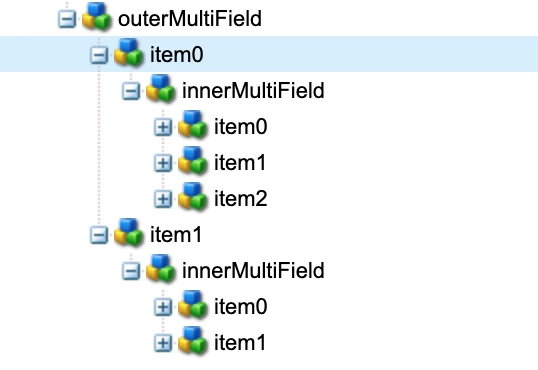


Thanks!

1 reply

Asutosh_Jena_
Community Advisor
Asutosh_Jena_Community AdvisorAccepted solution
Community Advisor
May 2, 2021

Hi @sushmapoojitha 


You need to get the data in a list format and then iterate over the list to print it in a order in <tr>.

Now it looks like the data is stored in a JSON format in multifield node and you are printing the complete string.


Are you using custom multifield? Please share the structure of the mulfield node in which the data is getting stored.


If it's getting stored in a Json format, you need to write a POJO class with the field values and then iterate over it and convert into a list. Now the same list can be used in HTL to print in the desired format.


import org.apache.sling.api.resource.Resource;
import org.apache.sling.models.annotations.DefaultInjectionStrategy;
import org.apache.sling.models.annotations.Model;
import org.apache.sling.models.annotations.injectorspecific.ChildResource;
import org.apache.sling.models.annotations.injectorspecific.ValueMapValue;

import java.util.List;

@Model(adaptables = Resource.class, defaultInjectionStrategy = DefaultInjectionStrategy.OPTIONAL)
public interface TestModel {

@ChildResource(name = "outerMultiField")
List<OuterMultiField> getOuterMultiField(); // the name 'getOuterMultiField' corresponds to the multifield name="./outerMultiField"

@Model(adaptables = Resource.class, defaultInjectionStrategy = DefaultInjectionStrategy.OPTIONAL)
interface OuterMultiField {
@ValueMapValue(name = "title")
String getTitle();

@ChildResource(name = "innerMultiField")
List<InnerMultiField> getInnerMultiField(); // the name 'getInnerMultiField' corresponds to the multifield name="./innerMultiField"
}

@Model(adaptables = Resource.class, defaultInjectionStrategy = DefaultInjectionStrategy.OPTIONAL)
interface InnerMultiField {
@ValueMapValue(name = "text")
String getText();

}
}


<sly data-sly-use.testModel="com.something.core.models.TestModel">
<div>
<ul data-sly-list.outer="${testModel.outerMultiField}">
<li>${outer.title}
<ul data-sly-list.inner="${outer.innerMultiField}">
<li>
<b>${inner.text} <br/></b>
</li>
</ul>
</li>
</ul>
</div>
</sly>


Thanks!

Level 2
May 2, 2021