Handling Select Event (dropdown) on overlayed "Create Workflow" Model | Community
Skip to main content
Level 3
November 29, 2022
Solved

Handling Select Event (dropdown) on overlayed "Create Workflow" Model

  • November 29, 2022
  • 1 reply
  • 1657 views

Hi, 

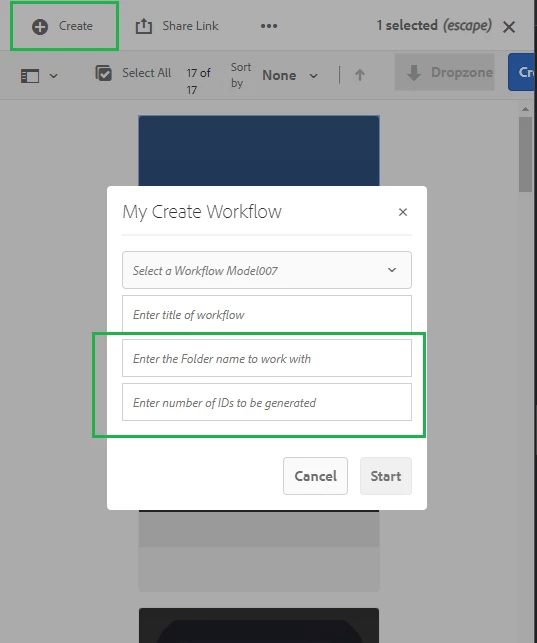
This is about handling an event on the overlayed "Create Workflow" model. Basically, I have to handle an event when the value changes in the dropdown


  1. I have done an overlay from
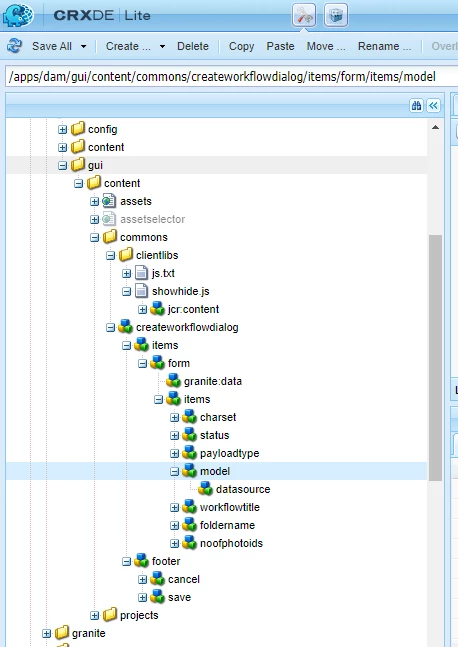
    /libs/dam/gui/content/commons/createworkflowdialog -> /apps/dam/gui/content/commons/createworkflowdialog

    2. Added two new text fields - text field 3 and 4 (Selected green)

    Now based on the selection of the workflow title/name from the dropdown I have to hide or show two new text fields which I have added.

    I used an approach using a CSS selector to hide/show the newly added fields and it didn't work
    http://www.sgaemsolutions.com/2019/01/showhide-tabs-and-fields-based-on-drop.html 

    One thing I noticed about the dialog we overlayed is having sling:resourceType as granite/ui/components/coral/foundation/dialog and the one which uses CSS selector is of type 
    cq/gui/components/authoring/dialog

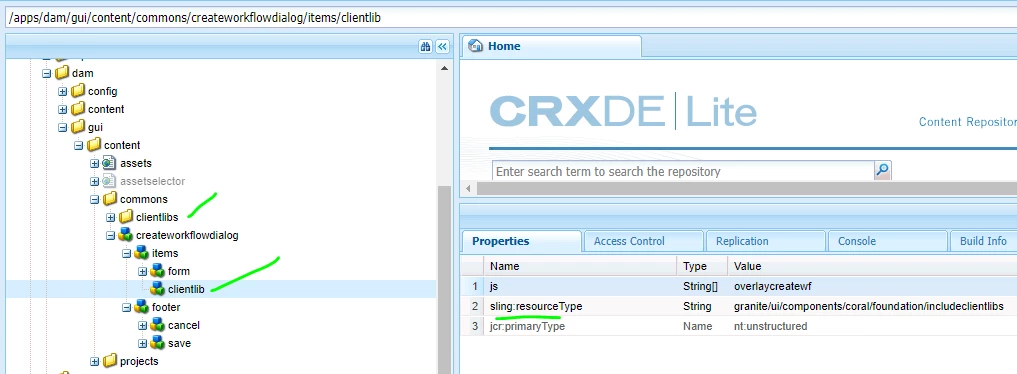
    We also tried to achieve this by creating a clientLib under /apps/dam/gui/content/commons/
    and it just not loading when model comes up.

    Please suggest to me the best approach. 


    TIA!

This post is no longer active and is closed to new replies. Need help? Start a new post to ask your question.
Best answer by MrudulMo

@mrudulmo - Have you tried with the granite:class property? check example here: https://sourcedcode.com/blog/aem/aem-granite-ui-multifield-maximum-items-validation


Just to Summarize how I fixed this:

This didn't work with CSS selector as the overlay was failing when I try to use cq:Component. I added a granite:class for each of the components and have to write clientlib to handle this.
Even after this, I faced a problem in loading the clientlib as I had to load the clientLib as shown below


1 reply

SantoshSai
Community Advisor
Community Advisor
November 29, 2022

Hi @mrudulmo,

  1. You have to use granite:data if you want to use data attributes
  2. You have to use granite:class instead of plain class if you want to add a custom class.

Please refer this: https://andreishilov.github.io/blog/show-hide-on-select/

Also, you can think about wcm.io extension here: https://wcm.io/wcm/ui/granite/showhide.html

Hope that helps!

Regards,

Santosh

Santosh Sai
MrudulMoAuthor
Level 3
November 29, 2022

Hi @santoshsai 

I forgot to mention it in the main description. I have tried granite:class well and something exactly similar which you have shared and hoping it should work. But it didn't. 
If you observe closely there are a few differences in the node structure where in my case I have to use the form component which wraps all other fields and also the select is loaded dynamically from the data source. 
To rule out an issue with dynamic select  I even created a static dropdown field something like this, it didn't work either

I am not sure if using a form is hindering this functionality.  - /apps/dam/gui/content/commons/createworkflowdialog/items/form


SantoshSai
Community Advisor
Community Advisor
November 29, 2022

@mrudulmo - Have you tried with the granite:class property? check example here: https://sourcedcode.com/blog/aem/aem-granite-ui-multifield-maximum-items-validation


Santosh Sai