Google Analytics Error Clashing with Adobe ANalytics? | Community
Skip to main content
Level 6
May 14, 2024
Solved

Google Analytics Error Clashing with Adobe ANalytics?

  • May 14, 2024
  • 3 replies
  • 2825 views

When we installed this code (below), we saw these errors in the console log. Why are they showing up, and also, the JavaScript errors are coming from the Adobe Core Components? How can we fix this?

The following item cannot be handled by the data layer because it does not have a valid format: {"0":"js","1":"2024-05-14T22:58:38.589Z"}
s @ core.wcm.components.commons.datalayer.acdl.lc-bf921af342fd2c40139671dbf0920a1f-lc.min.js:54
core.wcm.components.commons.datalayer.acdl.lc-bf921af342fd2c40139671dbf0920a1f-lc.min.js:54 The following item cannot be handled by the data layer because it does not have a valid format: {"0":"config","1":"X-FF488SADJK","2":{"linker":{"decorate_forms":false,"accept_incoming":true},"user_id":"","cookie_name":"","optimize_id":"","anonymize_ip":false,"cookie_domain":"","cookie_expires":0,"send_page_view":false}} 

<!-- Google tag (gtag.js) --> <script async src="https://www.googletagmanager.com/gtag/js?id=X-FF488SADJK"></script> <script> window.dataLayer = window.dataLayer || []; function gtag(){dataLayer.push(arguments);} gtag('js', new Date()); gtag('config', 'X-FF488SADJK'); </script>

 

This post is no longer active and is closed to new replies. Need help? Start a new post to ask your question.
Best answer by BrianKasingli

We just got out of this challenging problem as well. Jumped into a call with Adobe, and pinpointed the problem. The problem here is that the latest AEM Core Components introduced this bug.


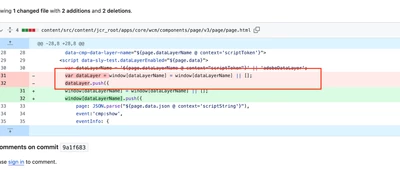
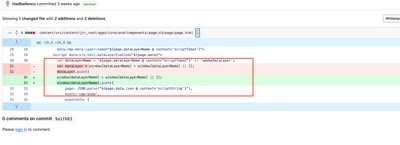
Let's take a look at what I am pointing to here, so what was removed was the ability to have customers set window['adobeDataLayer'] or any other variable to capture AEM Core Component's dataLayer object... This is a configuration in the Context Aware Data Layer Configs. However, the latest code have introduced a bug where now where dataLayer is always going to be set for the AEM Core Component's dataLayer.

That being said, Google Tag Manager relies on window.dataLayer, and so since Adobe's introduction of the bug... if you are using Adobe Launch (or now known as AEP Data-Collection) to inject Google Scripts on the page, the /apps/core/wcm/components/page/v3/page/page.html will override the Adobe Launch's collection object (window.dataLayer). As an interim solution we have re-configured the GA configuration on Adobe Launch to from depending on window.dataLayer to window.googleDataLayer, and it all works.... but however if you do this, you must beware of custom code in your codebase that uses window.dataLayer... which this object was meant for GA itself.

If Adobe Launch updates is not an option, you can simply overlay the page.html, and reverse the changes you see here.


Adobe has confirmed to me that in 2 weeks a new version of the AEMaaCS platform will be rolled out, and this problem will be resolved. 

My same response over here -> Re: Google Tag Manager events not tracking from AE... - Adobe Experience League Community - 673347

3 replies

Jennifer_Dungan
Community Advisor and Adobe Champion
May 15, 2024

Where is this Google Tag installed? I haven't installed GA directly as code in Launch (I normally use the Google Global Site Tag (gtag) extension for that:


But I have done direct coding methods for Google AdWords and Floodlight directly in my code and it's worked just fine (and in for people wondering why I don't use the above extension for that, there are some additional logic and things that I needed to run and it was easier and more efficient to do it via code in our case)... 


However, I will say that in my code, in my rule, I use a custom code action, but you have to remember that these are already "JS" so you can't just drop in script tags like this...


So for instance, if this is in a Rule Action, using custom code, I would do something more like:


var googleScript = document.createElement('script'); googleScript.type = 'text/javascript'; googleScript.src='https://www.googletagmanager.com/gtag/js?id=X-FF488SADJK' googleScript.async = true; document.getElementsByTagName('head')[0].appendChild(googleScript); window.dataLayer = window.dataLayer || []; function gtag(){dataLayer.push(arguments);} gtag('js', new Date()); gtag('config', 'X-FF488SADJK');


Basically using script, I am creating a new script and appending it to the head of my document, then I am running the actual dataLayer code to trigger it.

bjoern__koth
Community Advisor and Adobe Champion
May 15, 2024

Hi @supportmember 

I have seen this same issue in the past few days. Are you having an AEM core component setup?

AEM seems to push the same events from the core components into both the Adobe Client Data Layer (adobeDataLayer) as well as a GTM-style dataLayer object.

In my case it is even more related to the new Google Consent Mode fields


So, something seems a bit off, yet I do not think this should have an impact on the functioning of the data layer itself.


The error itself is stemming from the AEM integration of the Adobe Client Data Layer (core.wcm.components.commons.datalayer.acdl), so not from Launch itself. Maybe it's still a little buggy.


I will reach out to the Launch creators an see if they know anything about that.
Cheers
Björn

Cheers from Switzerland!
BrianKasingli
Community Advisor and Adobe Champion
May 16, 2024

No, I found out the problem, its because Adobe Core Components, latest version have introduced a bug,
https://github.com/adobe/aem-core-wcm-components/issues/2736


As you can see in this commit, https://github.com/adobe/aem-core-wcm-components/commit/27fda047ff40ca7f7be8889320b428bf5adc3e4c#diff-e289a30c0e7d5fd4e564b69136581640602ef9a99e21a9065f7522660a5488b3R31


content/src/content/jcr_root/apps/core/wcm/components/page/v3/page/page.html:31 has removed the working version of the code
window[dataLayerName] = window[dataLayerName] || [];

bjoern__koth
Community Advisor and Adobe Champion
May 16, 2024

Thx @briankasingli 


do you know why there are both "dataLayer" and "adobeDataLayer" on the page now?

Seems slightly redundant and dataLayer is GTM turf, so don't see a reason why Core Component events should be propagated there as well (unless you are using the Google Data Layer extension in Launch?)


Cheers

Cheers from Switzerland!