Get Country of currentPage | Community
Skip to main content
Level 6
September 3, 2021
Solved

Get Country of currentPage

  • September 3, 2021
  • 5 replies
  • 6164 views

In my Java model class I have the currentPage from which I'm trying to get the country. But it always gives empty/null value. I tried the following:

currentPage.getLanguage() --> gives me the locale

locale.getLanguage-->gives me the language of the locale

currentPage.getLanguage().getCountry()-->empty

currentPage.getLanguage().getDisplayCountry()-->empty

I'm getting the correct language codes for both cases but not the country. What should be the correct approach?
 

This post is no longer active and is closed to new replies. Need help? Start a new post to ask your question.
Best answer by rk_pandian

Hi @shaheena_sheikh,


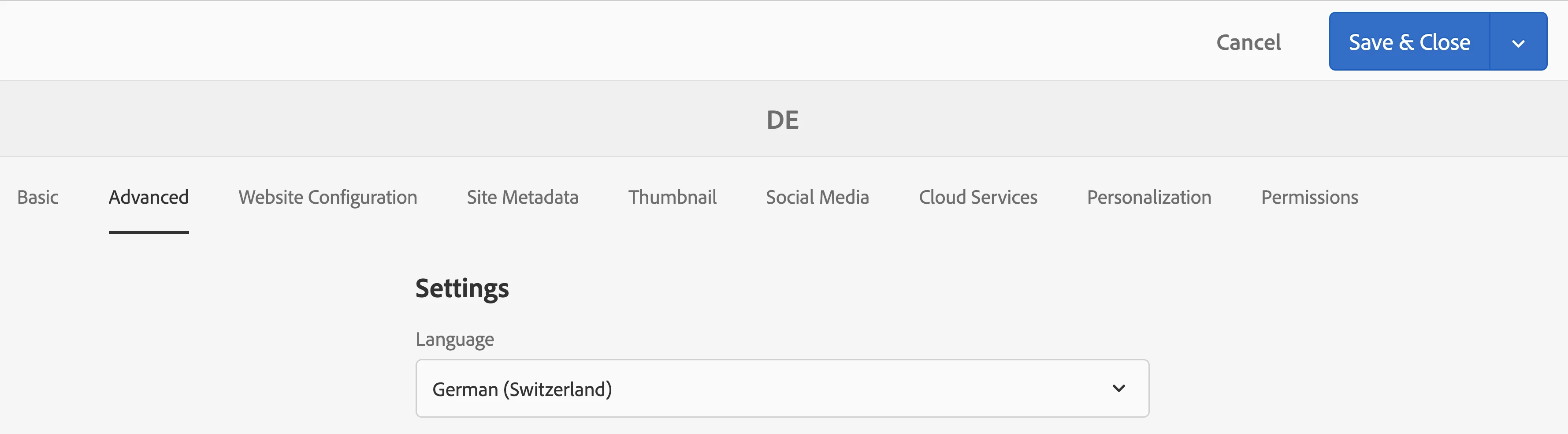
I had a similar requirement and I was able to achieve it via authoring & currentPage object. My home page which is also my language root had the name as its language code ("en" or "de" or "es" etc). Also for the same page I had to author the "Language" field in Advanced tab of page properties. Having these combined I was able to get the country and language for a specific page and its child pages. I think the authoring part will be missing in your case.

Below is for reference:

  1. My page - /content/sample/generic-root/switzerland/de
  2. Page properties:
  3. Sightly code
name --> ${currentPage.name}
country --> ${currentPage.language.displayCountry}
lang --> ${currentPage.language.displayLanguage}
Output:
name --> de
country --> Switzerland
lang --> German

Hope this helps! 🙂


Thanks!!

5 replies

Kiran_Vedantam
Community Advisor
Community Advisor
September 3, 2021

Hi @shaheena_sheikh,


As per the documentation: https://docs.oracle.com/javase/8/docs/api/java/util/Locale.html


getCountry()

Returns the country/region code for this locale, which should either be the empty string, an uppercase ISO 3166 2-letter code, or a UN M.49 3-digit code.
 
Please check if the country/region code is set for the page while creating it. Refer here.
 
Hope this helps!
 
Thanks,
Kiran Vedantam.
MayurSatav
Community Advisor and Adobe Champion
September 3, 2021

Hi @shaheena_sheikh ,


If you have constant pattern in your URLs then you can use below appraoch.

e.g. In our Project we had below contant pattern for URLs 

/content/webistename/us/en_us

/content/webistename/ie/en_gb

.

.

etc.

so we created below custom method to get country. you can try this if it fits for your requirement.


public static String getCountry(Resource resource) {
        String country = StringUtils.EMPTY;
        if (null != resource && StringUtils.isNotBlank(resource.getPath())) {
            String relPath = resource.getPath();
            if (relPath.contains("/")) {
                String[] path = relPath.split("/");
                country = path[3];
            }
        }
        return country;

Thank you


Rohit-Negi
Level 3
September 3, 2021

Hi @shaheena_sheikh 


Your code should work when your structure would be somewhat like: /content/we-retail/ca/en_CA.html

Here value after "_" will act as a country in currentPage.getLanguage().getCountry().


Thanks!

MayurSatav
Community Advisor and Adobe Champion
September 3, 2021

Hi @shaheena_sheikh ,


I already mentioned it. But if you want to use above method you need to modify its index value accordingly.

Level 2
September 3, 2021

I believe that the content hierarchy doesn't have country code. it's just language code.

i.e. /content/product/en/demo

in this case, you would want to create a field in page Properties ,common for all pages, as country and process the same.

or

you can explicitly try passing the locale name containing the language code and country code.

i.e. request.getLocale().getDisplayCoutnry(Locale.Canada)

Rohit-Negi
Level 3
September 3, 2021

Yes of course,if you want it configurable you have many options... few of them would be osgi config, csv ,json etc. As well.

rk_pandian
rk_pandianAccepted solution
Level 4
May 27, 2022

Hi @shaheena_sheikh,


I had a similar requirement and I was able to achieve it via authoring & currentPage object. My home page which is also my language root had the name as its language code ("en" or "de" or "es" etc). Also for the same page I had to author the "Language" field in Advanced tab of page properties. Having these combined I was able to get the country and language for a specific page and its child pages. I think the authoring part will be missing in your case.

Below is for reference:

  1. My page - /content/sample/generic-root/switzerland/de
  2. Page properties:
  3. Sightly code
name --> ${currentPage.name}
country --> ${currentPage.language.displayCountry}
lang --> ${currentPage.language.displayLanguage}
Output:
name --> de
country --> Switzerland
lang --> German

Hope this helps! 🙂


Thanks!!