Fonts aren't brought along the Page Exporter | Community
Skip to main content
Karl515
Level 5
February 20, 2019
Solved

Fonts aren't brought along the Page Exporter
  • February 20, 2019
  • 17 replies
  • 4925 views

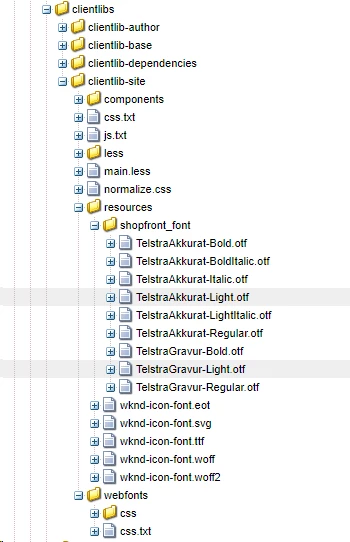
Here's my clientlibs and under my resources folder I have the fonts. works well on preview but when I export the page with Page Exporter. It doesn't come along. default Page exporter doesn't bring the fonts along?

This post is no longer active and is closed to new replies. Need help? Start a new post to ask your question.
Best answer by Karl515

Thanks. I did try but it did not work. But I managed a work around by placing my fonts in dam and using the type=copy, path=to/dam/font

It works but if I reference it from apps, it doesn't work.

is this alright? not standard or something cause fonts should be placed under apps/resource. But it works!

Lemme know what you guys think about this.

But for now, I'll keep my fonts under content/dam.

gauravb10066713smacdonald2008

17 replies

Karl515
Karl515Author
Level 5
February 20, 2019

If anyone knows a way to export fonts that would be great! Thanks!

Gaurav-Behl
Level 10
February 20, 2019

Did you create specific nodes to export each type - woff, ttf, evg, eot etc.? I assume that you'd need to create it.


For example the following configuration node copies the geometrixx clientlibs .js files to the zip file:

"geometrixx.clientlibs.js": {   //any name

    "extension": "ttf",

    "type": "clientlib",  // or try with "resources"

    "path": "/etc/designs/geometrixx/clientlibs/resources",  //path to resources folder

    "jcr:primaryType": "nt:unstructured"  // type of each font

reference -

The Page Exporter

smacdonald2008
Level 10
February 21, 2019

Please test with Gaurav suggestion.

Karl515
Karl515Author
Level 5
February 21, 2019

Thanks for taking time to answer.
But according to content sync

client lib can only be set to js or css ATM.

I tested with otf but what happen was, my design node wasn't brought along with the zip.

Karl515
Karl515Author
Level 5
February 21, 2019

This is what my code looks like

-Referencing to the correct path.

This is what the converted code looks like

and this the file

-------

Now here's what type-assets did.

Original code:

Converted to zip code:

and the folder structure it gave me.

\

-under that content is the reference image.

-under that var is where the css lies.

If I use type=copy path=font/path it would download the fonts but the css will not directly reference.

Thanks! tell me if you need more information.

Karl515
Karl515Author
Level 5
February 21, 2019

More information:
http://localhost:4502/etc.clientlibs/mySite/clientlibs/clientlib-base.css

this resources on the server also renders like

node design type=copy should include my clientlib-site/resources folder to render font.

smacdonald2008
Level 10
February 21, 2019

I am checking internally to see if there is a known issue.

Gaurav-Behl
Level 10
February 21, 2019

This is what I referred to test -

generic node - A generic node is used to copy resources like clientlibs .js or .css files to the zip file

path is the path to 'resources' folder and not to the file.

"abc.ttf": {   //font name to be picked up

   "extension": "ttf",

    "type": "resources", 

    "path":  //path to resources folder

    "jcr:primaryType": "nt:unstructured" 

arunpatidar
Community Advisor
Community Advisor
February 21, 2019

Hi,

I tried same in 6.3, for me it is working fine. Fonts are getting downloaded too. I did not configure my site for any custom content sync config

though you can find more details to configure content sync at Mobile with Content Sync

Arun Patidar
smacdonald2008
Level 10
February 21, 2019

Nice work Gaurav and Arun!!