Fonts aren't brought along the Page Exporter | Community
Skip to main content
Karl515
Level 5
February 20, 2019
Solved

Fonts aren't brought along the Page Exporter
  • February 20, 2019
  • 17 replies
  • 4925 views

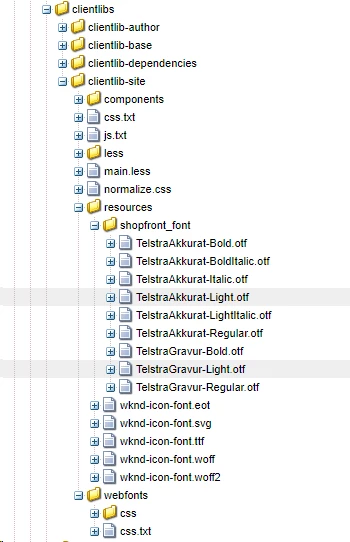
Here's my clientlibs and under my resources folder I have the fonts. works well on preview but when I export the page with Page Exporter. It doesn't come along. default Page exporter doesn't bring the fonts along?

This post is no longer active and is closed to new replies. Need help? Start a new post to ask your question.
Best answer by Karl515

Thanks. I did try but it did not work. But I managed a work around by placing my fonts in dam and using the type=copy, path=to/dam/font

It works but if I reference it from apps, it doesn't work.

is this alright? not standard or something cause fonts should be placed under apps/resource. But it works!

Lemme know what you guys think about this.

But for now, I'll keep my fonts under content/dam.

gauravb10066713smacdonald2008

17 replies

Karl515
Karl515Author
Level 5
February 22, 2019

Hello there! thanks. but unfortunately it's not working for me.
I'm using 6.4.0 then installed service pack 6.4.3.

Here's where my css lies,

any ideas?

Did you just use the default export settings? May I ask how did you apply your css to your html?

Karl515
Karl515Author
Level 5
February 22, 2019

Thank gauravb10066713​ But it still doesn't work.

Any more ideas?

Gaurav-Behl
Level 10
February 22, 2019

I'm running out of ideas at the moment.

--you may want to try with 6.3 as it worked for Arun and then figure out the 6.3 vs 6.4 differences later

-- in the above screenshot, the path is missing "fonts" after "resources", add that and test 

--change the path '/apps/mysite/clientlibs' to '/etc/designs/mysite/clientlibs', create a duplicate node structure and test

Karl515
Karl515AuthorAccepted solution
Level 5
February 22, 2019

Thanks. I did try but it did not work. But I managed a work around by placing my fonts in dam and using the type=copy, path=to/dam/font

It works but if I reference it from apps, it doesn't work.

is this alright? not standard or something cause fonts should be placed under apps/resource. But it works!

Lemme know what you guys think about this.

But for now, I'll keep my fonts under content/dam.

gauravb10066713smacdonald2008

Karl515
Karl515Author
Level 5
February 22, 2019

I'm also trying to change the folder structure if I can. How do you suggest I do it?

Gaurav-Behl
Level 10
February 22, 2019

This is what worked for me on 6.4.3 for we-retail site. I just added 3 properties on '/etc/contentsync/templates/mysite'

path: /apps/weretail/clientlibs/clientlib-site/resources/fonts

type: copy    // I just found this type

jcr:primaryType: nt:unstructured

I'm able to download entire fonts folder specified by the path

Karl515
Karl515Author
Level 5
February 22, 2019

Thanks! that also works for me. I'm able to download the entire font using that, but the problem after is that the design node type=copy doesn't automatically points to that direction (../../apps/mySite/...myfont.otf) directly, But if I place my fonts in DAM the design node automatically points to my fonts location.

Cheers!