Fetch featured image from Page properties in AEM 6.5 | Community
Skip to main content
Level 4
November 16, 2022
Solved

Fetch featured image from Page properties in AEM 6.5

  • November 16, 2022
  • 2 replies
  • 4217 views

This is the hierarchy of the page located under /content.
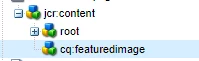
Now there's a property fileReference in the cq:featuredImage node and I want to fetch it in the sling model. How do I do it.

As mentioned by @avinash_gupta_ I've used the following piece of code to fetch the page title.

PageManager pm = resource.getResourceResolver().adaptTo(PageManager.class); Page containingPage = pm.getContainingPage(resourceResolver.getResource(pagePath)); ValueMap pageProperties = containingPage.getProperties(); String pageTitle= pageProperties.get("jcr:title", String.class);


Can someone help me fetch the fileReference property located in cq:featuredImage into my sling model?

This post is no longer active and is closed to new replies. Need help? Start a new post to ask your question.
Best answer by Avinash_Gupta_

@arindam6600 : Please use the following lines of snippet to get the value of fileReference in the cq:featuredImage node along with the previous snippet of code:-


Resource featuredImageResource = containingPage.getContentResource("cq:featuredImage");
ValueMap properties = featuredImageResource.adaptTo(ValueMap.class);
String fileReference = properties.get("fileReference", String.class);


Try this snippet and let me know if you face any issue.


2 replies

SantoshSai
Community Advisor
Community Advisor
November 16, 2022

Hi @arindam6600 ,

Please refer this: https://github.com/adobe/aem-core-wcm-components/search?q=NN_PAGE_FEATURED_IMAGE

Hope that helps!

Regards,

Santosh

Santosh Sai
Level 4
November 16, 2022

Hi @santoshsai ,

Thanks for the link, but I couldn't figure out much. Will it be possible for you to help me with the code snippet that I can put in my sling model?

Avinash_Gupta_
Community Advisor and Adobe Champion
Avinash_Gupta_Community Advisor and Adobe ChampionAccepted solution
Community Advisor and Adobe Champion
November 16, 2022

@arindam6600 : Please use the following lines of snippet to get the value of fileReference in the cq:featuredImage node along with the previous snippet of code:-


Resource featuredImageResource = containingPage.getContentResource("cq:featuredImage");
ValueMap properties = featuredImageResource.adaptTo(ValueMap.class);
String fileReference = properties.get("fileReference", String.class);


Try this snippet and let me know if you face any issue.


Level 4
November 16, 2022

Hi @avinash_gupta_ , I tried with the above script but it just prints cq:featuredimage and not the path of the image although the path is shown when checked in crx. Please advice.

Avinash_Gupta_
Community Advisor and Adobe Champion
November 16, 2022

@arindam6600 Can you share me the screenshot of the CRXDE which node and property you want to retrieve?