Fetch data from description field in assets into dialog | Community
Skip to main content
Level 2
June 22, 2023
Solved

Fetch data from description field in assets into dialog

  • June 22, 2023
  • 3 replies
  • 1160 views

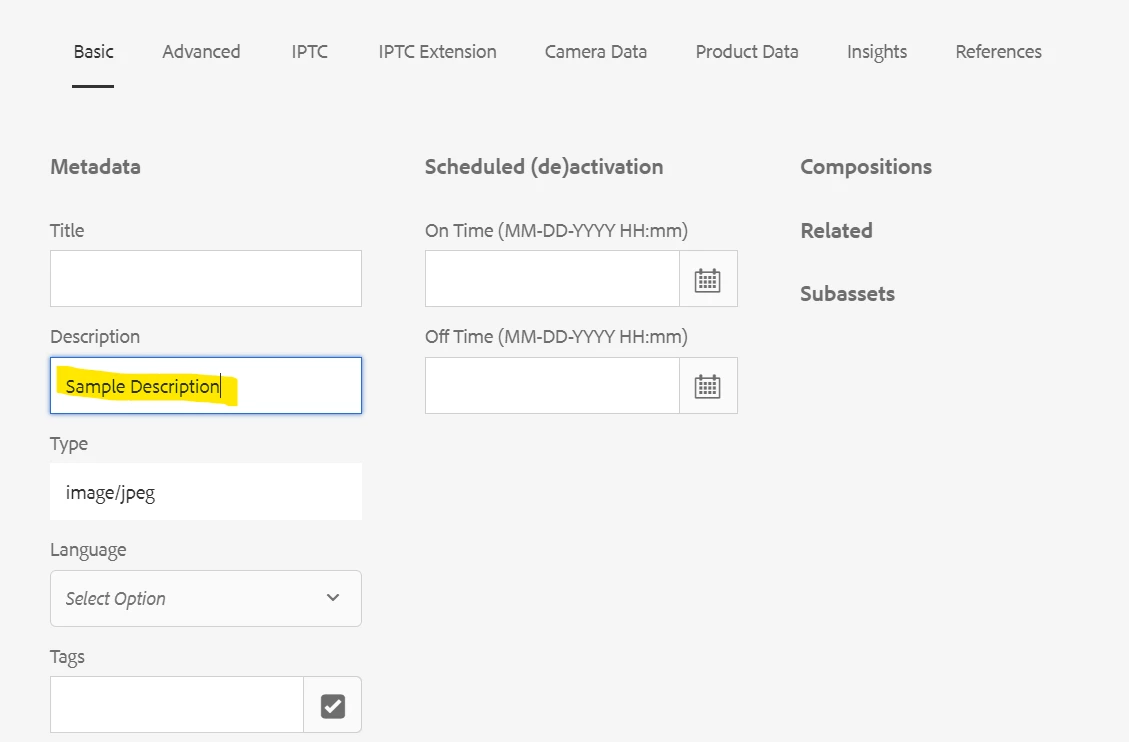
I've put in some description in the images that I have uploaded in the assets. Now I want to fetch that data automatically while the image is rendered. How can I do it?

The property value is saved in dc:description [OOTB]
 

This post is no longer active and is closed to new replies. Need help? Start a new post to ask your question.
Best answer by EstebanBustamante

You need to create a sling model to retrieve the metadata and then you can use it, you can do something like below:


@Model(adaptables = { SlingHttpServletRequest.class, Resource.class }, defaultInjectionStrategy = DefaultInjectionStrategy.OPTIONAL, resourceType = "myproject/components/mycomponent") @Exporter(name = "jackson", extensions = "json", options = { @ExporterOption(name = "MapperFeature.SORT_PROPERTIES_ALPHABETICALLY", value = "true") }) public class MyModel { private static Logger LOG = LoggerFactory.getLogger(ImageModel.class); @SlingObject private SlingHttpServletRequest request; private String description; public String getDescriptionMetaData() { Resource resource = request.getResourceResolver().getResource("/content/dam/my-project/image/image.png"); Asset asset = resource.adaptTo(Asset.class); description = asset.getMetadataValue("dc:description"); return description; } }


Snippet taken from: https://www.linkedin.com/pulse/get-asset-meta-data-from-node-aem-keshav-chaurasiya/


3 replies

EstebanBustamante
Community Advisor and Adobe Champion
EstebanBustamanteCommunity Advisor and Adobe ChampionAccepted solution
Community Advisor and Adobe Champion
June 22, 2023

You need to create a sling model to retrieve the metadata and then you can use it, you can do something like below:


@Model(adaptables = { SlingHttpServletRequest.class, Resource.class }, defaultInjectionStrategy = DefaultInjectionStrategy.OPTIONAL, resourceType = "myproject/components/mycomponent") @Exporter(name = "jackson", extensions = "json", options = { @ExporterOption(name = "MapperFeature.SORT_PROPERTIES_ALPHABETICALLY", value = "true") }) public class MyModel { private static Logger LOG = LoggerFactory.getLogger(ImageModel.class); @SlingObject private SlingHttpServletRequest request; private String description; public String getDescriptionMetaData() { Resource resource = request.getResourceResolver().getResource("/content/dam/my-project/image/image.png"); Asset asset = resource.adaptTo(Asset.class); description = asset.getMetadataValue("dc:description"); return description; } }


Snippet taken from: https://www.linkedin.com/pulse/get-asset-meta-data-from-node-aem-keshav-chaurasiya/


Esteban Bustamante
Tanika02
Level 7
June 23, 2023

Hello @ac6600 - 


In your image component template or component dialog, use the core/wcm/components/image/v2/image component from the Core Components. This component exposes the dc:description property by default as shown below : 


<sly data-sly-use.image="${'core/wcm/components/image/v2/image' @ resource=resource}"> <img src="${image.fileReference}" alt="${image.altText}" title="${image.title}" /> <p>${image.description}</p> <!-- Access the dc:description property --> </sly>


ac6600Author
Level 2
June 27, 2023

Hi @tanika02 , my component is using resourceSuperType which is pointing to some other component and this behavior can't be changed. What I did was I tried adding this piece of code in HTL but I'm getting the following error. Any  idea how to mitigate this?

Tanika02
Level 7
June 27, 2023

@ac6600 - 


If that is the case, can you try the following approach : 


To fetch the description (dc:description) of an image automatically while rendering it, you can use the HTL or JavaScript to access the property value and display it.


Here's an example of how you can achieve this using HTL:


<!-- HTML template code --> <img src="/path/to/image.jpg" alt="Image" data-sly-attribute="description=${properties['dc:description']}" />


In the above code, the data-sly-attribute directive is used to assign the value of dc:description to the description attribute. This makes the description available as a data attribute on the image element.


You can then access this value using JavaScript on the client-side to display it in the desired way. Here's an example of how you can retrieve and display the description using Javascript&colon;


// JavaScript code var imageElement = document.querySelector('img'); var description = imageElement.getAttribute('data-description'); console.log(description); // or display the description in any desired way


In the JavaScript code, we use document.querySelector to select the image element, and then getAttribute to retrieve the value of the data-description attribute, which contains the description fetched from the dc:description property.

aanchal-sikka
Community Advisor
Community Advisor
June 23, 2023

Hello @ac6600 


The ability is available in OOTB Image component. The dc:description is available via "Inherit alternative text from page" in Asset Tab of the Dialog


  • Inherit alternative text from page - This option uses the alternative description of the linked asset value of the dc:description metadata in DAM or of the current page if no asset is linked.

reference

https://experienceleague.adobe.com/docs/experience-manager-core-components/using/wcm-components/image.html?lang=en#asset-tab

Aanchal Sikka
