Facing Issues for Robots.txt in AEM Cloud SDK | Community
Skip to main content
Level 2
May 27, 2021

Facing Issues for Robots.txt in AEM Cloud SDK

  • May 27, 2021
  • 2 replies
  • 5577 views

Dear All,

I have setup AEM cloud SDK in my local and trying to implement robots.txt by following the below blog.


https://www.aemtutorial.info/2020/07/


Here I am facing 2 issues.


1) Issue-1 - I have created a file under root content like below.

/content/mysite/robots.txt

When I am trying to see the robots.txt from the page in author/publish like http://localhost:4503/content/mysite/robots.txt , then robots.txt is downloading...


2) Issue-2 - When I am hitting the robots.txt from the dispatcher page then also I am not seeing the any content frrom robots.txt , as shown below.
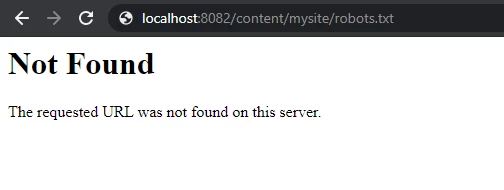


I am getting below error log in dispatcher it is showing that blocked [publishfarm/-] 0ms "localhost:8082".


[27/May/2021:08:39:31 +0000] "GET /content/dam/mysite/robots.txt HTTP/1.1" - blocked [publishfarm/-] 0ms "localhost:8082"
172.17.0.1 "localhost:8082" - [27/May/2021:08:39:31 +0000] "GET /content/dam/mysite/robots.txt HTTP/1.1" 404 196 "-" "Mozilla/5.0 (Windows NT 10.0; Win64; x64) AppleWebKit/537.36 (KHTML, like Gecko) Chrome/90.0.4430.212 Safari/537.36"
172.17.0.1 "localhost:8082" - [27/May/2021:08:40:25 +0000] "GET /content/mysite/robots.txt HTTP/1.1" 404 196 "-" "Mozilla/5.0 (Windows NT 10.0; Win64; x64) AppleWebKit/537.36 (KHTML, like Gecko) Chrome/90.0.4430.212 Safari/537.36"
[27/May/2021:08:40:25 +0000] "GET /content/mysite/robots.txt HTTP/1.1" - blocked [publishfarm/-] 0ms "localhost:8082"


My robots.txt file is below

#Any search crawler can crawl our site
User-agent: *

#Allow only below mentioned paths
Allow: /en/
Allow: /fr/
Allow: /gb/
Allow: /in/
#Disallow everything else
Disallow: /


Can anybody please help me on this. Thanks a lot....NOTE that I am using AEM cloud SDK in my local.

This post is no longer active and is closed to new replies. Need help? Start a new post to ask your question.

2 replies

Asutosh_Jena_
Community Advisor
Community Advisor
May 27, 2021

Hi @sunitaborn 


Please see my answers below:

#1: You need to configure the ContentDispositionFilter with the file path as exclusion to open the file instead of downloading it. Please add the below config in config.publish run mode so on all publish instance it will be opened while in author it will be downloaded. If you want in author also to open you can add the same configuration to config it self. But it's only required on publish as publish instances is exposed to public.

org.apache.sling.security.impl.ContentDispositionFilter.xml

<?xml version="1.0" encoding="UTF-8"?>
<jcr:root xmlns:sling="http://sling.apache.org/jcr/sling/1.0" xmlns:jcr="http://www.jcp.org/jcr/1.0"
jcr:primaryType="sling:OsgiConfig"
sling.content.disposition.all.paths="{Boolean}false"
sling.content.disposition.excluded.paths="[/content/mysite/robots.txt]"/>


#2: I see the path is blocked in "publishfarm" farm file. You need to enable access to the file location i.e. /content/mysite/* to allow the file to load. Ideally there will be a redirect set at the dispatcher because the file will be always accessed like www.website.com/robots.txt and it should serve content from the actual location. So you need to apply the below redirect at the dispatcher as well:


RewriteCond %{REQUEST_URI} ^/robots.txt$
RewriteRule (.*) /content/mysite/robots.txt [PT,L]


Thanks!

Level 2
May 27, 2021

Thanks @asutosh_jena_..Now my issue 1 is fixed and struggling for issue 2.


My cloud setup is like below.


I have conf.d and conf.dispatcher.d folder as shown in below.


I have done the below steps and still seeing the below error.


Step-1 , I have created a mysite.farm like below. 


Step-2 Then include and include this farm inside enabled_farms like below.


../available_farms/default.farm
../available_farms/mysite.farm


Step-3 Create a mysite.vhost inside avialble_vhosts , as shown below.


Step-4 I have added the above 2 lines inside mysite.vhost file, as shown below in bold text.

#
# This is the default publish virtualhost definition for Apache.
#
# DO NOT EDIT this file, your changes will have no impact on your deployment.
#
# Instead create a copy in the folder conf.d/available_vhosts and edit the copy.
# Finally, change to the directory conf.d/enabled_vhosts, remove the symbolic
# link for default.vhost and create a symbolic link to your copy.
#

# Include customer defined variables
Include conf.d/variables/custom.vars

<VirtualHost *:80>
ServerName "publish"
# Put names of which domains are used for your published site/content here
ServerAlias "*"
# Use a document root that matches the one in conf.dispatcher.d/default.farm
DocumentRoot "${DOCROOT}"
# URI dereferencing algorithm is applied at Sling's level, do not decode parameters here
AllowEncodedSlashes NoDecode
# Add header breadcrumbs for help in troubleshooting
<IfModule mod_headers.c>
Header add X-Vhost "publish"
</IfModule>
<Directory />
<IfModule disp_apache2.c>
# Some items cache with the wrong mime type
# Use this option to use the name to auto-detect mime types when cached improperly
ModMimeUsePathInfo On
# Use this option to avoid cache poisioning
# Sling will return /content/image.jpg as well as /content/image.jpg/ but apache can't search /content/image.jpg/ as a file
# Apache will treat that like a directory. This assures the last slash is never stored in cache
DirectorySlash Off
# Enable the dispatcher file handler for apache to fetch files from AEM
SetHandler dispatcher-handler
</IfModule>
Options FollowSymLinks
AllowOverride None
# Insert filter
SetOutputFilter DEFLATE
# Don't compress images
SetEnvIfNoCase Request_URI \.(?:gif|jpe?g|png)$ no-gzip dont-vary
# Prevent clickjacking
Header always append X-Frame-Options SAMEORIGIN
</Directory>
<Directory "${DOCROOT}">
AllowOverride None
Require all granted
</Directory>
<IfModule disp_apache2.c>
# Enabled to allow rewrites to take affect and not be ignored by the dispatcher module
DispatcherUseProcessedURL On
# Default setting to allow all errors to come from the aem instance
DispatcherPassError 0
</IfModule>
<IfModule mod_rewrite.c>
RewriteEngine on
Include conf.d/rewrites/rewrite.rules

# Rewrite index page internally, pass through (PT)
RewriteRule "^(/?)$" "/index.html" [PT]

RewriteCond %{REQUEST_URI} ^/robots.txt$
RewriteRule (.*) /content/myraitt/us/en/robots.txt [PT,L]

</IfModule>
</VirtualHost>


Step-5 Also I have changed the below in mysite_rewrite_rules, as shown below


#

# Examples:
# This ruleset would look for robots.txt and fetch it from the dam only if the domain is exampleco-dev.adobecqms.net

RewriteCond %{SERVER_NAME} localhost:8080 [NC]
RewriteRule ^/robots.txt$ /content/dam/myraitt/robots.txt [NC,PT]

# This ruleset would look for favicon.ico in exampleco's base dam folder if the domain is exampleco-brand1-dev.adobecqms.net


Still I am getting below error blocked by publishfarm , as shown below...Anything I am missing here.


172.17.0.1 "localhost:8080" - [27/May/2021:13:12:36 +0000] "GET /content/dam/myraitt/robots.txt HTTP/1.1" 404 196 "-" "Mozilla/5.0 (Windows NT 10.0; Win64; x64) AppleWebKit/537.36 (KHTML, like Gecko) Chrome/90.0.4430.212 Safari/537.36"
[27/May/2021:13:12:36 +0000] "GET /content/dam/myraitt/robots.txt HTTP/1.1" - blocked [publishfarm/-] 0ms "localhost:8080"


rawvarun
Community Advisor
Community Advisor
May 25, 2023