
Exported AEM Experience Fragment to Adobe Target not working | Community
Skip to main content
stiegjo22
Level 4
August 20, 2025
Solved

Exported AEM Experience Fragment to Adobe Target not working

  • August 20, 2025
  • 2 replies
  • 1258 views

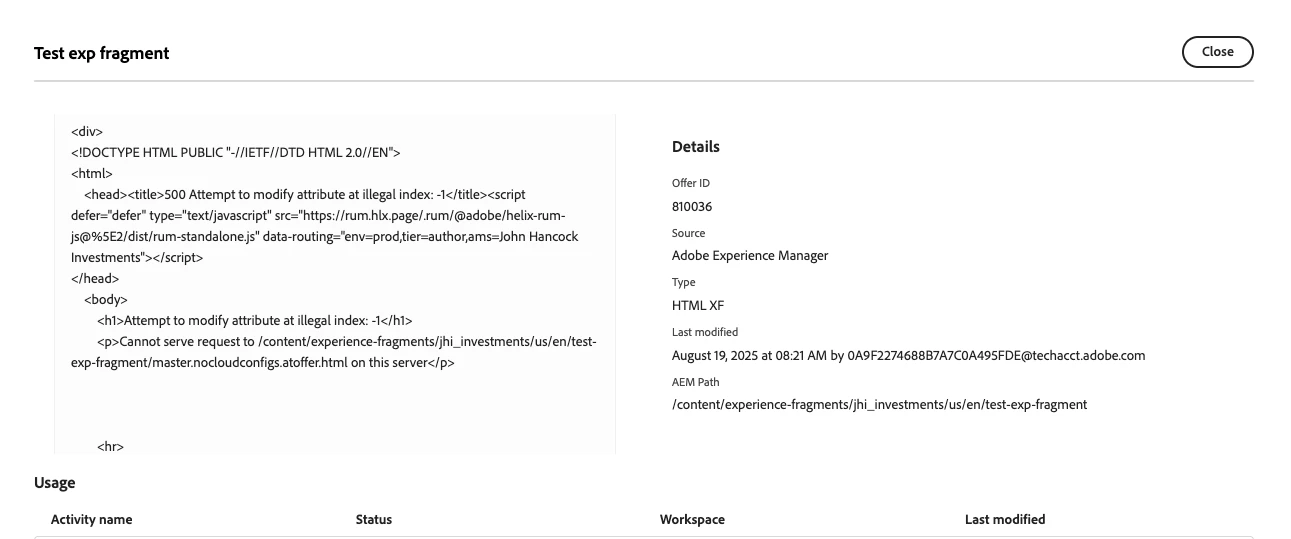
We're using AEM (AMS) and have been able to export experience fragments from AEM to Adobe Target. They show under Offers inside Adobe Target. However they don't show up correctly when we try to replace them in an activity in Target. Also the HTML for the fragment shows the message "cannot serve request to "fragment" on the server".
 

Best answer by HrishikeshKagne

Hi @stiegjo22 ,

This usually happens when the Experience Fragment (XF) HTML that Target tries to render is not publicly accessible or is not being served correctly by AEM. In short, here’s how you can fix it: Publish the XF – Make sure the XF and all referenced components/assets are published to the publish environment. Check Dispatcher/Filters – Often the dispatcher or CDN blocks the XF HTML request. Add the XF path (/content/experience-fragments/...) to the allow rules. Use the right variation (HTML) – In AEM Target integration, you must export the HTML variation of the XF, not JSON. Preview URL – Open the fragment’s published URL directly in browser to confirm it serves HTML without the error. If it fails, check AEM logs for missing resource types or invalid Sling mappings. Re-sync with Target – Sometimes re-exporting the XF to Target fixes mapping issues.


2 replies

HrishikeshKagne
Community Advisor
HrishikeshKagneCommunity AdvisorAccepted solution
Community Advisor
August 20, 2025

Hi @stiegjo22 ,

This usually happens when the Experience Fragment (XF) HTML that Target tries to render is not publicly accessible or is not being served correctly by AEM. In short, here’s how you can fix it: Publish the XF – Make sure the XF and all referenced components/assets are published to the publish environment. Check Dispatcher/Filters – Often the dispatcher or CDN blocks the XF HTML request. Add the XF path (/content/experience-fragments/...) to the allow rules. Use the right variation (HTML) – In AEM Target integration, you must export the HTML variation of the XF, not JSON. Preview URL – Open the fragment’s published URL directly in browser to confirm it serves HTML without the error. If it fails, check AEM logs for missing resource types or invalid Sling mappings. Re-sync with Target – Sometimes re-exporting the XF to Target fixes mapping issues.


Hrishikesh Kagane
stiegjo22
stiegjo22Author
Level 4
August 21, 2025

Thanks - we added the XF path to the allow rules in dispatcher. I'll update the ticket if it works.

kautuk_sahni
Community Manager
Community Manager
August 21, 2025

@stiegjo22 Just checking in. Were you able to resolve your issue? We’d love to hear how things worked out. If the suggestions above helped, marking a response as correct can guide others with similar questions. And if you found another solution, feel free to share it — your insights could benefit the community. Thanks again for being part of the conversation!

Kautuk Sahni
stiegjo22
stiegjo22Author
Level 4
August 23, 2025

In addition to the dispatcher change, we also had to update the "Adobe AEM WebVitals Support" configuration in /system/console/configMgr. This step is required to prevent "Adobe AEM WebVitals Support" configuration from injecting additional HTML snippets into the exported Experience Fragment intended for Adobe Target.